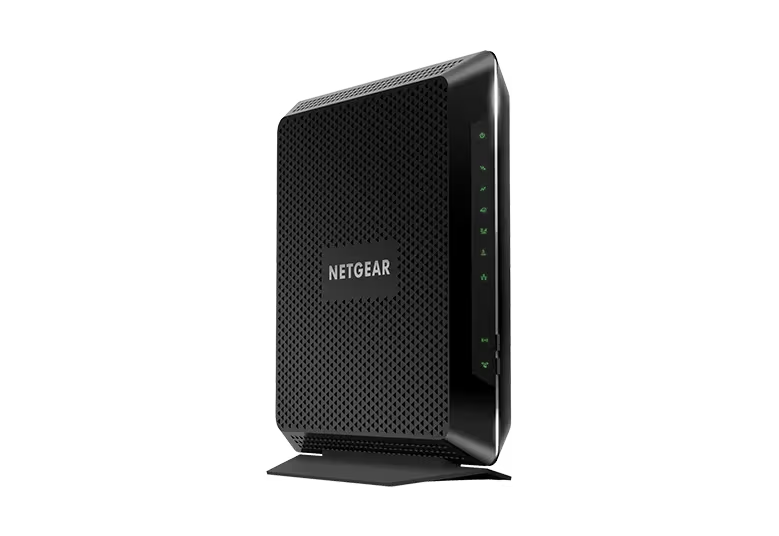
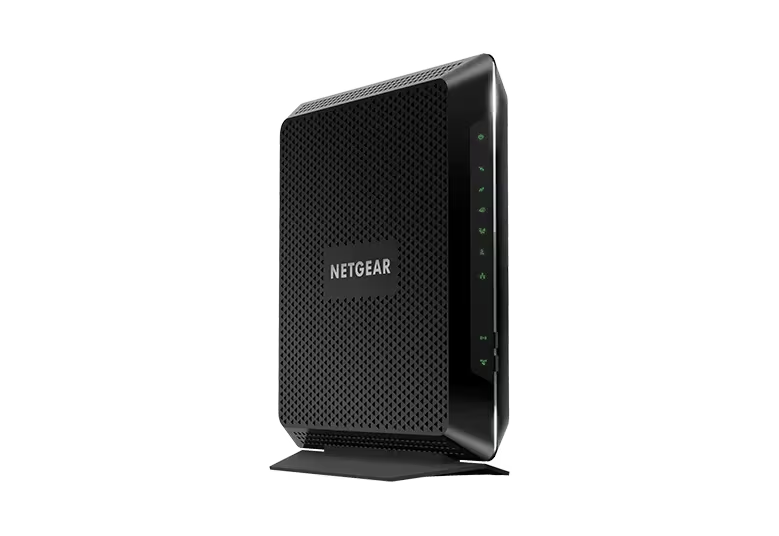
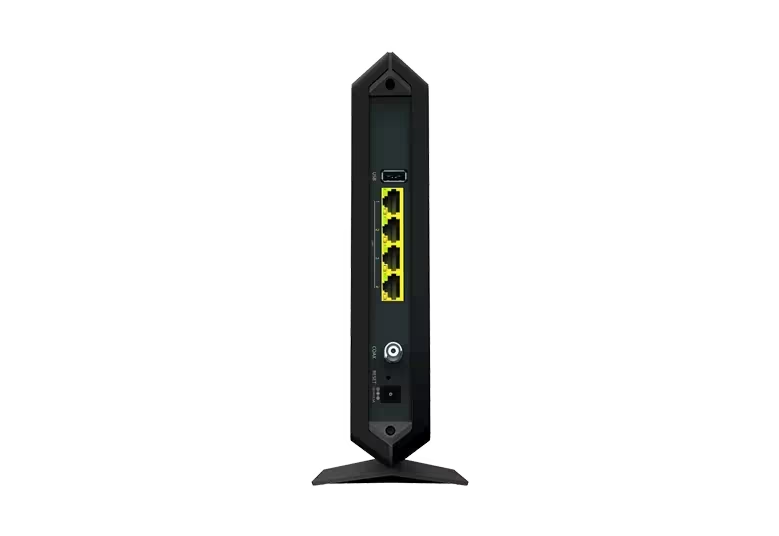
NETGEAR Nighthawk Cable Modem and WiFi 5 Router Combo (C7000) - Compatible with Major Cable Providers incl. Xfinity & Cox - Cable Plans up to 800Mbps - AC1900 (Up to 1.9Gbps) - DOCSIS 3.0
Homeowner measured 417 Mbps download and 20.6 Mbps upload in one Xfinity setup. Purchase suitability remains conditional on the exact hardware revision, provider approval and firmware deployment; none of these test results guarantees another installation.
Updated 2026-10-07

We may earn a commission from qualifying purchases.
Prices and sellers
No price information yet
Conditions and limitations
Reviewed exact-model testing and manufacturer support guidance. Test configuration and revision uncertainty prevent general performance guarantees.
Compatibility
NETGEAR documents C7000v2 US ISP certification; original revision, exact speed tiers and other countries are not established.
Where sources differ
Firmware table and security advisory name different C7000 versions, and MiniPCReviewer gives inconsistent MU-MIMO descriptions. Device deployment and contested features remain unresolved.
Reported issues and fixes
Reviewed Fragment and Forge advisory naming a C7000 fix released to ISPs. Exact device firmware and deployment are not verified; no exhaustive issue survey claimed.
Care and support
Investigated firmware maintenance responsibility. Reviewed sources do not establish future support duration, spares or repairability.
Ownership costs
Reviewed maintenance and ISP deployment obligations. No prices are submitted and no total ownership cost or rental savings is calculated.
Who it suits
Buyer assessment covers measured throughput, hardware identity and provider confirmation. No verified rival comparison or all-region recommendation is claimed.
Specifications
Download throughput
417 MbpsReviewer speed test using an iPhone 13 at 40 feet on an Xfinity 500 Mbps plan · Homeowner reports use over two weeks. Hardware revision, firmware, radio band and repeat count are not specified.
Source [7]Upload throughput
20.6 MbpsReviewer speed test using an iPhone 13 at 40 feet on an Xfinity 500 Mbps plan · Hardware revision, firmware, radio band and repeat count are not specified; this is not a manufacturer maximum.
Source [7]Reviewer consensus
Single-source notes
The review
NETGEAR C7000: verify the revision, cable service and firmware before buying
The ASIN does not settle the hardware revision
The first purchase check is the physical model and hardware revision. DeviWiki associates B00ZUPOF7Y with the C7000 and explicitly warns that the device has multiple revisions. That warning means the catalog identifier is insufficient to choose firmware guidance or transfer every feature description between units. The available independent reviews also do not provide a reliable revision identification for their test samples. Ask for the model marking before using a review as a prediction for the item being purchased, particularly when choosing second-hand hardware. Keep C7000 and C7000v2 separate in any compatibility or maintenance question. A familiar Nighthawk name does not remove that ambiguity. This research leaves the exact revision represented by an individual offer unresolved because it has not inspected that unit or its label. It therefore avoids treating an original-model test as a verified v2 test. This is a practical limitation of the evidence, rather than proof that either revision is unsuitable. [6]
Observed performance
Homeowner provides a useful measured reference: 417 Mbps download and 20.6 Mbps upload from an iPhone 13 at 40 feet, using an Xfinity cable plan. The reviewer describes more than two weeks with the C7000-100NAS. These are results from that setup, not a guaranteed minimum, a modem maximum or a prediction for every household. The article does not disclose the hardware revision, firmware, radio band or repeat count, which limits reproducibility. A buyer whose service resembles this tested plan has a more concrete reference than an advertised WiFi class alone. Even then, reproducing the same result requires comparable conditions that this review does not fully document. Keep the download and upload figures separate when considering video calls, downloads or cloud transfers: this test reports different outcomes in each direction. It does not measure latency under load, long-term reliability or maximum simultaneous demand, so those questions remain open. [7]
Performance over distance
The Vocal Media review describes testing in a 2500-square-foot house, with generally usable service apart from the farthest end. It reports network performance falling from around 230 Mbps to 130 Mbps over that layout. This is evidence that one reviewed installation lost throughput with distance; it is not a coverage certificate for another building. The report does not supply a detailed floor plan, wall construction, radio band, firmware or repeat count. It would therefore be misleading to promise the same coverage area or the same far-room speed. Treat the distance result as a reason to check the rooms where connectivity matters before committing to a single-box arrangement. The review's observations also cannot establish what an extender or separate wireless system would deliver in your home. No comparative installation test is supplied here. Buyers who need a dependable connection in a distant room should consider that uncertainty alongside the convenience of combining modem and router. [4]
Confirm cable service and the exact speed tier
NETGEAR's compatibility article has a C7000v2 section that marks Comcast/Xfinity, Cox and Spectrum/Charter as both compatible and certified. The article distinguishes certification, which includes ISP testing, from compatibility, which means the device meets the provider's requirements. That distinction is useful, but the table does not establish approval for every current plan or address. It also does not establish the original C7000's status merely because the ASIN can refer to multiple revisions. Confirm the exact unit and subscribed speed tier with the provider before replacing existing equipment. Ask separately about any bundled services rather than assuming a general cable compatibility entry covers them. A retailer's headline, a theoretical wireless speed or another owner's successful activation cannot replace that check. These source records describe United States cable-service compatibility; translation into another language does not create approval for another country. The refresh records this regional boundary explicitly and leaves unverified providers and revisions as unknown. [6], [2]
Firmware maintenance depends on the provider
NETGEAR's cable-firmware support guidance places deployment responsibility with the Internet service provider. NETGEAR supplies the firmware and the ISP updates the device; the article directs owners with outdated firmware to contact their provider. Its manual-update exceptions concern other product families, so they should not be borrowed as C7000 instructions. Before relying on a review that promises user-controlled updates, establish how your ISP manages this exact cable gateway. The published table distinguishes C7000 from C7000v2 and further distinguishes deployed firmware from approved or production firmware. Those labels are not interchangeable with evidence that a particular customer's modem has received an update. This refresh has no direct access to an owner's device and cannot confirm installed firmware. Record the device's own version and ask the provider to explain any difference from relevant manufacturer guidance. That is more useful than promising automatic protection simply because a review describes updates in general terms. [5]
Heavy-load limitation
MiniPCReviewer describes practical testing with low gaming latency and consistent 5GHz performance for HD streams, but publishes no numerical latency result in the cited passage. Its separate C7000 article warns about heavy simultaneous uploads and many active clients. These descriptions support a cautious expectation of moderate household use; they do not quantify a competitive-gaming advantage or a safe number of busy devices. The distinction matters because a list of connected devices does not describe how intensively each device uses the connection. The cited material offers no controlled concurrency benchmark that resolves that question. Its feature discussion also contains inconsistent MU-MIMO statements, so this refresh does not adopt those statements as verified capabilities. General claims about security subscriptions or forcing firmware updates are likewise insufficient without model-specific support documentation. Use the measured review results as the stronger performance reference, and keep broad entertainment claims conditional. There is no basis here for promising uninterrupted streaming, low ping on every service or sustained performance during heavy uploads. [8], [1]
A published security fix is not proof of installation
NETGEAR's Fragment and Forge advisory lists a C7000 fix in firmware 1.01.37 and says the firmware was released to Internet service providers. Its general firmware table lists other C7000 versions by provider. These documents answer different questions and do not resolve the installed state of any individual unit. The advisory is evidence of a published fix path, not evidence that all C7000 owners are patched or that a newer hardware revision shares the same version number. For an existing owner, the useful action is to check the exact model and installed version with the provider against the relevant advisory. For a prospective buyer, unresolved deployment belongs in the ownership decision alongside performance and compatibility. This research neither diagnoses a particular device as vulnerable nor declares it secure. It also does not infer an end-of-support date from the age of the model. The reviewed sources do not establish a guaranteed future support period or a repairability assessment. [5], [3]
Buyer questions
Before you buy
What throughput was independently measured?
Homeowner reports 417 Mbps download and 20.6 Mbps upload from an iPhone 13 at 40 feet on an Xfinity cable plan. The hardware revision and repeat count are unspecified; these are test results, not guaranteed speeds. [7]
Limitations
Does performance change with distance?
Yes. An independent review observed throughput decreasing at the far end of a large house. [4]
What happens under heavy load?
Heavy simultaneous uploads or many active clients can expose the unit's practical limits. [1]
Care and maintenance
Who updates the cable firmware?
NETGEAR supplies cable firmware to the ISP, which deploys it. Contact the provider about outdated firmware; do not assume instructions for other router families apply to C7000. [5]
Does the security advisory prove my device is patched?
No. NETGEAR lists C7000 firmware 1.01.37 as the Fragment and Forge fix released to ISPs. The installed version and deployment on your unit remain unverified. [3]
Product images
Facts and specifications
Manufacturer manual
| Specification | Value | Source |
|---|---|---|
| Compatibility | NETGEAR's C7000v2 table marks Comcast/Xfinity, Cox and Spectrum/Charter compatible and certified; this does not verify a specific speed tier or original C7000 revision. US | [2] |
Measured by a lab
| Specification | Value | Source |
|---|---|---|
| Data Rate | 20.6 Mbps US; 417 Mbps US | [7] |
Other facts
| Specification | Value | Source |
|---|---|---|
| Limitation | Heavy uploads or many active clients expose practical limits. | [1] |
| Risk | DeviWiki associates B00ZUPOF7Y with multiple device revisions; the ASIN alone does not establish the hardware revision.; NETGEAR lists C7000 firmware 1.01.37 as the Fragment and Forge fix released to Internet service providers; installation on any individual device remains unverified. | [6], [3] |
| Setup Requirement | NETGEAR supplies cable firmware to the ISP, which updates the device; contact the ISP about outdated firmware. US | [5] |
KnowSpec analysis
Useful testing, conditional purchase
Homeowner measured 417 Mbps download and 20.6 Mbps upload in one Xfinity setup. Purchase suitability remains conditional on the exact hardware revision, provider approval and firmware deployment; none of these test results guarantees another installation.
Method: Synthesis of independently reported measurements, revision warning and manufacturer support guidanceVisible information gaps
Missing information is shown rather than guessed.
- Warrantynot found
- Generationnot found
- Source.Manufacturernot public
- Topic:Efficiencynot found
- Topic:Buyer Fitnot found
Sources and method
- NETGEAR Nighthawk C7000 Modem Router ReviewMiniPCReviewer · retrieved 2026-09-27Editorial review
- Which ISPs are compatible with my NETGEAR cable modem or cable modem router?NETGEAR · retrieved 2026-10-07Manufacturer support
- Security Advisory for Fragment and Forge vulnerabilitiesNETGEAR · retrieved 2026-10-07Manufacturer support
- Netgear Nighthawk C7000 ReviewVocal Media · retrieved 2026-09-27Editorial review
- What is the latest firmware version of my NETGEAR cable modem or modem router?NETGEAR · retrieved 2026-10-07Manufacturer support
- Netgear C7000DeviWiki · retrieved 2026-10-07Other source
- Netgear Nighthawk C7000 Review: is it Good Enough in 2025?Homeowner · retrieved 2026-10-07Lab review
- NETGEAR Nighthawk C7000 ReviewMiniPCReviewer · retrieved 2026-09-27Editorial review