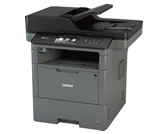
Brother MFC-L6700DW Business Monochrome Laser All-in-One Printer
The MFC-L6700DW is worth considering for shared office document work: retailer evidence identifies printing, copying, scanning and faxing, automatic duplex operation, Gigabit Ethernet and wireless connectivity. Its listed paper capacity and toner option address repeated document jobs. Buy on these documented features, while treating measured speed, print quality, feeder reliability and current running costs as unresolved.
Updated 2026-10-08

We may earn a commission from qualifying purchases.
Prices and sellers
No price information yet
Conditions and limitations
Maximum speed and duplex use different settings
- Capability
- Duplex printing is the default, with single-pass duplex copy, scan and fax.
- Limitations
- No independent speed measurement was verified by native snapshots.
- Requirements
- Maximum print speed uses one-sided printing and requires a setting change.
Compatibility
Historical manufacturer interface and cloud prerequisites are documented; no current OS, firmware or service interoperability test is established.
Where sources differ
Maximum simplex rating is scoped. PCMag and Top Ten Reviews snapshots were robots denied; no native-verified measured-versus-rated comparison is recorded.
Reported issues and fixes
A model-specific Reddit feeder report was attempted but robots denied. No issue incidence, affected firmware or confirmed fix is established.
Care and support
Documented drum and feeder spare routes
- Details
- Retailer catalogues identify DR820 and D001R9001 for this model; rated drum life varies with pages per job. Listings do not guarantee future availability or repair outcome.
Brother International Corporation · Precision Roller · Precision Roller
Ownership costs
Consumable yield and job-dependent drum interval support qualitative planning. No price observations or ownership cost calculation are included.
Who it suits
Shared document work with unresolved outcomes
- Check before buying
- Confirm the intended operating system, consumables and scan destination.
- Constraints
- Current software compatibility must be checked.
- Needs
- Shared printing, copying, scanning and faxing.
- Reason
- The documented functions support a shortlist for office document work; benchmark performance, current software behavior and long-term reliability remain unverified.
- Tradeoffs
- Documented capacity and interfaces do not establish tested quality or feeder reliability.
- Assessment
- conditional
123ink · Synapses Technologies, LLC · Brother International Corporation
Reviewer consensus
Single-source notes
Buyer questions
Before you buy
Compatibility
Is third-party toner guaranteed to work?
No current guarantee is established. The accepted evidence records a retailer's 2019 compatible-cartridge statement, with current firmware compatibility unresolved. [3]
Setup
Can an office share this printer?
The retailer lists Gigabit Ethernet and wireless connectivity. Exact setup steps and current driver support are not verified. [4]
Care and maintenance
What does the toner yield tell me?
The retailer estimates 12,000 pages for TN880. A yield estimate alone does not establish current running costs or your actual replacement interval. [1]
Why is drum life not one fixed page count?
Brother rates approximately 30,000 pages at one page per job or 50,000 pages at three pages per job for Letter/A4 simplex pages. These are rated conditions, not a measured service interval for your unit. [2]
Product images
Facts and specifications
Manufacturer datasheet
| Specification | Value | Source |
|---|---|---|
| Functions | Duplex printing is the default; copy, scan and fax support single-pass duplex operation. US | [2] |
| Interface | Wireless 802.11b/g/n, Gigabit Ethernet, Hi-Speed USB 2.0 US | [2] |
| Limitation | Rated drum life is approximately 30,000 pages at one page per job or 50,000 pages at three pages per job; these are Letter/A4 simplex estimates. US | [2] |
| Setup Requirement | Brochure cloud functions require an Internet connection and an account with the desired service. US; The maximum print speed rating uses one-sided printing and requires changing the default setting. US | [2] |
Retailer listing
| Specification | Value | Source |
|---|---|---|
| Compatibility | 123ink states that compatible replacement cartridges can be used; the 2019 statement does not establish current firmware behavior. | [3] |
| Duplex Printing | Yes | [4] |
| Functions | 70-page capacity auto document feeder; Print, copy, scan and fax | [3], [4] |
| Interface | Gigabit Ethernet and wireless | [4] |
| Paper Capacity | 570 sheet | [4] |
| Print Speed | 48 ppm | [4] |
| Toner Yield | 12000 page | [1] |
KnowSpec analysis
Office document workflow
The MFC-L6700DW is worth considering for shared office document work: retailer evidence identifies printing, copying, scanning and faxing, automatic duplex operation, Gigabit Ethernet and wireless connectivity. Its listed paper capacity and toner option address repeated document jobs. Buy on these documented features, while treating measured speed, print quality, feeder reliability and current running costs as unresolved.
Method: inferredJob structure matters for maintenance planning
The TN880 estimate identifies a supply option, while Brother's drum interval changes with pages per job. An office printing many single-page jobs should retain that distinction when planning maintenance. Retailer ease claims do not measure staff time, and no price observations establish a total ownership budget.
Method: inferredVerify supplies and software before purchase
The accepted compatible-cartridge claim comes from a retailer's historical statement, so it should not be read as a current firmware guarantee. Network interfaces and an automatic document feeder are documented features, while current driver behavior and feeder durability remain gaps. Confirm the intended computer environment and consumables before making the printer part of a daily workflow.
Method: Documentation synthesis and buyer implicationVisible information gaps
Missing information is shown rather than guessed.
- Topic:Scanning And Adf Reliabilitynot found
- Topic:Measured Graphics Qualityrights restricted
- Topic:Noise And Footprintnot found
- Topic:Toner Cost Per Pagenot found
- Topic:Measured Text Qualityrights restricted
- Topic:Driver Software And Firmware Locksrights restricted
- Topic:Third Party Toner Policynot found
- Topic:Purchase Costnot found
- Topic:Warranty And Supportrights restricted
- Topic:Measured Print Speedrights restricted
Products in this content
-
Brother MFC-L2750DW Monochrome All-in-One Wireless Laser Printer
The printer's monochrome focus, duplex scanning and 250-sheet tray suit recurring paperwork. Size a shared workload against Brother's recommended 2,000 pages/month rather than its 15,000-page maximum duty cycle. PrintingPilot's positive tex
-
HP LaserJet Tank MFP 2604sdw Printer
The HP LaserJet Tank MFP 2604sdw is a practical match for small offices that print monochrome documents regularly and value refillable toner, low page costs, mobile printing, and a built-in paper tray. Evidence supports clean text output, a
-
Canon Color imageCLASS MF656Cdw Wireless All-in-One Printer
The Canon Color imageCLASS MF656Cdw suits a small or medium office that needs dependable color documents, duplex scanning, flexible wired or wireless setup, and a long limited warranty. It prints quickly and produces crisp text and office g
-
Brother HL-L2460DW Wireless Compact Monochrome Laser Printer with Duplex Printing
The Brother HL-L2460DW is a focused monochrome document printer for home offices and small teams that value sharp text, low toner cost, wireles
Sources and method
- Brother MFC-L6700DW Toner CartridgesPrecision Roller · retrieved 2026-10-02Retailer listing
- MFC-L6700DW Business Laser All-in-One PrinterBrother International Corporation · retrieved 2026-10-08DatasheetPDF
- Brother MFC-L6700DW Printer Review123ink · retrieved 2026-10-02Retailer listing
- Brother MFC-L6700DW Laser Multifunction PrinterSynapses Technologies, LLC · retrieved 2026-10-02Retailer listing
- Genuine Brother MFC-L6700DW ADF Separation Holder AssemblyPrecision Roller · retrieved 2026-10-08Retailer listing
- Brother MFC-L6700DW Toner CartridgesPrecision Roller · retrieved 2026-10-08Retailer listing
- Brother MFC-L6700DW Drum UnitsPrecision Roller · retrieved 2026-10-08Retailer listing