PreSonus FaderPort 16 DAW Controller
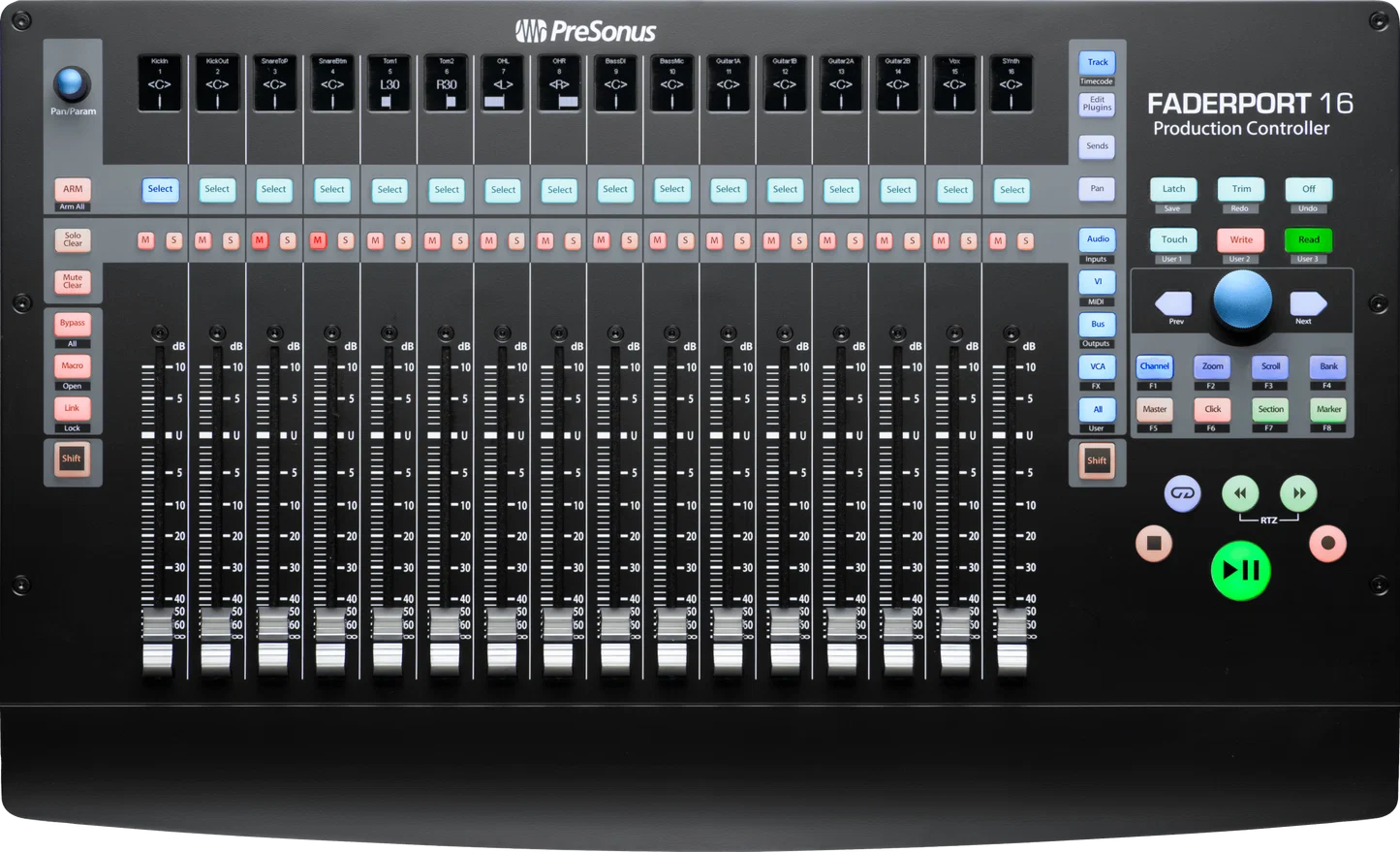
The PreSonus FaderPort 16 suits computer-based mixing when you want physical faders and simultaneous control rather than audio processing. It connects by USB, uses an external power supply, and the quick start guide describes macOS and Windows operation. Check your DAW configuration before buying: the accepted evidence documents HUI for Pro Tools, while the guide requires firmware updating. Its value is tactile control of your session; no audio passes through the controller.
Updated 2026-10-11

We may earn a commission from qualifying purchases.
Prices and sellers
No price information yet
Areas not yet researched (7)
No conclusion is available for these areas. This does not mean the Product has no limitations or reported issues.
- Conditions and limitations
- Compatibility
- Where sources differ
- Reported issues and fixes
- Care and support
- Ownership costs
- Who it suits
Buyer questions
Before you buy
Does FaderPort 16 process audio?
No. SonicScoop states that no audio passes through it. Evaluate the device as a controller for your DAW. [6]
Compatibility
What computer platforms are documented?
The quick start guide describes class-compliant operation on macOS and Windows. The accepted evidence does not establish a current operating-system version matrix. [4]
Setup
What should I prepare during installation?
The guide requires firmware updating. SonicScoop reports automatic fader calibration through Universal Control after updating; include this in initial setup. [4], [6]
How does it connect to the computer?
The guide identifies a USB device connection and a separate external power supply connection. [4]
Everyday use
What navigation function is verified?
The guide states that the Session Navigator encoder controls horizontal zooming in Zoom mode. [4]
Product images
Facts and specifications
Manufacturer manual
| Specification | Value | Source |
|---|---|---|
| Compatibility | Class-compliant on macOS and Windows, according to the 2017 quick start guide. US | [4] |
| Control Type | Session Navigator encoder controls horizontal zooming in Zoom mode. US; The quick start guide describes an Edit Plug-ins fader mode for plug-in parameters. | [1], [4] |
| Interface | USB device connection US | [4] |
| Power Source | External power supply connection US | [4] |
Retailer listing
| Specification | Value | Source |
|---|---|---|
| Control Type | 16 touch-sensitive 100 mm motorized faders US | [2] |
| Voltage | 12 V US | [3] |
Stated by reviewers
| Specification | Value | Source |
|---|---|---|
| Interface | HUI control protocol for Pro Tools, as reported in the 2018 review. US | [6] |
Other facts
| Specification | Value | Source |
|---|---|---|
| Buyer Fit | SonicScoop describes simultaneous adjustment of multiple controls as a benefit for hands-on mixing. US | [6] |
| Limitation | No audio passes through this controller; it does not process the audio signal. US; RockScience Music criticizes the small LCD scribble strips as a tradeoff of the compact layout. | [6], [5] |
| Setup Requirement | SonicScoop reports that Universal Control calibrates the faders after firmware updating. US; The quick start guide requires a firmware update before full operation. US | [6], [4] |
KnowSpec analysis
Choose it for physical DAW control
The PreSonus FaderPort 16 suits computer-based mixing when you want physical faders and simultaneous control rather than audio processing. It connects by USB, uses an external power supply, and the quick start guide describes macOS and Windows operation. Check your DAW configuration before buying: the accepted evidence documents HUI for Pro Tools, while the guide requires firmware updating. Its value is tactile control of your session; no audio passes through the controller.
Method: inferredAllow time for setup
Treat firmware preparation as part of installation. The guide requires an update, and SonicScoop reports automatic fader calibration through Universal Control after updating. That is relevant to moving between an unopened unit and a working mixing desk. These sources describe documented operation at their publication dates; they do not establish a current operating-system version matrix.
Method: inferredVisible information gaps
Missing information is shown rather than guessed.
- Topic:Platform Supportnot public
- Topic:Limitationsrights restricted
- Weightnot public
- Topic:Limitationsnot found
- Topic:Platform Supportrights restricted
Sources and method
- PRESONUS FaderPort 16 ManualPreSonus (manual hosted by ManualsLib) · retrieved 2026-10-11Manual
- PreSonus FaderPort 16 Control Surface User ReviewszZounds · retrieved 2026-10-02Retailer listing
- PreSonus FaderPort 16 DAW Mix Control SurfacezZounds · retrieved 2026-10-11Retailer listing
- FaderPort 16 Quick Start GuidePreSonus Audio Electronics, Inc. (manual hosted by CCI Solutions) · retrieved 2026-10-02ManualPDF
- PreSonus FaderPort 16 Review: Compact, Versatile, and PowerfulRockScience Music · retrieved 2026-10-11Editorial review
- New Gear Review: PreSonus FaderPort 16SonicScoop · retrieved 2026-10-02Editorial review