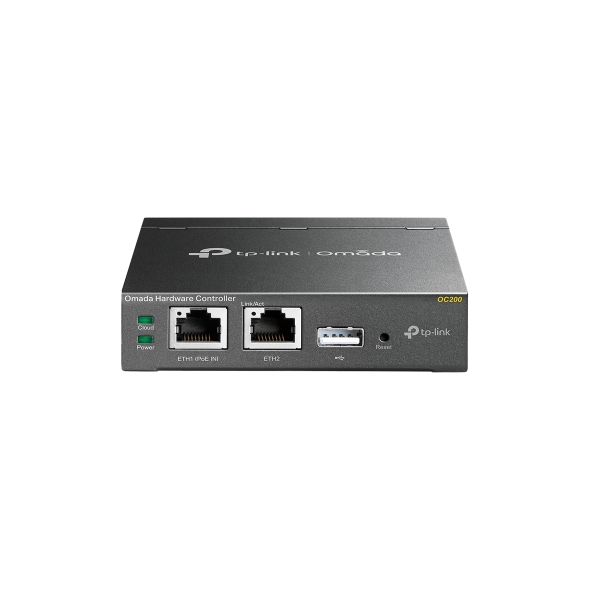
TP-Link OC200 Omada Hardware Controller
OC200 is worth considering if you want an Omada controller without hosting the software on your own hardware. MBReviews tested it with TL-SG2210P and EAP660 HD, not every device in the ecosystem. Confirm the purchased hardware revision, supported firmware and power arrangement before relying on version-specific specifications or backup behavior.
Updated 2026-10-02

We may earn a commission from qualifying purchases.
Buyer questions
Before you buy
Does this evidence confirm the hardware revision sold under this ASIN?
No. The numeric specifications cited here belong to the OC200 V2 datasheet. The queued unit's revision remains unconfirmed; verify it before applying those specifications. [1]
Compatibility
Which devices were actually used in the independent review?
MBReviews used TL-SG2210P and EAP660 HD with OC200. This does not establish compatibility with every TP-Link or third-party device. [3]
Setup
Can it be managed locally without internet access?
The 2020 installation guide documents Local Management without internet access. Check the procedure against the unit and firmware you have. [4]
Product images
Facts and specifications
Manufacturer datasheet
Other facts
| Specification | Value | Source |
|---|---|---|
| Buyer Fit | MBReviews recommends the tested OC200 as an option for buyers who do not want to host an Omada SDN instance on their own hardware.; Omada's capacity FAQ for Controller 6.3 or later recommends planning an upgrade or migration as managed device count approaches recommended capacity. | [3], [2] |
| Limitation | Omada's capacity FAQ for Controller 6.3 or later warns that exceeding recommended capacity may slow page loading, configuration delivery and data processing.; The 2020 OC200 installation guide limits USB automatic backup to operation powered by a PoE device. | [4], [2] |
| Risk | The legacy OC200 1.0 user guide excludes mesh-network configuration from backup; confirm current firmware behavior before relying on restoration.; The OC200 V2 datasheet says actual management scale varies with network environment, bandwidth and settings; published capacity is not a measured guarantee. | [1], [5] |
| Setup Requirement | MBReviews reports no power cable in its reviewed OC200 package; verify the contents and power provision for the purchased unit.; The 2020 OC200 installation guide specifies a separate Micro USB power source of 5V DC, minimum 1A, if PoE is unavailable. | [4], [3] |
| Use Case | MBReviews tested OC200 with TL-SG2210P and EAP660 HD; that test is not proof of compatibility with all TP-Link or third-party devices.; The 2020 OC200 installation guide provides Local Management for configuration and management without internet access. | [4], [3] |
KnowSpec analysis
A controller appliance, with revision checks before purchase
OC200 is worth considering if you want an Omada controller without hosting the software on your own hardware. MBReviews tested it with TL-SG2210P and EAP660 HD, not every device in the ecosystem. Confirm the purchased hardware revision, supported firmware and power arrangement before relying on version-specific specifications or backup behavior.
Method: inferredKeep datasheet scope attached to specifications
The OC200 V2 datasheet records 2 Ethernet ports and a width of 100 mm. Those values describe V2, not a confirmed hardware revision for this ASIN. Compatibility evidence here is a specific review test, so verify the intended devices rather than treating it as universal support.
Method: inferredChoose power with backup in mind
The installation guide documents local management without internet access, but USB automatic backup depends on PoE power. The reviewed package lacked a power cable. Plan the power supply and recovery procedure together, then check their applicability to the actual unit and firmware.
Method: inferredLeave room for growth and test restoration
Published management scale is not a guarantee of measured performance. Omada's FAQ for Controller 6.3 or later warns about performance beyond recommended capacity and advises planning migration. The legacy user guide also excludes mesh configuration from backup; do not assume a backup restores everything on current firmware.
Method: inferredVisible information gaps
Missing information is shown rather than guessed.
- Topic:Interfaces Standardsconflicting
- Source.Manufacturernot public
- Topic:Platform Supportnot found
- Topic:Buyer Fitnot found
- Topic:Limitationsnot found
Sources and method
- Controller Datasheet — OC200 V2 / OC300 (2022)TP-Link · retrieved 2026-10-02DatasheetPDF
- Omada Hardware Controller Management Capacity: Recommended and Maximum Device LimitsOmada by TP-Link · retrieved 2026-10-02Manufacturer support
- TP-Link OC200 Omada Controller ReviewMBReviews · retrieved 2026-10-02Editorial review
- OC200 Installation Guide REV1.1.0 (2020)TP-Link · retrieved 2026-10-02ManualPDF
- OC200 1.0 User Guide (2018)TP-Link · retrieved 2026-10-02ManualPDF