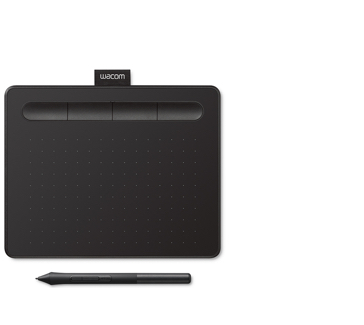
Wacom Intuos Small Black CTL4100 with ACK20001 Standard Nibs
Consider the CTL4100 only if a wired small tablet fits your setup and you have checked the software entitlement. The exact-model historical reviewer cautioned against it without a need for the bundled programs, citing difficulty with very light strokes and nib wear. ACK20001 is a listed compatible accessory, but additional nibs do not remove those drawing-feel concerns.
Updated 2026-10-08

We may earn a commission from qualifying purchases.
Prices and sellers
No price information yet
Conditions and limitations
USB, driver and drawing limitations documented; current application-specific behavior and controlled performance remain unverified.
Compatibility
Exact-model Chromebook certification and ACK20001 compatibility documented; current ExpressKeys support and exact bundle fulfillment remain unresolved.
Where sources differ
One-year US and two-year WEG warranty statements are regional, not interchangeable. Historical software offers change; current exact-bundle entitlement remains unresolved.
Reported issues and fixes
One exact-model historical reviewer reported light-stroke control and nib wear concerns. Present frequency and any fixes are not established.
Care and support
ACK20001 spares and regional warranty documented; nib lifetime, repairability and support end date not established.
Ownership costs
Tip inspection and replacement are documented. No measured nib lifespan or price observations support a monetary total.
Who it suits
Wired model fit, drawing limitations, registration and Chromebook conditions assessed. Current exact-bundle entitlement and application-specific behavior remain unresolved.
Reviewer consensus
Consensus rows require at least two distinct sources for the topic.
| Topic | Positive | Negative | Mixed | Reading | Evidence |
|---|---|---|---|---|---|
| Active area and monitor mapping | 1 | 0 | 1 | Mixed · 1/2 | [5], [2] |
| Connection and driver setup | 2 | 0 | 1 | Leans positive · 2/3 | [4], [5], [6] |
| Expresskeys and pen controls | 1 | 1 | 0 | Debated · 1 v 1 | [4], [1] |
| Nib compatibility and replacement | 1 | 1 | 0 | Debated · 1 v 1 | [4], [5] |
| Pen pressure and initial activation | 1 | 1 | 0 | Debated · 1 v 1 | [4], [2] |
| Software entitlement and registration | 0 | 1 | 1 | Mixed · 1/2 | [4], [3] |
| Warranty and support | 1 | 0 | 1 | Mixed · 1/2 | [4], [3] |
Single-source notes
- Build portability and cable: Agreed · 1/1 · [5]
- Buyer fit: Weak point · 1/1 · [2]
- Drawing feel and surface wear: Weak point · 1/1 · [2]
- Host os and application compatibility: Agreed · 1/1 · [1]
- Limitations: Weak point · 1/1 · [2]
- Measured performance: Weak point · 1/1 · [2]
- Pen tilt and supported tools: Weak point · 1/1 · [2]
The review
Wacom Intuos CTL4100 with ACK20001: wired setup and drawing caveats
Judge light-stroke control, not just advertised levels
Wacom describes the Pen 4K as battery-free and specifies 4096 pressure levels with two customizable side switches. That is a capability specification, not a measurement of how reliably an artist can maintain the thinnest stroke. The independent Digital Art Tablet Guides review used the actual CTL4100 and found easy initial activation but difficulty starting and holding very light lines. Its assessment is historical and subjective; it supplies neither a calibrated force value nor a numerical latency result. The review also lists no pen tilt sensitivity. Buyers whose brushes depend on tilt should therefore treat that requirement as unsupported, while buyers concerned mainly with delicate line starts should assess the review's examples against their own technique. Pressure-level count, initial activation and controlled minimum pressure describe different aspects of drawing. A large advertised count alone does not resolve the specific concern raised by those drawing tests. [2], [4]
Chromebook support has its own conditions. Wacom's June 2021 announcement specifically identifies CTL-4100 as Works With Chromebook certified and describes USB use with an up-to-date Chrome OS. The pen must operate on the tablet; this statement does not turn the supplied pen into one that writes directly on a Chromebook display. The same announcement says the four ExpressKeys were unsupported on Chrome OS as of May 2021, with later support planned. That is dated evidence, so it should neither be ignored nor presented as a confirmed current failure. If shortcuts are central to your workflow, check their current behavior on the intended Chromebook and application before relying on the Windows or Mac configuration experience. The official setup guide's driver-free Chromebook path establishes an installation difference, not feature parity across operating systems. Compatibility at the connection level leaves application-specific brush behavior and the current shortcut implementation to be verified. [4], [6], [1]
Identify the wired model and plan setup
This assigned bundle concerns the small black Wacom Intuos CTL4100 and the listed ACK20001 accessory, so begin with the model number rather than a photograph of the wider Intuos family. CTL4100 is the wired model; CTL4100WL denotes a Bluetooth version. Wacom lists USB-A host connectivity, a 1.5 m cable and a tablet weight of 230 g. The product information separates the 152 x 95 mm drawing area from the complete 200 x 160 x 8.8 mm tablet. Those dimensions describe the manufacturer specification rather than an independent measurement. For a buyer, that distinction helps answer two different questions: whether the tablet fits beside the keyboard and whether its drawing surface suits the movements used for artwork. The historical Windows review also documents monitor selection and active-area mapping. A compact tablet therefore deserves a mapping check with your own screen rather than an assumption that its complete footprint is usable drawing space. [2], [4], [5]
Wacom's official getting-started instructions tell computer users to connect the USB cable and download and install the driver. The guide identifies security and privacy settings as part of Mac installation and distinguishes Chromebook use, where that driver is not required. Treat these instructions as the installation route, not as proof that every operating-system release or creative application has been tested here. Once installed, check the mapped monitor, active area and the functions assigned to ExpressKeys in the application you actually use. The historical review shows these mapping controls, while the manufacturer describes application-specific customizable keys. That gives a practical reason to configure the tablet before judging it: a shortcut arrangement suitable for one program may not match another. Software redemption is a separate step requiring registration. Successful pointer movement, useful shortcuts and access to a bundled application are separate checks, even though all contribute to a usable desk setup. [2], [4], [6]
Compatible nibs do not eliminate surface wear
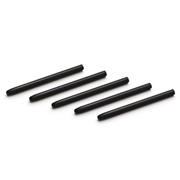
Wacom's fact sheet lists Standard nibs ACK20001 as an Intuos accessory. This supports the compatibility of the named nib type, but it does not prove that an individual seller will supply every advertised bundle component. Keep accessory compatibility and bundle fulfillment separate when checking this purchase. The historical CTL4100 reviewer observed a flat side on the first nib during review drawing on the rough tablet surface. That observation is useful as a maintenance warning, but it is not a measured wear rate and does not establish how many drawing hours a replacement will last. Wacom's product information recommends replacing a nib when it becomes worn or sharp. For a buyer, the actionable consequence is to inspect the tip and keep an appropriate replacement available rather than adopt a universal replacement calendar. The battery-free pen specification concerns pen power; it does not imply that the physical tip is maintenance-free. [4], [2], [5]
The manufacturer's care instruction and the reviewer's observation answer different questions. The instruction explains when visible tip condition warrants replacement; the review records what happened to one tip during one drawing experience. Together they support routine inspection, not a prediction that every owner will reproduce the same flattening. If the supplied bundle includes additional ACK20001 nibs, those spares address replacement availability but do not change the surface behavior reported in the review. A buyer who draws frequently should include this maintenance task in the decision while acknowledging that the evidence does not quantify a consumable budget. No replacement interval, recurring purchase total or monetary ownership-cost figure is calculated here. The absence of a universal wear figure is a reason to keep the recommendation conditional, rather than turn one historical observation into an assurance of either rapid failure or long service life. [4], [2], [5]
Check software and purchase terms
Complimentary software requires a Wacom ID and Intuos registration, and software vendors may require another registration. The separately versioned regional manufacturer sheet explicitly warns that software offers change over time and directs buyers to Wacom ID for the latest offer. That warning matters when comparing old reviews, product sheets and a seller's bundle description: a historically advertised application is not proof of today's entitlement for this exact purchase. Verify the application, license period and operating-system eligibility that apply when redeeming the product. Regional warranty statements also need their own scope. The US-oriented sheet lists one year in the USA, Canada and Latin America, while the WEG sheet lists two years. The latter does not increase the US warranty. It demonstrates why country and purchase terms should accompany a warranty statement instead of transferring a favorable number from another regional document. [4], [3]
The strongest fit is conditional: the buyer wants this small wired model, accepts the historical drawing-feel caveats and checks software entitlement independently. The exact-model reviewer did not recommend CTL4100 without a need for its bundled programs. That is the reviewer's historical judgment, not a current ranking of competing products. Preserve the caution while checking whether its actual concerns matter to your work: delicate strokes, tilt-dependent brushes and tip wear are more informative than a generic recommendation. Chromebook certification supplies a documented connection route, but the dated ExpressKeys limitation still requires a current feature check. The available evidence does not establish controlled sustained performance, calibrated pen force, numerical end-to-end latency or a universal nib lifespan. Those uncertainties should remain visible. Choose this bundle because its documented connection, size and accessories match your requirements, after checking the unresolved conditions, rather than because an old software promotion or an unmeasured pressure specification appears to settle every question. [2], [1], [3]
Buyer questions
Before you buy
Can I assume all advertised software is included today?
No. Wacom requires registration and notes that vendor registration may be needed. The exact current bundle entitlement is unresolved; verify the offer before buying rather than relying on historical promotions. [4]
Compatibility
Limitations
Will tilt-sensitive brushes work as intended?
The exact-model review lists no pen tilt sensitivity. It also reports difficulty maintaining very thin strokes; evaluate those limitations against your drawing style. [2]
Product images
Facts and specifications
Manufacturer datasheet
| Specification | Value | Source |
|---|---|---|
| Compatibility | Complimentary software requires a Wacom ID and Intuos registration; vendor registration may also be required. US; The regional manufacturer sheet explicitly says software offers change over time and directs buyers to Wacom ID for the latest offer.; Wacom lists Standard nibs ACK20001 as an Intuos accessory. US; Wacom's June 2021 announcement identifies CTL-4100 as Works With Chromebook certified; use USB and a current Chrome OS, with the pen on the tablet. JP | [4], [1], [3] |
| Interface | USB-A host connection; wireless connection applies only to Bluetooth models. US | [4] |
| Warranty | Manufacturer fact sheet lists one year in the USA, Canada and Latin America; applicable purchase terms still govern. US; The 2021 WEG regional sheet lists a two-year limited warranty; this regional document does not replace the US sheet's one-year statement. WEG | [4], [3] |
Manufacturer manual
Stated by reviewers
| Specification | Value | Source |
|---|---|---|
| Compatibility | Pen tilt-sensitive tools are not supported: the reviewer lists no pen tilt sensitivity. US | [2] |
| Interface | CTL4100 is the small black wired model, not CTL4100WL. US | [2] |
Other facts
| Specification | Value | Source |
|---|---|---|
| Buyer Fit | The historical CTL4100 reviewer did not recommend it without a need for the bundled software; this is not a current price comparison. US | [2] |
| Limitation | In the reviewer's drawing tests, maintaining very thin strokes was difficult; advertised pressure levels do not establish light-stroke control. US; The historical CTL4100 reviewer found it difficult to maintain the lightest pen pressure consistently, despite easy initial activation. US; The June 2021 release says the four ExpressKeys were unsupported on Chrome OS as of May 2021; it promised later support but does not confirm current behavior. JP | [2], [1] |
| Risk | The CTL4100 reviewer observed a flat side on the first nib during review drawing on the rough surface; this is one user's result, not a wear-rate guarantee. US | [2] |
| Setup Requirement | Configure application-specific shortcuts using the tablet's customizable ExpressKeys. US; Replace a nib when worn or sharp to avoid damaging the tablet. US; Wacom's setup guide requires a driver for Windows and Mac, Mac security/privacy settings, and no driver for Chromebook. US | [4], [5], [6] |
| Use Case | The historical Windows reviewer could select the mapped monitor and active-area ratio in the Mapping tab. US | [2] |
KnowSpec analysis
Should you buy this wired Intuos bundle?
Consider the CTL4100 only if a wired small tablet fits your setup and you have checked the software entitlement. The exact-model historical reviewer cautioned against it without a need for the bundled programs, citing difficulty with very light strokes and nib wear. ACK20001 is a listed compatible accessory, but additional nibs do not remove those drawing-feel concerns.
Method: observedVisible information gaps
Missing information is shown rather than guessed.
- Topic:Bundle Identity And Included Partsrights restricted
- Topic:Nib Compatibility And Replacementnot public
- Topic:Tracking Accuracy And Report Ratenot found
- Topic:Sustained Performancenot found
- Topic:Pen Pressure And Initial Activationnot found
- Topic:Host Os And Application Compatibilityconflicting
- Topic:Software Entitlement And Registrationconflicting
- Topic:Connection And Driver Setupnot public
- Topic:Efficiencynot found
Sources and method
- Wacom Intuos expands Chrome OS compatibilityWacom via PR TIMES · retrieved 2026-10-08Manufacturer
- Wacom Intuos 2018 ReviewDigital Art Tablet Guides · retrieved 2026-10-02Editorial review
- Intuos 2021 WEG regional fact sheetWacom, hosted by Bueromarkt · retrieved 2026-10-08DatasheetPDF
- Wacom Intuos fact sheet March 2023Wacom · retrieved 2026-10-02DatasheetPDF
- Wacom Intuos Important Product InformationWacom · retrieved 2026-10-02ManualPDF
- Getting Started with Wacom IntuosWacom · retrieved 2026-10-08Manufacturer support