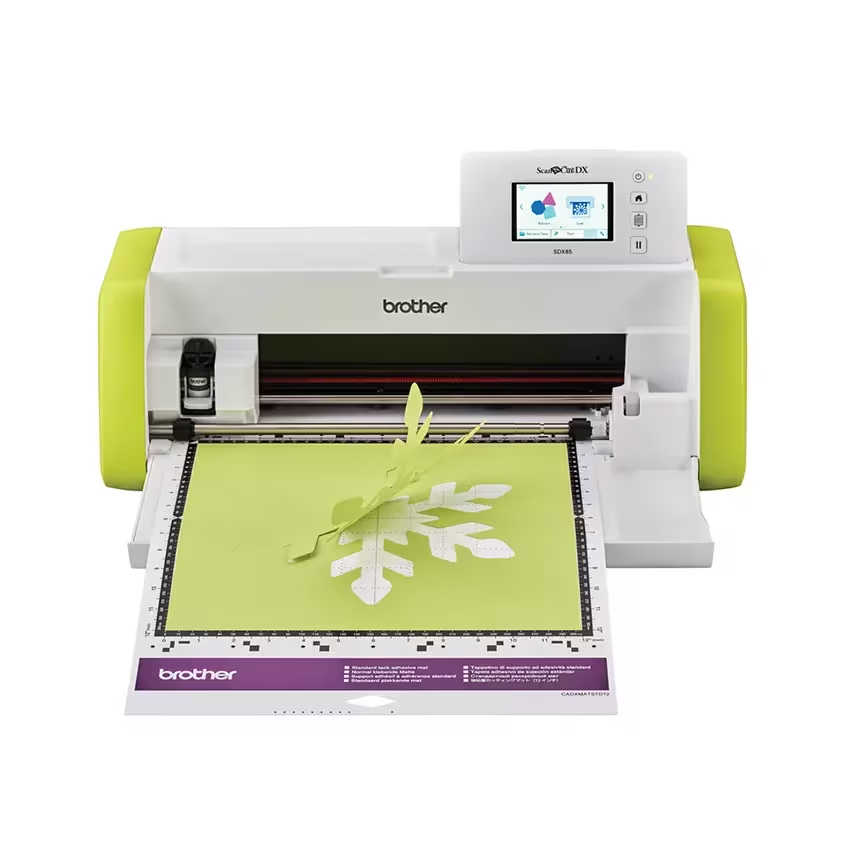
Brother Lime Green ScanNCut DX SDX85 Cutting Machine with Built-In Scanner
The Brother ScanNCut DX SDX85 suits crafters who want built-in designs, scanning and wireless file transfer. It is a conditional choice for felt or fine lettering: reported adhesion problems can require trial cuts and finishing. These sources do not establish controlled cutting accuracy, sustained production performance or efficiency.
Updated 2026-10-11

We may earn a commission from qualifying purchases.
Prices and sellers
No price information yet
Areas not yet researched (7)
No conclusion is available for these areas. This does not mean the Product has no limitations or reported issues.
- Conditions and limitations
- Compatibility
- Where sources differ
- Reported issues and fixes
- Care and support
- Ownership costs
- Who it suits
Measured performance
Owner reported cutting noise
50 dBOwner used a smartphone beside the cutting machine during a Japanese SDX85 first-impressions trial. · Approximately 50 dB during louder operation. Distance, phone/app calibration, frequency weighting, background noise, material at the measurement moment and repeat count are unspecified. This is an informal observation, not a laboratory benchmark or a guarantee for the US variant.
Source [6]Reviewer consensus
Single-source notes
- Accessories and consumables: Weak point · 1/1 · [1]
- Buyer fit: Agreed · 1/1 · [1]
- Cutting materials and thickness: Agreed · 1/1 · [4]
- Limitations: Weak point · 2/2 · [6], [4]
- Scan to cut and alignment: Agreed · 1/1 · [4]
- Setup and trial cuts: Agreed · 1/1 · [6]
- Software and file transfer: Agreed · 1/1 · [4]
- Standalone controls: Agreed · 1/1 · [4]
The review
Brother ScanNCut DX SDX85: documented features, craft tests and material limits
Built-in designs and scanning
The Brother ScanNCut DX SDX85 combines scanning, built-in designs and a touchscreen workflow for craft projects. Brother's US launch announcement lists 251 designs and a 3.47-inch display. These are manufacturer specifications, not measures of cutting accuracy. The practical appeal is being able to begin with existing designs or turn printed artwork into cut data without keeping a computer attached. Wild Olive actually tried the SDX85 and found the built-in-design workflow approachable, while also reporting limitations with some materials. That review disclosed a complimentary machine supplied by Brother, so it should be read as an attributed craft experience rather than an unsponsored laboratory comparison. CraftsSelection similarly positions the machine for people interested in built-in designs and wireless features. Together, the sources support a hobby-craft use case; they do not establish suitability for continuous production or a quantified accuracy guarantee. [4], [1], [5]
Fabric, felt and fine lettering
Brother describes cutting selected materials, including foam and felt, up to 3 mm thick, and explicitly says compatibility varies and a trial cut is needed. The thickness statement therefore should not be read as permission to cut every sheet material of that thickness. The existing hands-on evidence reinforces this distinction: Wild Olive obtained imperfect felt cuts even after changing preparation and adhesion, while a Japanese SDX85 owner reported very small masking-sheet letters lifting during cutting. Neither account supplies a minimum reliable letter size or a general failure rate. For felt decorations, the practical decision is whether a trial and possible hand finishing fit the project. For lettering that must work correctly on the first attempt, the available evidence leaves a meaningful uncertainty. Automatic blade sensing does not erase the observed dependence on the material, adhesion and the detail being cut. [4], [6], [5]
Computer-created files and wireless transfer
Wireless transfer is supported by a real craft workflow: Wild Olive created a design on a computer and sent it to the SDX85. The US launch documentation separately lists SVG reading and CanvasWorkspace editing and transfer. These are different kinds of evidence: the review demonstrates one completed workflow, while the announcement describes intended compatibility. Neither establishes that every file, operating-system version or network configuration works. Brother's Japanese comparison also lists SVG support for its regional SDX85, which corroborates the feature without turning a Japanese accessory list into a US bundle inventory. Plan around the specific design files you intend to use, and confirm the current software requirements before committing a project. The evidence here supports importing custom artwork, but does not provide a tested matrix of file complexity, software revisions or transfer reliability. [4], [5], [3]
Workspace, trial cuts and accessories
Leave room in front of and behind the machine for mat movement, as the Japanese owner's account emphasizes. A machine that fits on a shelf may still need more working clearance while cutting; this evidence does not establish an exact clearance measurement. Brother's US launch package includes a standard-tack mat, blade and holder, hand tools and introductory project materials. Treat that as a dated package description and verify the actual seller's contents. Supported larger cutting mats are not proof that one is included, and a cutting-mat dimension is not automatically the scanning area. The Japanese comparison also marks the roll feeder as a separate accessory for feeding roll material without a mat. CraftsSelection warns that application-specific accessories add cost. Current accessory expenditure, replacement intervals and lifetime ownership cost remain unknown, so no numerical cost forecast is justified. [6], [4], [1], [5], [3]
Consider the screen before choosing
Create With Sue highlights the SDX85's small screen as a factor to consider, particularly for people planning substantial stamp scanning. This is a usability preference from a buying guide, not a timed comparison or an accessibility assessment. It also does not contradict the positive report about navigating built-in designs: finding a ready-made pattern and inspecting a scanned outline can place different demands on the same display. The useful question is which task will dominate your own projects. Someone mainly choosing existing patterns may weigh the screen differently from someone who wants to inspect fine details on the machine. The guide's advice supports trying the interface before buying if screen comfort matters. It does not justify declaring the SDX85 unusable, or assuming that a larger-screen model will produce more accurate cuts. [4], [5], [2]
What the noise observation can tell you
The Japanese owner reported approximately 50 dB during louder operation, measured with a smartphone beside the machine. That is an informal measurement rather than a controlled acoustic benchmark. The report does not specify microphone distance, calibration, frequency weighting, background noise or the number of readings, and the exact material at the measurement moment is unclear. The measurement record therefore leaves sample size unknown and names no laboratory. It can document what this owner observed, but cannot establish a certified sound-pressure level, compare competing machines fairly or guarantee a quiet workspace. It also concerns a Japanese SDX85 trial, not a verification of this US package. Buyers sensitive to noise should treat the number as limited contextual evidence and seek a demonstration under conditions similar to their intended room. [6]
Choose around the project, not just the specification
The defensible buying case is a craft workflow that benefits from scanning, built-in designs and custom file transfer, with time allowed for testing materials. The strongest reasons to pause are projects requiring guaranteed fine lettering, unattended production consistency, or a fully predictable accessory budget: those outcomes are not established here. Before choosing, identify the material and smallest detail you need, confirm the actual package and required accessories, and decide whether the screen suits the way you will edit. Keep regional documentation in its proper scope; a Japanese comparison can explain that version without proving every US accessory or software entitlement. This evidence set supports a conditional decision based on those needs. It does not supply controlled cutting-tolerance tests, sustained-production results, consumable lifetimes or enough information for a numerical ownership-cost calculation. [1], [5], [2], [3]
Buyer questions
Before you buy
Who is the SDX85 for?
Crafters seeking built-in designs, scanning and wireless transfer are its supported buyer fit. These reviews do not prove a high-volume production workload. [4], [1]
What can increase total cost?
Application-specific accessories can add to project cost. Current prices and lifetime consumable expenditure are not established by this evidence. [1]
Setup
What workspace should I plan?
Leave clearance at the front and rear for the moving mat. The Japanese owner's account does not establish the contents of the US package. [6]
Everyday use
Can I create cutting files without connecting a computer?
A reviewer reported scanning items to create cutting files without an attached computer. No measured alignment tolerance is established here. [4]
Product images
Facts and specifications
Manufacturer datasheet
| Specification | Value | Source |
|---|---|---|
| Compatibility | The US launch announcement lists SVG reading and CanvasWorkspace editing and transfer; cutting mats may be 12 x 12 or 12 x 24 inches, while listed scanning mats are 12 x 12 inches. US | [5] |
| Limitation | Brother specifies cutting selected materials such as foam and felt up to 3 mm thick, with variable material compatibility and a required trial/test cut. US | [5] |
| Option | The US launch package lists a 12 x 12-inch standard-tack mat, Auto Blade and holder, spatula, stylus, accessory bag and getting-started project materials. US | [5] |
Other facts
| Specification | Value | Source |
|---|---|---|
| Buyer Fit | Built-in designs offer an accessible starting point for craft projects using the machine's touch-screen workflow.; Create With Sue advises considering the SDX85's small screen when choosing a machine, especially for substantial stamp scanning; this is editorial advice rather than a measured usability result.; The editorial overview favors crafters who want built-in designs and wireless connectivity, not a proven high-volume production workload. | [4], [1], [2] |
| Limitation | The reviewer's felt cuts remained imperfect after adhesion-related adjustments, so felt projects may need trial cuts and hand finishing.; Very small lettering lifted from the masking sheet during the Japanese reviewer's trial and did not cut successfully. | [4], [6] |
| Risk | Additional accessories can increase total project cost; the overview does not establish current prices or lifetime consumable expenditure. | [1] |
| Setup Requirement | Allow working clearance at the front and rear for the moving cutting mat; the Japanese first-impressions review is not a US package inventory. | [6] |
| Use Case | Craft projects using fabric and felt are supported, although successful cutting depends on material adhesion and preparation.; Scanning printed items can create cutting files without an attached computer; this does not establish a measured alignment tolerance.; The reviewer created a file on a computer and transferred it wirelessly to the machine; this is an observed workflow, not proof of every file format. | [4] |
KnowSpec analysis
A craft-focused cutter, with material-dependent results
The Brother ScanNCut DX SDX85 suits crafters who want built-in designs, scanning and wireless file transfer. It is a conditional choice for felt or fine lettering: reported adhesion problems can require trial cuts and finishing. These sources do not establish controlled cutting accuracy, sustained production performance or efficiency.
Method: synthesisPlan workspace and accessory costs
Leave clearance for the moving mat and budget for application-specific accessories. The Japanese review describes a regional owner's trial, not the contents of the US package. Wireless transfer was demonstrated by a reviewer and SVG reading is documented by Brother; compatibility with every file and current consumable costs remain unestablished.
Method: synthesisVisible information gaps
Missing information is shown rather than guessed.
- Topic:Software And File Transferrights restricted
- Topic:Sustained Performancenot found
- Topic:Measured Performancenot found
- Topic:Efficiencynot found
Sources and method
- Brother ScanNCut SDX85 Cutting Machine ReviewCraftsSelection · retrieved 2026-10-02Editorial review
- How to choose a Scan N Cut to buyCreate With Sue · retrieved 2026-10-11Editorial review
- ScanNCut model comparison, May 2025Brother Japan · retrieved 2026-10-11DatasheetPDF
- Review: Brother ScanNCut DX SDX85 cutting machine and felt wreath projectWild Olive · retrieved 2026-10-02Editorial review
- Brother introduces ScanNCut DX SDX85Brother International Corporation via PR Newswire · retrieved 2026-10-11Manufacturer
- Brother ScanNCut DX SDX85 first impressionsSchizophonic9 · retrieved 2026-10-02Owner community