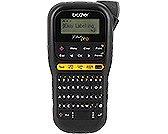
Brother PT-H111 P-touch Pro Label Maker
The Brother PT-H111 suits cable identification and repeated tape-label jobs when its TZe format fits your needs. Brother recommends Flexible ID Tape for cables and wires, while Chain Print reduces tape used between different labels. Obtain batteries or a compatible optional AC adapter separately and choose a supported wider tape for two-line printing. Current purchase price, exact retail bundle contents and warranty duration remain unverified in this package.
Updated 2026-10-04

We may earn a commission from qualifying purchases.
Prices and sellers
No price information yet
Conditions and limitations
Prepare power before labeling
- Capability
- The PT-H111 can run from batteries or an optional AC adapter.
- Limitations
- Battery runtime under a defined workload remains unverified.
- Requirements
- Obtain the required batteries or compatible AC adapter separately.
Compatibility
Retailer-listed TZe-231 tape compatibility
- Connection
- Install the compatible tape cassette in the label maker.
- Functions
- Print tape labels.
- Notes
- Tato lists TZe-231 compatibility for this exact model. This is a retailer specification, not an independent compatibility test.
- Protocol
- TZe
- Result
- full
- Source device
- Brother PT-H111
- Target device
- Brother P-touch TZe-231
Who it suits
Cable and wire identification
- Check before buying
- Check the exact seller bundle and the tape supplied.
- Constraints
- Choose the tape material for the application.
- Obtain a power supply separately.
- Needs
- Identify cables and wires with tape labels.
- Reason
- The documented tape recommendation supports this use when the consumable and power requirements are met.
- Tradeoffs
- Flexible ID Tape is the manufacturer recommendation for cables and wires.
- Assessment
- conditional
Labels needing two text lines
- Check before buying
- Check the required label width and cassette before purchase.
- Constraints
- Use a supported wider tape for two-line output.
- Needs
- Print two lines of text on a label.
- Reason
- Tape width and display capacity impose separate layout constraints.
- Tradeoffs
- The display shows one row even when the intended label has two lines.
- Assessment
- conditional
Areas not yet researched (4)
No conclusion is available for these areas. This does not mean the Product has no limitations or reported issues.
- Where sources differ
- Reported issues and fixes
- Care and support
- Ownership costs
Reviewer consensus
Consensus rows require at least two distinct sources for the topic.
| Topic | Positive | Negative | Mixed | Reading | Evidence |
|---|---|---|---|---|---|
| Consumables | 2 | 0 | 0 | Agreed · 2/2 | [3], [2] |
| Power and portability | 1 | 1 | 0 | Debated · 1 v 1 | [3], [2] |
Single-source notes
Buyer questions
Compatibility
Setup
Do I need to obtain batteries separately?
Yes, if you plan to use batteries. The setup guide specifies six AAA alkaline batteries or six fully charged Ni-MH batteries, not included. An optional AC adapter is another separately purchased power option. Measured battery runtime remains unverified. [2], [3]
Everyday use
How can I reduce tape used between different labels?
The quick guide identifies Chain Print as a tape-saving option for multiple different labels with narrow margins. This supports using the margin workflow, but it does not establish an exact financial saving. [2]
Limitations
Can every supported tape print two lines?
No. Two-line printing requires the supported wider tapes. Choose the appropriate cassette before composing the label; a supported tape format alone does not guarantee the desired line layout. [1]
Product images
Facts and specifications
Manufacturer manual
| Specification | Value | Source |
|---|---|---|
| Compatibility | Brother TZe tapes; TZe tape widths: 3.5, 6, 9 and 12 mm | [2], [1] |
| Interface | LCD displays one row of 15 characters; text entry allows up to 80 characters. | [1] |
Retailer listing
| Specification | Value | Source |
|---|---|---|
| Compatibility | Brother P-touch TZe-231 DO | [3] |
| Power Source | 6 AAA batteries or an AC power adapter; separate purchase required. DO | [3] |
Other facts
| Specification | Value | Source |
|---|---|---|
| Buyer Fit | Brother recommends Flexible ID Tape for labels attached to cables and wires. | [1] |
| Limitation | Two-line printing requires 9 mm or 12 mm tape. | [1] |
| Setup Requirement | Requires six AAA alkaline batteries or six fully charged Ni-MH batteries, not included.; Use a dry cotton swab to clean the print head. | [4], [2] |
| Use Case | Chain Print saves tape when printing multiple different labels with narrow margins. | [2] |
KnowSpec analysis
Who the PT-H111 suits
The Brother PT-H111 suits cable identification and repeated tape-label jobs when its TZe format fits your needs. Brother recommends Flexible ID Tape for cables and wires, while Chain Print reduces tape used between different labels. Obtain batteries or a compatible optional AC adapter separately and choose a supported wider tape for two-line printing. Current purchase price, exact retail bundle contents and warranty duration remain unverified in this package.
Method: inferredTape and power costs
Running costs depend on tape consumption and power supplies. Chain Print is a tape-saving option, so margin settings deserve attention before a batch. The evidence identifies TZe consumables and separately purchased battery or AC power, but provides no verified tape prices or measured cost per label.
Method: inferredText entry and output constraints
The LCD shows a single row of 15 characters although a label can contain up to 80 characters. That distinction matters when composing text: visible screen capacity is not the total text-entry allowance. Two-line output also depends on choosing a supported wider tape rather than assuming every cassette permits it.
Method: inferredPrint-head care
Brother directs users to clean the print head with a dry cotton swab. Treat that as maintenance guidance rather than evidence of long-term reliability. These sources do not supply a measured endurance test or a confirmed service interval.
Method: inferredVisible information gaps
Missing information is shown rather than guessed.
- Topic:Purchase Costnot found
- Topic:Bundle Identity And Warrantynot found
Sources and method
- PT-H111 User's GuideBrother · retrieved 2026-10-02ManualPDF
- PT-H111 Quick Setup GuideBrother · retrieved 2026-10-02ManualPDF
- Rotuladora / Etiquetadora Brother P-Touch Pro, PT-H111Tato Technology · retrieved 2026-10-04Retailer listing
- PT-H111 Product Safety GuideBrother · retrieved 2026-10-02ManualPDF