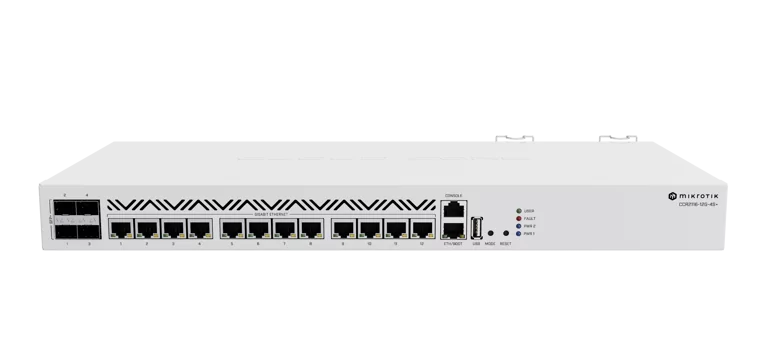
MikroTik CCR2116-12G-4S+ Cloud Core Router
The port count, RouterOS v7 environment, console and redundant AC supplies support a planned indoor wired deployment. Choose it after mapping the links, checking the v7 configuration requirements and deciding where traffic must encounter the firewall. Hardware offloading is conditional, and the manufacturer laboratory table varies with packet size and rules. Those results can guide a workload test, but they do not establish independent sustained performance or typical electricity consumption.
Updated 2026-10-08

We may earn a commission from qualifying purchases.
Prices and sellers
No price information yet
Conditions and limitations
Hardware routing requires a deliberate packet path
- Capability
- L3 hardware routing depends on port settings and underlying Layer 2 hardware offloading.
- Limitations
- A hardware-routed path must not be assumed to pass through the CPU firewall.
- Requirements
- Check ingress and egress offload settings together.
Compatibility
RouterOS v7 operation and the retailer's v6 downgrade restriction are documented; no independent exact-device interoperability test was verified.
Where sources differ
Secondary storage description conflicts with manufacturer
- Explanation
- Use the manufacturer specification; the secondary entry does not establish a different ASIN variant.
- Status
- explained
Reported issues and fixes
Owner reports were located but native snapshots were denied by robots policy. No current firmware defect or confirmed fix is asserted.
Care and support
RouterBOOT upgrade and reboot guidance is documented. Exact warranty, spares availability and a support end date were not established.
Ownership costs
Installation, configuration migration and reboot planning are discussed. Typical power draw and monetary ownership totals remain unverified; no prices are submitted.
Who it suits
Choose it after checking ports, software and packet paths
- Check before buying
- Map the required links and validate the intended workload.
- Constraints
- Indoor placement and a reviewed v7 configuration.
- Needs
- The documented wired port mix and RouterOS v7.
- Reason
- Documented interfaces and power support a planned deployment; manufacturer tests do not guarantee the intended sustained workload.
- Tradeoffs
- Offload and CPU/firewall processing require different packet-path choices.
- Assessment
- conditional
Specifications
Routing throughput filter64
2122.4 MbpsRFC2544 / XenaBay (Xena2544) · Aggregate all-port routing with 25 IP filter rules and 64-byte packets; 30+ second attempts, 0.1% packet-loss tolerance. Firmware and sample count not stated. Manufacturer test, not independent sustained performance.
Source [4]Routing throughput l3hw1518
51323.7 MbpsRFC2544 / XenaBay (Xena2544) · Aggregate all-port routing, no rules, L3HW, 1518-byte packets; 30+ second attempts, 0.1% packet-loss tolerance. Firmware and sample count not stated. Not a single-port result or an independent test.
Source [4]Reviewer consensus
Consensus rows require at least two distinct sources for the topic.
| Topic | Positive | Negative | Mixed | Reading | Evidence |
|---|---|---|---|---|---|
| Routing and offload | 1 | 0 | 1 | Mixed · 1/2 | [3], [4] |
| Software license and updates | 1 | 1 | 2 | Mixed · 2/4 | [2], [1], [8], [4] |
| Storage and management | 1 | 1 | 2 | Mixed · 2/4 | [5], [2], [4], [7] |
Single-source notes
The review
MikroTik CCR2116-12G-4S+: interfaces and installation
Routing and management
The MikroTik CCR2116-12G-4S+ combines thirteen Gigabit Ethernet ports, four SFP+ ports, RouterOS v7 and an RJ45 console. Its specified nominal CPU clock is 2 GHz, and installed memory is 16 GB. These details identify the hardware and management environment; they do not establish the throughput of an individual application. For a buyer planning a wired deployment, the first decision is therefore an interface map: count the connections you actually need and identify how the router will be managed when the normal network path is unavailable. The console deserves a separate entry in that plan rather than being counted as another client Ethernet connection. Likewise, having the required sockets is only the beginning of a routing design. The documented hardware-offload capability depends on configuration, so a port inventory should be followed by a check of which traffic will be processed in hardware and which will reach the CPU. Select this model when its documented connectivity and RouterOS environment match a planned network, while treating CPU frequency and memory capacity as specifications rather than performance guarantees. [4], [7], [3]
Plan the installation
The current hardware manual allows indoor rackmount installation with the supplied mounts or placement on a desktop. It also calls for a dry, ventilated environment. This broadens the placement choice compared with reading the rackmount warning alone, but it does not establish suitability for exposed or wet locations. Choose the physical location before buying, and verify that the planned space fits the intended installation method. Power planning is equally concrete: the router has two redundant internal supplies, each accepting 100-240 V AC, and the manual permits using either supply or both together. That is useful flexibility, but the presence of two supplies is not evidence that every surrounding component or electrical feed is redundant. Assess the whole installation rather than treating the router's power arrangement as a complete availability plan. The manufacturer's maximum consumption specification is 83 W; it is a specified maximum, not a measurement of typical operation. For operating-cost estimates, obtain consumption under your own configuration instead of silently substituting that maximum as the expected continuous draw. This keeps installation and energy planning tied to what the evidence actually establishes. [4], [7], [7]
Treat offloading as a configuration decision
The L3 Hardware Offloading manual explains that hardware routing occurs when both the ingress and egress ports have offloading enabled. Its CPU/firewall path uses different settings, so enabling offloading is not simply a universal speed switch. The same documentation warns that disabling it only on the ingress port can produce unpredictable behavior, including packets bypassing the CPU and firewall. It also makes Layer 3 processing dependent on the underlying Layer 2 hardware-offload configuration. The buyer implication is that a design must specify both the intended packet path and where filtering should happen. Before selecting the router for a security boundary, review the port configuration alongside the firewall design rather than assuming that every packet will encounter the same processing. Before selecting it for fast internal routing, verify the applicable hardware path instead of inferring it from the model name. These are documentation-based configuration requirements, not a finding that this particular ASIN has a current defect. Exact installed firmware, hardware revision and the behavior of a completed customer configuration remain to be checked on the device. [3]
Prepare for the RouterOS v7 configuration model
DuxTel explicitly warns that this model ships with RouterOS v7 and cannot be downgraded to RouterOS v6. Treat it as a v7 deployment rather than assuming that an older operating environment can be selected after purchase. MikroTik's general migration guide provides useful context for moving an existing network configuration: BGP configuration is redesigned around connection, template and session menus; OSPF versions share a menu; and routing-filter configuration uses a script-like form. The guide also calls for caution and a configuration backup when migrating MPLS. Those instructions describe configuration migration across RouterOS generations, not permission to run v6 on the CCR2116. If the purchase replaces an older router, include configuration review in the project alongside moving the physical links. Check the protocol sections relevant to the actual network and verify the resulting configuration before a production cutover. Buying hardware with the required ports does not remove that software work. The documented v7 environment is a clear selection criterion for an administrator ready to maintain it, and a concrete constraint when continued v6 operation is a requirement. [4], [2], [8]
Include bootloader maintenance in ownership planning
RouterOS and RouterBOOT require separate attention in the manufacturer's maintenance guidance. MikroTik recommends upgrading RouterBOOT after a RouterOS upgrade, and applying the bootloader upgrade requires a reboot. The RouterBOOT manual also describes checking the current and available bootloader versions. That makes the maintenance plan more specific than simply installing a software package: reserve time to inspect the versions and account for the reboot when planning a change. General RouterBOOT documentation contains examples from other hardware, so its example board names and version numbers are not specifications for the unit being purchased. For this model, retain the documented v7 operating requirement and verify the versions actually present on the device. The RJ45 console is part of the management plan, but its existence alone does not prove that a recovery procedure has been rehearsed or that a particular failure will be resolved. For ownership decisions, include configuration work, maintenance time and workload testing alongside physical installation. This evidence supports that checklist; it does not support a monetary total, a guaranteed maintenance interval or a measured reliability claim. [7], [4], [2], [1]
Specifications and evidence limits
MikroTik publishes aggregate all-port Ethernet tests conducted with XenaBay equipment according to RFC2544. Two results illustrate why the configuration matters: routing with 25 IP filter rules reaches 2122.4 Mbps with 64-byte packets, while routing with no rules and L3 hardware offloading reaches 51323.7 Mbps with 1518-byte packets. The manufacturer determines maximum throughput using attempts lasting more than thirty seconds and allows a 0.1% packet-loss tolerance. These are actual reported laboratory measurements, but they belong to MikroTik's own testing and are not an independent review. They also compare different packet sizes and different processing configurations, so they must not be presented as a controlled comparison of the effect of offloading alone. The larger number is aggregate traffic across the tested ports, not a claim that one port can carry that rate. For purchasing, use the table to ask which row resembles the intended workload, then test that workload before relying on a deployment target. The available evidence does not establish independent sustained throughput, application latency or long-duration stability under your specific configuration. [4]
Separate RAM from storage and check secondary claims
Memory and storage describe different specifications here. The documented RAM capacity is 16 GB, whereas the manufacturer lists 128 MB of NAND storage; DuxTel repeats the 128 MB storage entry. The Technical Afnan article instead lists storage as 128GB. That secondary entry conflicts with the manufacturer, and this review uses the manufacturer's capacity rather than carrying the larger figure into a purchase recommendation. The article is useful for checking how the model has been described, but a page titled a full review does not automatically establish independent measurement. It lists specifications and points to a final-test chart without providing a reproducible independent procedure in the text we read. Consequently, its CPU and power entries should not be recast as lab benchmarks, and its storage entry should not replace the official one. For a buyer comparing listings, this is a practical reason to verify whether a capacity refers to installed RAM, onboard storage or something else. Confirm the exact model and specification with the supplier when a secondary description conflicts, and avoid treating an unsupported larger number as an upgrade included with this ASIN. [4], [2], [5]
Buyer questions
Compatibility
Setup
Must it be installed in a rack?
The current manual permits indoor rackmount or desktop placement. Use a dry, ventilated environment and follow the mounting instructions for the chosen installation. [7]
Everyday use
Limitations
Do the published tests guarantee my throughput?
No. MikroTik's RFC2544 results are aggregate manufacturer tests with specified packet sizes and configurations, using 30+ second attempts and a 0.1% loss tolerance. Independent sustained performance for your workload remains unverified. [4]
Product images
Facts and specifications
Manufacturer datasheet
| Specification | Value | Source |
|---|---|---|
| Base Clock | 2 GHz | [4] |
| Ethernet Ports | 13 | [4] |
| Memory Capacity | 14.9011611938 GB | [4] |
| Operating System | RouterOS v7 | [4] |
| Port Count | 4 | [4] |
| Power | 83 W | [4] |
| Storage Capacity | 128 MB | [4], [2] |
Manufacturer manual
| Specification | Value | Source |
|---|---|---|
| Interface | RJ45 console port | [7] |
| Power Source | Each of the two redundant power supplies accepts 100-240 V AC.; Two redundant internal AC power supplies; either or both may be used. | [7] |
| Setup Requirement | Indoor rackmount using supplied mounts or desktop placement; use a dry, ventilated environment.; RouterOS v7 redesigns BGP configuration, merges OSPF versions and changes routing filters; MPLS migration calls for a configuration backup. | [7], [8] |
Retailer listing
| Specification | Value | Source |
|---|---|---|
| Compatibility | Ships with RouterOS v7; DuxTel warns that this model cannot be downgraded to RouterOS v6. | [2] |
Measured by a lab
| Specification | Value | Source |
|---|---|---|
| Data Rate | 2122.4 Mbps; 51323.7 Mbps | [4] |
Other facts
| Specification | Value | Source |
|---|---|---|
| Limitation | Installation is intended for indoors. | [7] |
KnowSpec analysis
A conditional fit for a planned wired deployment
The port count, RouterOS v7 environment, console and redundant AC supplies support a planned indoor wired deployment. Choose it after mapping the links, checking the v7 configuration requirements and deciding where traffic must encounter the firewall. Hardware offloading is conditional, and the manufacturer laboratory table varies with packet size and rules. Those results can guide a workload test, but they do not establish independent sustained performance or typical electricity consumption.
Method: Documentation synthesis and comparison of differently configured manufacturer tests; no independent performance certification.Visible information gaps
Missing information is shown rather than guessed.
- Topic:Sustained Performancerights restricted
- Topic:Buyer Fitnot found
Sources and method
- RouterBOOTMikroTik · retrieved 2026-10-08Manufacturer support
- Cloud Core Router 2116-12G-4S+DuxTel · retrieved 2026-10-08Retailer listing
- L3 Hardware OffloadingMikroTik · retrieved 2026-10-08Manufacturer support
- MikroTik CCR2116-12G-4S+MikroTik · retrieved 2026-10-02Manufacturer
- CCR 2116-12G-4S+Full Review | Mikrotik RouterTechnical Afnan · retrieved 2026-10-08Editorial review
- Mikrotik CCR2116-12G-4S+Multilink Solutions · retrieved 2026-10-02Retailer listing
- CCR2116-12G-4S+ hardware manualMikroTik · retrieved 2026-10-08Manual
- Upgrading to v7MikroTik · retrieved 2026-10-08Manufacturer support
- CCR2116-12G-4S+ RouterOS ManualMikroTik · retrieved 2026-10-02Manual
- CCR 2116-12G-4S+Full Review | Mikrotik RouterTechnical Afnan · retrieved 2026-10-02Editorial review