Elgato Video Capture
Elgato Video Capture fits a family-video transfer project when the buyer already has a working analogue player and a suitable computer. Its simple workflow helps move recordings into MP4 files, but historical reviewers found limited editing and substantial host load. Check playback hardware before buying, schedule capture time around computer use, and treat degraded source quality as a separate problem that digitization will not repair.
Updated 2026-10-08

We may earn a commission from qualifying purchases.
Prices and sellers
No price information yet
Conditions and limitations
Analogue transfer needs a complete signal chain
- Capability
- Transfer a playable analogue source into the computer capture workflow.
- Limitations
- Current operating-system combinations are not comprehensively verified.
- Source quality remains a limit on the transfer.
- Requirements
- A working source player with matching composite or S-Video output.
- A USB 2.0 computer connection and separate RCA audio connection.
Compatibility
S-Video picture with separate RCA audio
- Connection
- Connect the S-Video input to the player's S-Video output and the RCA audio inputs to its audio outputs.
- Functions
- Video input
- Separate audio input
- Notes
- This is a documented wiring case; it does not certify any particular current computer or playback-device model.
- Protocol
- S-Video and RCA analogue audio
- Result
- full
- Source device
- Analogue player with S-Video and RCA audio outputs
- Target device
- Elgato Video Capture
Where sources differ
The verified sources do not establish a reproducible conflicting specification; differences in historical file sizes have different recording conditions.
Reported issues and fixes
Historical host load is documented. Current release-note snapshots were denied, so no new version-specific defect or fix is asserted.
Care and support
Release-note and download sources were attempted but native fetch denied access or robots permission; no dated support-end commitment was verified.
Ownership costs
The workflow requires a working player, computer and output-file storage. No prices were gathered and no monetary ownership-cost total is calculated.
Who it suits
Choose transfer simplicity when your player is ready
- Check before buying
- Confirm a working player for every tape format.
- Check analogue picture and audio outputs.
- Check current software support for your computer.
- Constraints
- The player and analogue connections must be available.
- Needs
- Transfer playable home recordings to files.
- Reason
- The historical project demonstrates a useful family-tape workflow, but the source player and recording quality remain decisive. Choose it when obtaining and trimming files is the goal; resolve current computer compatibility before buying.
- Tradeoffs
- A simple trimming workflow does not establish extensive editing or restoration.
- Assessment
- conditional
Technogog · Burlington Public Library · The Average Guy Network
Measured performance
Captured file size
1.45 GBReviewer-reported file size after capturing a two-hour VHS video. · n=1 · Technogog, 2010: MacBook Pro; MP4 container, H.264 video, AAC audio, 640 x 480. Host configuration, bitrate variation and repeated-run statistics were not reported. This is output-file storage use, not device storage capacity.
Source [1]Reviewer consensus
Consensus rows require at least two distinct sources for the topic.
| Topic | Positive | Negative | Mixed | Reading | Evidence |
|---|---|---|---|---|---|
| Audio routing | 0 | 0 | 2 | Mixed · 2/2 | [2], [6] |
| Capture and passthrough formats | 1 | 0 | 1 | Mixed · 1/2 | [3], [6] |
| Console setup and hdcp | 1 | 0 | 1 | Mixed · 1/2 | [3], [5] |
| Host and software compatibility | 1 | 0 | 1 | Mixed · 1/2 | [4], [2] |
| Limitations | 0 | 1 | 1 | Mixed · 1/2 | [1], [6] |
Single-source notes
The review
Elgato Video Capture: analogue transfers with explicit limits
Read the historical results in context
Technogog reported that its captured video reproduced the quality of the source material accurately. That is a historical reviewer's assessment of a particular transfer, rather than a controlled fidelity score or a guarantee for every tape. The same review described capture as demanding on the host computer. Together, those observations suggest a practical tradeoff: a straightforward transfer workflow can still occupy resources on the machine doing the work. They do not establish a modern computer's performance. A buyer should read the quality observation alongside the source-quality limitation, because faithfully capturing a poor recording is different from improving that recording. [1], [5]
The review provides one concrete storage observation: its two-hour VHS capture produced a 1.45 GB MP4 file using H.264 video and AAC audio at 640 x 480. This is the size of an output file under the review's stated conditions, not storage built into the device and not a universal space requirement. The host was a MacBook Pro, but the report does not provide a complete configuration or repeated-run statistics. Use the number as evidence that a transfer project needs room for captured files. Do not turn one historical recording into a fixed promise for recordings made with different source material or software settings. [1]
Connect the player and computer
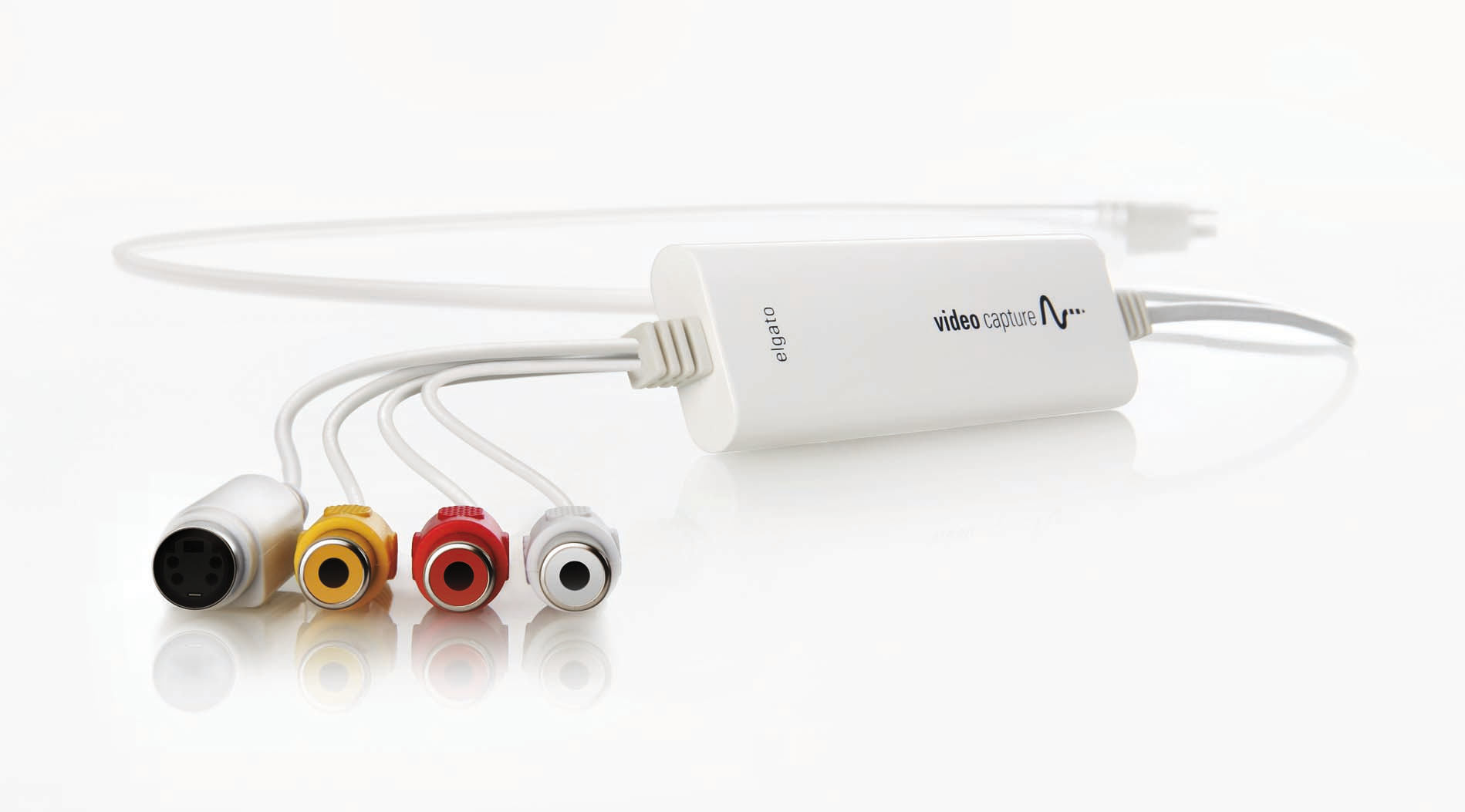
Elgato Video Capture connects an analogue video source to a computer through USB 2.0. The quick-start guide identifies the computer connection, while the analogue side uses composite video or S-Video together with RCA audio. Choose the route that matches the output on your actual player. The manufacturer's S-Video instructions still require separate RCA audio connections: selecting that video input does not remove the audio-wiring step. For a buyer, the useful question is therefore whether the player can supply both a picture and sound through the documented connections. A familiar connector on the computer alone does not establish that the entire source-to-file chain is ready. [2], [1], [3]
Revolution Lightboards describes transferring the signal from a VCR or DVD player with yellow, red and white RCA connectors into MP4 files. The Average Guy Network's family-video project also makes the playback requirement explicit: the recordings need something capable of playing them. That prerequisite matters before purchasing the capture device, particularly when a collection contains several tape formats. Start by identifying a working player for the recordings you actually want to transfer, then check its analogue outputs. The capture device is one part of that workflow. A suitable output format on the computer will not compensate for a player that cannot play the original recording. [3], [5]
Check picture shape and recording audio
The library-hosted operating guide offers 16:9 and 4:3 aspect-ratio choices and says that the selected shape should match the source video output. This is a setup decision about how the recording is represented, rather than evidence that the capture adds detail. Check the displayed picture after selecting the actual input and before treating a transfer as complete. The documented choice gives you a way to align the capture with the material you are playing; it does not establish a new resolution measurement. For a mixed collection, avoid assuming that the same selection is appropriate merely because the previous tape used it. The source remains the reference. [1], [6]
Audio deserves its own setup check. The guide recommends adjusting volume so that its meter does not turn red, describing red as a sign of distortion. The manufacturer separately documents connecting the RCA audio inputs to the player's audio outputs, including when S-Video carries the picture. These instructions address different parts of the same task: the wiring establishes an audio path, and the level check helps you inspect the recording signal. A visible picture alone therefore should not be the basis for deciding the capture is ready. Follow the documented audio test as well, and set the level using the guide's meter instruction before committing to a longer recording. [2], [6]
Plan around the whole transfer project
The documented prerequisites and historical storage observation are useful when deciding whether this is a manageable home project. A working player, a computer connection and room for output files are separate requirements; satisfying one does not establish the others. The successful tape-transfer project supports proceeding conditionally when those pieces are available. The measured file size helps frame the storage question without pretending to calculate a universal total. Before committing to a collection, identify what can actually be played and where the resulting files will go. That preparation follows from the supported workflow, while any monetary ownership-cost total would require additional evidence that was not gathered here. [2], [5], [1]
Plan for the editing you actually need
The operating guide documents trimming unwanted material from the beginning and end of the captured clip. Technogog's historical review similarly characterized the included software as basic, while Revolution Lightboards describes a workflow ending in MP4 files. This is a useful combination for someone whose immediate objective is to obtain a recording and remove unused ends. It is weaker evidence for someone expecting elaborate editing or repair within the capture application itself. Decide what the first deliverable needs to be: a transferred file, or a finished production with additional changes. The reviewed trimming step supports the former workflow, while source-quality improvement remains outside the demonstrated result. [1], [3], [5], [6]
Know where the captured files are saved
The library-hosted manufacturer manual describes saving recordings to the Movies folder on Mac or the Videos folder on Windows, with a preference for changing the default location. Treat those as the guide's documented destinations and check the actual application setting on your installation. Knowing the destination matters when the aim is to obtain MP4 files and when a historical recording already demonstrates meaningful output-file size. Choose a location you can identify again after capture, rather than treating the final screen as the only record of where the movie went. This guidance concerns the captured files themselves; it does not certify that every sharing integration shown in an older guide still works today. [3], [1], [4]
Transfer is not restoration
The strongest fit in the reviewed evidence is a home-video transfer project with a working player, suitable connections and modest editing needs. The Average Guy Network reports successful progress through its own collection, but also states that capture cannot improve the source resolution or quality. Technogog's description of basic software and the guide's end-trimming step point in the same direction: the workflow prioritizes obtaining a usable file over extensive editing. Choose it for moving playable recordings into a computer workflow when that matches your goal. If the goal is restoration, distinguish making a digital copy from addressing defects already present in the recording. [1], [5], [6]
The evidence still leaves important boundaries. No current controlled sustained-capture benchmark was verified during this refresh, and the accessible historical guides cannot certify every current operating-system combination. Manufacturer release-note pages and several other sources could be read publicly but could not be stored as permitted native snapshots; those failures are recorded as gaps rather than promoted into new compatibility promises. Hardware weight and a dated support-end commitment also remain unverified. The source list distinguishes historical documents from newly retrieved snapshots, including separate snapshots of one review URL. These are limits of the research record, not measured properties of a current computer configuration.
Buyer questions
Before you buy
What project does it suit?
The reviewed family-tape project supports a conditional fit for home-video transfer when you have a working player and compatible analogue outputs. It does not establish restoration of damaged source material. [5]
Setup
How do the audio and computer connect?
The manual describes USB 2.0 for the computer connection and RCA audio inputs connected to the source's audio outputs. [2]
Everyday use
What files does the guide describe?
Revolution Lightboards describes digitizing the source video signal into MP4 files. [3]
How much space did the historical VHS test use?
Technogog reported 1.45 GB for a two-hour VHS recording saved as MP4 with H.264 video and AAC audio at 640 x 480. It is a single historical output-file observation, not a fixed space requirement or device storage capacity. [1]
Product images
Facts and specifications
Manufacturer manual
| Specification | Value | Source |
|---|---|---|
| Interface | RCA audio inputs connected to source audio outputs; USB 2.0 host connection; When using S-Video, connect RCA audio separately to the source audio outputs. | [2] |
| Software | The guide offers 16:9 or 4:3 and says the aspect ratio should match the source video output.; The guide recommends adjusting recording volume so the audio meter does not turn red.; The historical manual saves recordings to Movies on Mac or Videos on Windows and allows changing the default location in Preferences.; The operating guide documents trimming the beginning and end of a captured video. | [6], [4] |
Stated by reviewers
| Specification | Value | Source |
|---|---|---|
| Interface | Composite, RCA and S-Video inputs | [1] |
Other facts
| Specification | Value | Source |
|---|---|---|
| Buyer Fit | The Average Guy Network's successful family-tape project supports a conditional fit for home-video transfer. | [5] |
| Limitation | Technogog characterized the bundled software as very basic.; The Average Guy Network states that the capture device cannot improve source resolution or quality. | [1], [5] |
| Risk | Technogog's historical test described capture as demanding on the host computer. | [1] |
| Setup Requirement | The Average Guy Network's project required content and a working device to play each tape format.; Use an analogue player with the appropriate yellow, red and white RCA outputs, as described in the guide. | [3], [5] |
| Use Case | Revolution Lightboards describes digitizing the source video signal into MP4 files. | [3] |
KnowSpec analysis
For analogue home-video transfer
Elgato Video Capture fits a family-video transfer project when the buyer already has a working analogue player and a suitable computer. Its simple workflow helps move recordings into MP4 files, but historical reviewers found limited editing and substantial host load. Check playback hardware before buying, schedule capture time around computer use, and treat degraded source quality as a separate problem that digitization will not repair.
Method: Evidence-based synthesis of operating instructions and historical hands-on observations.Visible information gaps
Missing information is shown rather than guessed.
- Weightnot public
- Topic:Sustained Performancenot found
- Topic:Lifecycle And Supportnot public
- Topic:Hdr And Vrrnot found
Products in this content
-
Elgato Game Capture HD60 X
HD60 X suits portable console capture when its supported recording modes match your output. The launch datasheet lists 2160p30 and 1440p60 capture, with HDR capture up to 1080p60. VRR passthrough supports compatible displays, but passthroug
-
Elgato Game Capture Neo
Game Capture Neo fits creators whose finished footage is 1080p60 and whose separate gaming display needs up to 4K60 HDR passthrough. Those two ceilings describe different signal paths, so a 4K display does not make the recording 4K. The dir
Sources and method
- Review of Elgato Video Capture DeviceTechnogog · retrieved 2026-10-02Editorial review
- Elgato Video Capture Quick Start GuideElgato · retrieved 2026-10-02ManualPDF
- How to Digitize VHS Tapes and DVDsRevolution Lightboards · retrieved 2026-10-02Editorial review
- Elgato Video Capture ManualElgato; hosted by Public Library of Steubenville and Jefferson County · retrieved 2026-10-08ManualPDF
- Elgato Video Capture Review: Digitizing VHS and Analog VideoThe Average Guy Network · retrieved 2026-10-08Editorial review
- Elgato Video Capture User GuideBurlington Public Library · retrieved 2026-10-08ManualPDF