RØDE AI-Micro Ultracompact USB Audio Interface
The AI-Micro suits mobile interviews and voice recording when you already have compatible analog microphones and can manage levels in software. It combines two microphone inputs, host cables and headphone monitoring in a pocketable device. Check the recording app and microphone power requirements first, especially for stereo microphones. It needs a recording host and does not provide phantom power to microphones.
Updated 2026-10-05

We may earn a commission from qualifying purchases.
Prices and sellers
No price information yet
Conditions and limitations
Two microphones with an editing step
- Capability
- Capture two mono microphone feeds through one interface.
- Limitations
- Split mode places the voices on opposite sides; center them in the final edit when appropriate.
- Requirements
- Use a recording app that preserves the two channels when separate editing is needed.
Stereo input is conditional
- Capability
- A reproduced RØDE support response describes stereo operation through input 1.
- Limitations
- Input 2 is disabled in this mode; there is no third recording channel.
- Direct current official support snapshots were refused; the retained quotation is a clearly labeled community reproduction.
- Requirements
- Select Stereo mode and use a microphone that does not require plug-in power.
Direct monitoring is not a host-latency measurement
- Capability
- Listen at the interface's headphone output while recording.
- Limitations
- No calibrated computer round-trip latency was found; direct monitoring does not establish DAW playback stability.
- Requirements
- Connect wired headphones to the single 3.5 mm output.
Compatibility
An iPhone and two RØDE lavaliers were actually tested
- Connection
- Both lavalier models were used through AI-Micro with the RØDE Reporter iOS app.
- Functions
- Voice recording
- Split-channel capture
- Notes
- Success is scoped to that review, not every iPhone, app or microphone. Sound comparisons also change microphone placement and capsule.
- Protocol
- Analog TRS/TRRS to USB/Lightning audio
- Result
- full
- Source device
- RØDE Lavalier GO and smartLav+
- Target device
- Apple iPhone 13 Pro Max
Check stereo microphone power before purchase
- Connection
- Single stereo plug into input 1.
- Functions
- Two-channel stereo microphone capture
- Notes
- This restriction is reported in owner-reproduced RØDE guidance. Plug-in power is different from phantom power, and the stereo restriction must not be generalized to both mono inputs.
- Protocol
- 3.5 mm stereo TRS
- Result
- unsupported
- Source device
- Stereo microphone requiring plug-in power
- Target device
- RØDE AI-Micro input 1 in Stereo mode
Where sources differ
Older reviews vary in sample-rate and gain wording. The linked RØDE datasheet is used for 48 kHz and 0–26 dB; historical auto-gain generalizations are excluded rather than presented as current behavior.
Reported issues and fixes
Historical playback and detection reports
- Status
- reported
- Symptom
- A 2022 reviewer reported USB-C non-detection on one computer and occasional DAW playback dropouts; recording and calls worked in that setup.
- Workaround
- USB-A worked for that reviewer's computer. Test the intended port, app and playback path before an important session.
A field reviewer reported lower levels on screen lock
- Status
- reported
- Symptom
- The field-recording PDF reports a recording-level change when locking the phone in RØDE Reporter.
- Workaround
- The reviewer kept the phone unlocked. Rehearse screen lock and app switching on the actual host; no current fix was verified.
Care and support
No exact-model current warranty, repairability or support-end commitment was verified in the permitted sources.
Who it suits
Choose it for a rehearsed mobile voice workflow
- Check before buying
- Test both microphones, separate-channel recording and screen-lock behavior.
- Constraints
- Comfort with app-based gain and channel settings.
- Needs
- Two compatible microphones and a portable recording host.
- Reason
- Original reviews support mobile speech capture, but app behavior needs a trial on the intended device.
- Tradeoffs
- Pocketability comes with a host-dependent recording workflow.
- Assessment
- conditional
Unique Photo · RØDE · Craving Tech · Producer Hive · The Creative Session's
Decide how both participants will listen
- Check before buying
- Check headphone routing and DAW playback in the intended app.
- Constraints
- Only one headphone connection is built in.
- Needs
- Direct monitoring for the recording operator.
- Reason
- Suitable for one listener at the interface, with a separate plan needed if both people require headphones.
- Tradeoffs
- Direct monitoring does not prove host playback stability.
- Assessment
- conditional
Areas not yet researched (1)
No conclusion is available for these areas. This does not mean the Product has no limitations or reported issues.
- Ownership costs
Reviewer consensus
Consensus rows require at least two distinct sources for the topic.
| Topic | Positive | Negative | Mixed | Reading | Evidence |
|---|---|---|---|---|---|
| Analogue io and routing | 4 | 1 | 0 | Mostly · 4/5 | [8], [1], [2], [6], [4] |
| Build quality and warranty | 1 | 0 | 1 | Mixed · 1/2 | [3], [6] |
| Buyer fit | 3 | 0 | 0 | Agreed · 3/3 | [1], [2], [4] |
| Control software and remote operation | 1 | 1 | 0 | Debated · 1 v 1 | [2], [5] |
| Headphone monitoring | 2 | 1 | 0 | Debated · 2 v 1 | [2], [6], [4] |
| Latency and driver stability | 0 | 2 | 0 | Weak point · 2/2 | [3], [7] |
| Limitations | 0 | 2 | 0 | Weak point · 2/2 | [3], [7] |
| Measured performance | 3 | 0 | 0 | Agreed · 3/3 | [1], [6], [7] |
| Preamps and gain range | 1 | 1 | 0 | Debated · 1 v 1 | [8], [6] |
Single-source notes
Alternatives
| Alternative | Where this Product wins | Where it loses | Pick it if |
|---|---|---|---|
| Focusrite Scarlett 18i20 4th Generation USB-C Audio Interface | AI-Micro's 13 g body and supplied phone-oriented host cables suit a pocket recording setup; Scarlett 18i20 uses a rackmount form factor. [6] | Scarlett 18i20 provides eight microphone preamps plus MIDI, S/PDIF and ADAT connectivity; AI-Micro's two-microphone arrangement serves a much narrower capture job. [2], [6] | Choose AI-Micro for portable microphone-to-phone capture. Scarlett 18i20 belongs to a different studio/rackmount class, not a like-for-like portable alternative; investigate it when multiple studio microphones and digital expansion are the actual requirement. |
| Specification | RØDE AI-Micro Ultracompact USB Audio Interface | Focusrite Scarlett 18i20 4th Generation USB-C Audio Interface |
|---|---|---|
| Interface | USB Type-C interface with supplied USB-C, USB-A and Lightning host cables [6] | One-rack-unit rackmount form factor.; Eighteen inputs, eight microphone preamps, and twenty outputs.; MIDI, S/PDIF, and ADAT input/output connectivity. |
The review
RØDE AI-Micro: choose the microphone and workflow before the interface
What the pocket-sized system actually includes
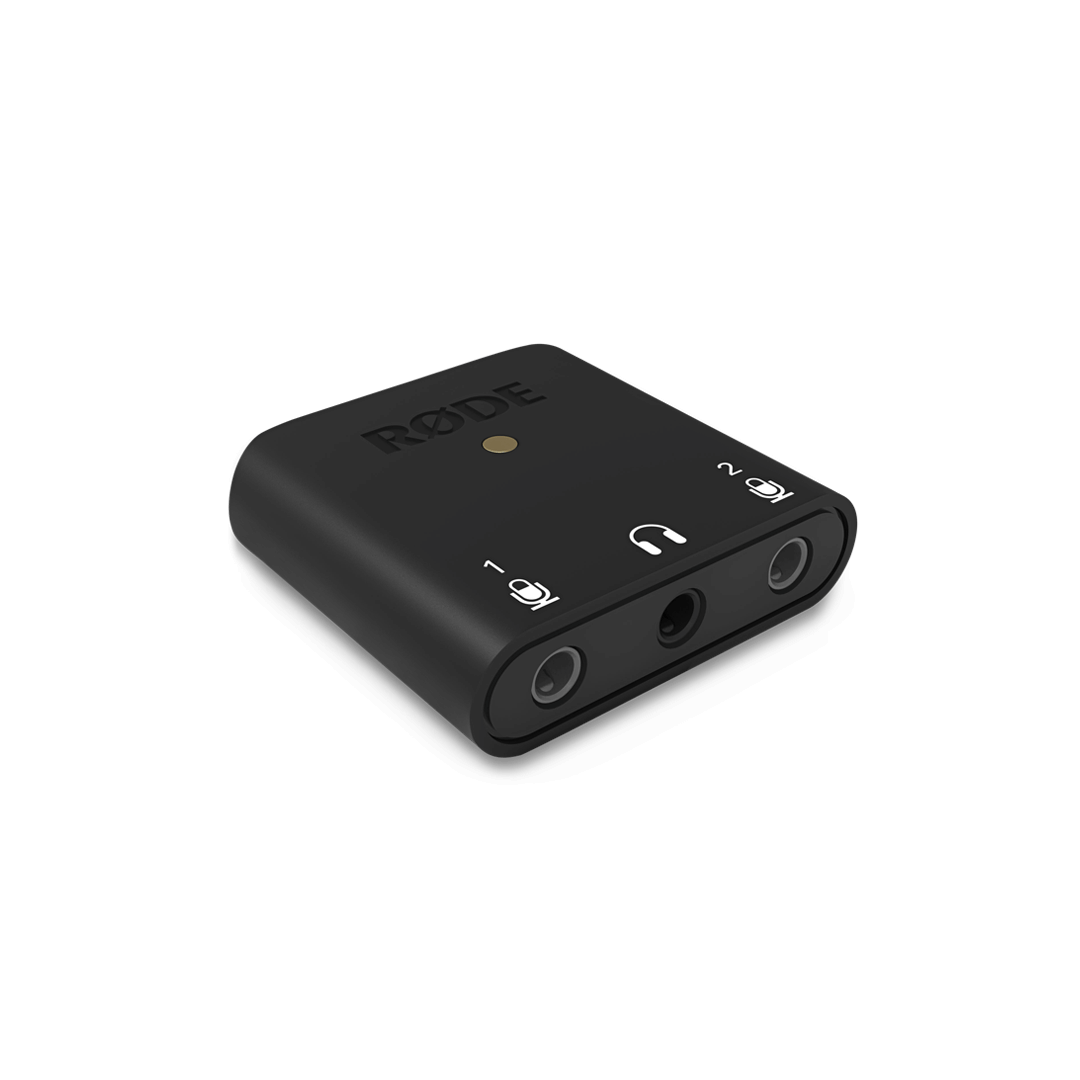
This is the AI-Micro / AIMICRO dual-input interface identified by ASIN B09KZJTW73. Its two auto-sensing 3.5 mm inputs accommodate TRS or TRRS microphone connections, while a separate headphone socket provides monitoring. The manufacturer's interface-only mass is 13 g. It needs a connected recording host and microphones; the interface itself is not a complete standalone recording system. [2], [6]
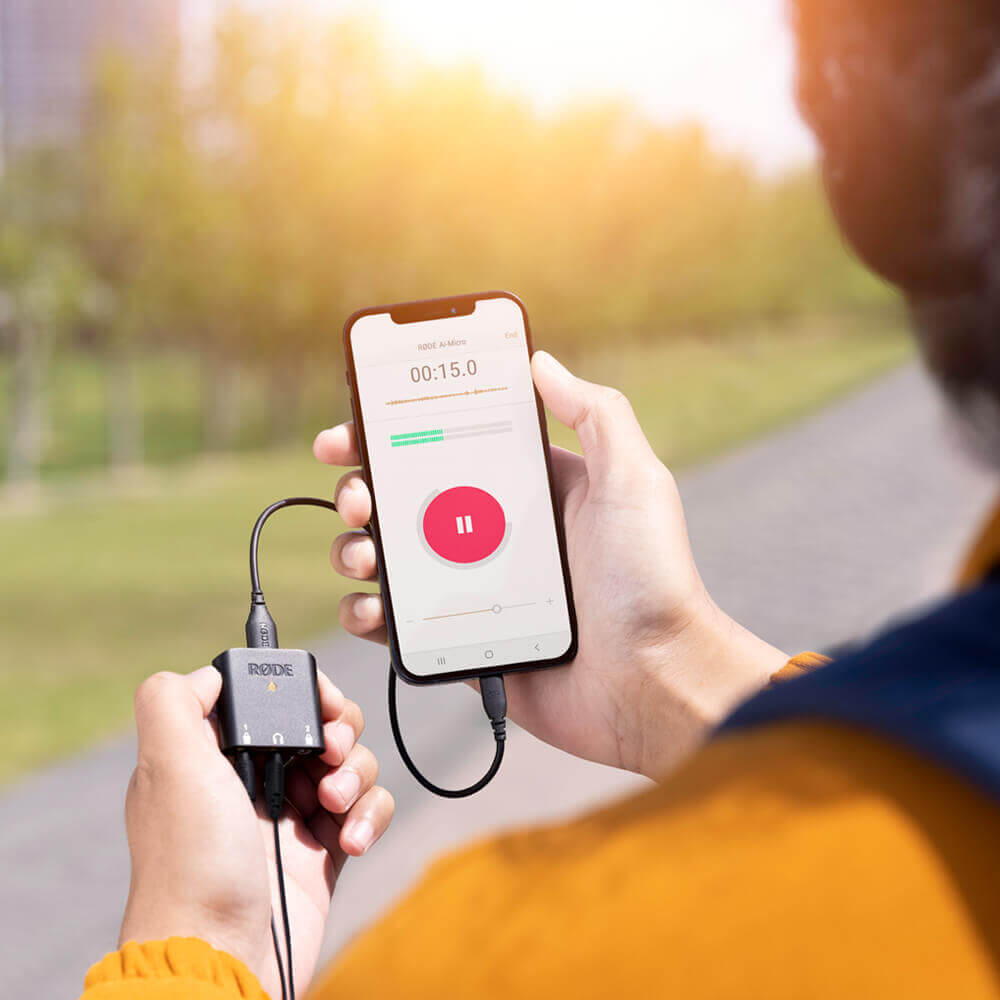
USB-C, USB-A and Lightning host cables are supplied. The datasheet lists macOS Big Sur, Windows 10 build 19041, iOS 14 and Android 9.0 or later. Those are stated host minimums, not a promise that every app or port works identically. Craving Tech successfully used an iPhone 13 Pro Max with RØDE lavaliers; Performer also reported successful stock iPhone app use without specifying the phone or software versions. [6], [1], [4]
Read the specifications and tests at their proper scope
RØDE specifies 0–26 dB analog gain, 24-bit recording at 48 kHz and 100 dB A-weighted input dynamic range in the linked datasheet. Its stated frequency range runs from 20 Hz to 20 kHz. These are manufacturer ratings. They do not establish the usable gain for every microphone or a measured noise floor for your complete recording chain. [6], [1]
The original tests are most helpful as workflow evidence. Craving Tech compared phone-internal and lavalier recordings, changing both microphone and placement. The Podcast Host published recording-level tables but not enough calibration detail to derive interface-only EIN or SNR. A field reviewer questioned drop durability without a controlled drop test. Sustained-session performance, measured host power consumption and current warranty coverage remain gaps. [6], [1], [7], [3]
Two voices and one stereo microphone are different setups
For an interview, the split workflow places input 1 on the left and input 2 on the right. Preserve those channels if you want to adjust each voice independently, then center them in the final edit when appropriate. RØDE Central offers merged, split and stereo modes. Choose the intended route before recording rather than assuming that two plugged-in microphones will produce an immediately finished mix. [2], [6], [1], [4]
Stereo needs extra care. RØDE guidance reproduced in an owner forum says Stereo mode uses input 1, disables input 2 and requires a stereo microphone that does not need plug-in power. Current official guidance could not be verified; this is an owner-reproduced support statement. Do not assume a third channel, or confuse the stereo plug-in-power restriction with phantom power. The interface does not supply phantom power. [3], [8]
Rehearse the app, monitoring and playback path
RØDE Central can adjust input gain, headphone monitor level and high-pass filtering; there are no physical knobs to fall back on. Check levels again after changing applications because cross-app setting persistence could not be verified. The headphone output provides direct monitoring, but there is only one headphone connection. Direct monitoring is a different path from computer round-trip latency or DAW playback. [2], [6], [5], [4]
Before an important recording, test the actual cable, port, app, screen lock and playback. The Podcast Host reported one computer USB-C detection failure and occasional DAW playback dropouts, while recording and calls worked in that setup. The Creative Session's review reported lower recording levels on phone lock with RØDE Reporter. Neither report identifies enough version information to establish current prevalence or a verified fix. Bus power also makes the host part of the recording system; no runtime estimate was established. [6], [7], [3]
Buyer questions
Before you buy
Can it record without a phone or computer?
It is a bus-powered audio interface for a connected recording host. Plan for microphones, a compatible host and a recording app; do not buy it as a standalone recorder. [6]
Compatibility
Will every TRS or TRRS microphone work?
Connector detection is only part of compatibility. Phantom power is not supplied. Owner-reproduced RØDE guidance also restricts Stereo mode to microphones that do not need plug-in power and says input 2 is disabled. Confirm power requirements for the exact microphone; current official stereo guidance and the plug-in-power voltage could not be verified. [6], [8], [3]
Setup
Everyday use
Can I change the gain, and do settings follow me between apps?
Yes, RØDE Central provides input-gain and monitoring controls; the lack of hardware knobs does not mean gain is unadjustable. Cross-app persistence could not be verified. Recheck levels after switching apps rather than relying on an older review's automatic-gain generalization. [2], [5]
Limitations
Does direct monitoring guarantee trouble-free DAW performance?
No. Direct headphone monitoring does not measure the computer's round-trip or playback performance. Historical reviewers reported setup-specific playback, port-detection and screen-lock issues. Test your own system before an important session; no current firmware fix or general failure rate was verified. [7], [3]
Product images
Facts and specifications
Manufacturer datasheet
| Specification | Value | Source |
|---|---|---|
| Bus-Powered | Yes | [6] |
| Highest Frequency | 20 kHz | [6] |
| Functions | 24-bit recording; the current linked datasheet specifies a 48 kHz sample rate; Manufacturer-specified analog gain range: 0–26 dB | [6] |
| Interface | USB Type-C interface with supplied USB-C, USB-A and Lightning host cables | [6] |
| Operating System | Datasheet minimums: macOS Big Sur; Windows 10 build 19041; iOS 14; Android 9.0; or higher | [6] |
| Weight | 13 g | [6] |
Retailer listing
| Specification | Value | Source |
|---|---|---|
| Functions | 3.5 mm headphone output provides direct audio monitoring and playback; zero-latency is the source's direct-monitoring description | [2], [6] |
| Inputs | Two 3.5 mm auto-sensing TRS/TRRS microphone inputs | [2], [6] |
| Model | AI-Micro / AIMICRO, ASIN B09KZJTW73 | [2] |
| Software | RØDE Central configures input gain, headphone monitor level and high-pass filtering | [2] |
Stated by reviewers
| Specification | Value | Source |
|---|---|---|
| Channels | In the review's split recording workflow, input 1 is left and input 2 is right; editing is needed to center separate voices | [1] |
| Compatibility | Performer reported successful use with stock iPhone video/audio apps and RØDE lavaliers; iPhone, OS and firmware versions were not specified; The Podcast Host's computer did not detect AI-Micro through one USB-C port; USB-A on the computer and USB-C on the phone worked | [7], [4] |
| Control Type | App-based control without physical buttons or knobs | [5] |
| Lowest Frequency | 20 Hz | [1], [6] |
| Functions | RØDE Central provides stereo, split and merged channel modes | [4] |
| Ports | One headphone connection; two participants cannot connect independent headphones directly | [4] |
Other facts
| Specification | Value | Source |
|---|---|---|
| Limitation | No phantom power is supplied; microphone power requirements must be checked separately from connector fit. | [3] |
KnowSpec analysis
A practical two-microphone phone interface
The AI-Micro suits mobile interviews and voice recording when you already have compatible analog microphones and can manage levels in software. It combines two microphone inputs, host cables and headphone monitoring in a pocketable device. Check the recording app and microphone power requirements first, especially for stereo microphones. It needs a recording host and does not provide phantom power to microphones.
Method: Synthesis of manufacturer specifications and scoped original reviews; compatibility is conditional rather than universal.Portability trades physical controls for app dependence
Gain and monitoring adjustments are available in software, but there are no hardware knobs. That makes a rehearsal of the actual phone, recording app and screen-lock behavior important. Historical playback and mobile-app reports deserve attention without being treated as a universal current defect.
Method: Separate datasheet ratings, firsthand observations and missing calibration conditions.Useful voice tests, limited laboratory evidence
The reviewed recordings support practical speech-capture use. They do not isolate converter performance from microphone choice, placement and gain. Manufacturer dynamic-range and recording-format ratings should therefore remain separate from the reviewers' listening impressions and recording-level tables.
Method: Distinguish verified control features from version-unspecified reviewer problem reports.Visible information gaps
Missing information is shown rather than guessed.
- Voltagenot public
- Topic:Efficiencynot found
- Topic:Sustained Performancenot found
- Warrantynot found
- Input Lagnot found
- Signal To Noisenot found
- Softwarerights restricted
- Topic:Analogue Io And Routingnot public
Products in this content
-
Focusrite Scarlett 18i20 4th Generation USB-C Audio Interface
The Focusrite Scarlett 18i20 4th Gen is a strong fit for project studios that record several microphones, integrate digital hardware, and need flexible monitor routing from des
Sources and method
- Turn your phone into a professional, portable audio recorder – RØDE AI-Micro ReviewCraving Tech · retrieved 2026-10-05Editorial review
- Rode AI-Micro Ultracompact USB Type-C Audio InterfaceUnique Photo · retrieved 2026-10-05Retailer listing
- Product review: The Rode AI Micro InterfaceThe Creative Session's · retrieved 2026-10-05Editorial reviewPDF
- RODE AI-Micro Interface REVIEWPerformer Magazine · retrieved 2026-10-05Editorial review
- Rode AI-Micro Review (Best Mobile Audio Interface?)Producer Hive · retrieved 2026-10-05Editorial review
- AI-Micro DatasheetRØDE · retrieved 2026-10-05DatasheetPDF
- Rode AI Micro Review: An Audio Interface in Your PocketThe Podcast Host · retrieved 2026-10-05Editorial review
- Mosconi automatisiert einmessen: Stereo Mikrofon besser als Mono? Page 4, AI-Micro discussionKlangfuzzi Forum · retrieved 2026-10-05Owner community