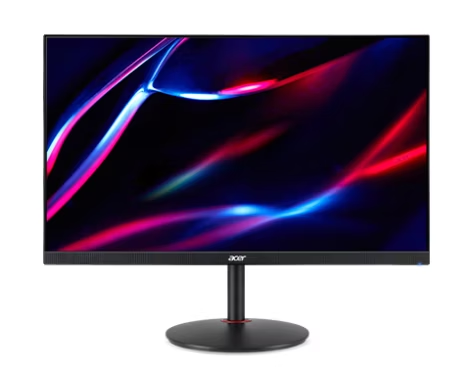
Acer Nitro KG241Y Sbiip 23.8 Inch Full HD Gaming Monitor
The documented Sbiip model combines a 23.8-inch VA screen, 165 Hz refresh, a tilt-only stand, and a 100 x 100 mm mounting pattern. DisplayNinja reports approximate input lag and visible dark-scene trailing, but its model page omits the latency test conditions. Reviews conflict on simultaneous strobing and variable refresh. Shortlist conditionally and verify the exact unit and required mode rather than infer a complete performance verdict from the advertised VRB figure.
Updated 2026-10-04

We may earn a commission from qualifying purchases.
Prices and sellers
No price information yet
Where sources differ
VRB and variable-refresh operation conflict
- Explanation
- The reviewed sources disagree. Do not promise simultaneous strobing and VRR; confirm the exact unit and firmware with the manufacturer or a documented test.
- Status
- unresolved
Areas not yet researched (6)
No conclusion is available for these areas. This does not mean the Product has no limitations or reported issues.
- Conditions and limitations
- Compatibility
- Reported issues and fixes
- Care and support
- Ownership costs
- Who it suits
Measured performance
Reviewer reported input lag
4 msApproximate input-lag result reported by DisplayNinja; model-specific instrument and test mode not disclosed · The review reports approximately 4 ms. Refresh setting, signal path, screen position, sample count, and instrument are not specified on the model page. Treat this as a qualified reported result, not an independently reproduced measurement or the advertised 1 ms VRB response-time specification.
Source [3]Reviewer consensus
Single-source notes
The review
Acer KG241Y Sbiip: confirmed display and refresh specifications
Screen size
The Acer Nitro KG241Y Sbiip is documented here as a 23.8-inch VA display with a 165 Hz refresh specification and 1920 x 1080 Full HD resolution. The exact-part distributor reference identifies UM.QX1AA.S01. Keep that suffix and part number on a buying or troubleshooting checklist instead of relying on the shorter KG241Y family name. This assessment concerns the documented Sbiip configuration; a result from a differently specified family member should not silently become evidence for this one. Before choosing a unit, compare the seller's full model identification with the physical label and the supplied documentation. That check is particularly important when a listing uses a shortened title or combines descriptions from several variants. [6], [7], [1], [4]
The documented combination of 23.8 inches and 1920 x 1080 describes the display format, not a measured verdict on text quality or personal viewing comfort. Use it to decide what to examine at the intended desk distance and with the applications you actually use. For office work, open a representative document, spreadsheet, or browser layout rather than assume a general gaming description answers the question. For a secondary display, compare the intended layout with the space available on the desk. These are practical checks for the buyer; they do not establish an unmeasured scaling result, a universal ideal viewing distance, or a promise that every application will look equally clear. [6], [4]
Panel technology
The distributor's technical table explicitly identifies Vertical Alignment, or VA, panel technology. The specification compilation lists 250 nits of brightness. That figure remains a listed specification in this assessment: it has not been converted into a measured calibration outcome. A panel-type label and a brightness entry do not by themselves settle uniformity, out-of-box color accuracy, or how a particular sample behaves in the buyer's room. If those details are central to the purchase, request a test of the exact configuration or examine the unit under representative lighting. Do not use a calculated website suitability score as a substitute for an instrumented measurement that the source has not actually supplied. [1], [4]
DisplayNinja describes the supplied stand as tilt-only, with adjustment from -5° to 15°, and the exact-part distributor table lists a 100 x 100 mm VESA mounting pattern. Treat the stand and the mounting interface as separate considerations. First decide whether the supplied adjustment is sufficient for the intended desk arrangement. If considering an alternative arm or stand, confirm its compatibility with the actual monitor and installation requirements before purchase. A matching mounting pattern is useful evidence, but this research does not certify an arbitrary arm or provide an unsupported load-capacity claim. Keep the assembled position, cable routing, and installation clearances in the checklist rather than choosing a mounting accessory solely from the screen diagonal. [1], [3]
Refresh rate
The inherited documentation specifies 165 Hz, while the distributor labels the advertised response-time figure as 1 ms VRB. DisplayNinja separately reports approximately 4 ms of input lag and describes trailing behind fast-moving objects, particularly in dark scenes. These statements address different aspects of display behavior and should not be collapsed into a single response-time claim. The approximate latency is stored as a qualified reviewer-reported measurement, with its missing test conditions preserved. It is not a reproduction of the review's test and is not the same quantity as the advertised VRB figure. For a motion-sensitive purchase, examine the games and scenes that matter to you instead of assuming the refresh specification proves an absence of visible trails. The same review reports excessive overshoot in Extreme overdrive mode, so check the selected overdrive setting when assessing trails rather than changing several display controls at once. [7], [1], [3]
DisplayNinja lists a FreeSync range of 48–165 Hz and says VRB strobing cannot operate simultaneously with variable refresh rate. PCVarge's exact-model review says Black Frame Insertion can operate concurrently with variable refresh rate. The sources therefore disagree about the combined mode, and this update keeps that disagreement visible rather than selecting the more attractive statement. If simultaneous operation is essential, obtain confirmation for the exact unit and firmware or a documented mode test before relying on it. The presence of both feature names in marketing is not sufficient evidence that they work together. This unresolved combination question should remain separate from the review's basic report that variable refresh is supported. [3], [2]
Unresolved purchase questions
The exact-model compilation lists two HDMI 2.0 inputs and one DisplayPort 1.2 input. That information is useful for planning connections, but it is not a test of every console, adapter, cable, or source-device mode. Write down the source device, intended resolution, intended refresh setting, and any adapter in the signal path before checking compatibility. A 165 Hz monitor specification should not be treated as proof that an unspecified console or adapter can send that mode. Likewise, a Full HD resolution entry does not establish how every non-native signal will be processed. Confirm the particular combination that matters, especially when the intended setup differs from a direct desktop-computer connection. [7], [4], [6]
A sensible shortlist is conditional: consider this documented 23.8-inch, 165 Hz configuration when the format and stand arrangement fit the intended setup, then verify the motion behavior that could change the decision. The review-reported latency provides a limited reference, while the reported dark-scene trailing is a reason to check representative content. Do not turn either statement into a guarantee for every sample. Reproducible exact-model latency conditions, measured color accuracy, sustained behavior, and efficiency remain research gaps. The available material supports a clearer checklist than the earlier brief, but it does not justify inventing missing laboratory results, assuming an untested device combination, or making a current price-performance recommendation. [6], [7], [3]
Buyer questions
Before you buy
How large is the screen?
The documented screen size is 23.8 inches. [6]
Which panel technology is documented?
The exact-part distributor table explicitly lists Vertical Alignment, or VA, for UM.QX1AA.S01. This is a listed specification, not a uniformity or color-accuracy measurement. [1]
Is there an input-lag result?
DisplayNinja reports approximately 4 ms. Its model review does not state the instrument, test mode, or sample count, so the result is recorded with those limitations and is not presented as an independently reproduced measurement. [3]
Setup
Everyday use
Limitations
Can variable refresh and VRB be used together?
DisplayNinja lists FreeSync at 48–165 Hz but says VRB cannot run simultaneously with VRR. PCVarge says the opposite about Black Frame Insertion. The combined mode is therefore unresolved here; confirm the exact unit and firmware before relying on it. [3], [2]
Facts and specifications
Retailer listing
Stated by reviewers
| Specification | Value | Source |
|---|---|---|
| Adaptive Sync | FreeSync, reported range 48–165 Hz | [3] |
| Display Size | 604.52 mm global | [6] |
| Limitation | DisplayNinja reports visible trailing behind fast-moving objects, particularly in dark scenes. | [3] |
| Ports | 2 HDMI 2.0 inputs and 1 DisplayPort 1.2 input | [6] |
| Refresh Rate | 165 Hz global | [7] |
| Stand Adjustment | Tilt-only stand, -5° to 15° | [3] |
KnowSpec analysis
Check motion behavior and exact configuration
The documented Sbiip model combines a 23.8-inch VA screen, 165 Hz refresh, a tilt-only stand, and a 100 x 100 mm mounting pattern. DisplayNinja reports approximate input lag and visible dark-scene trailing, but its model page omits the latency test conditions. Reviews conflict on simultaneous strobing and variable refresh. Shortlist conditionally and verify the exact unit and required mode rather than infer a complete performance verdict from the advertised VRB figure.
Method: Exact-model specification synthesis with separately qualified review results and an explicit source discrepancy.Visible information gaps
Missing information is shown rather than guessed.
- Topic:Color Gamut And Accuracynot found
- Topic:Input Lagnot found
- Topic:Measured Performancenot found
- Topic:Text Clarity And Scalingnot found
- Topic:Efficiencynot found
- Topic:Adaptive Sync And Vrrnot found
- Topic:Hdr Brightness And Contrastnot found
- Source.Manufacturernot public
- Topic:Limitationsnot found
- Topic:Sustained Performancenot found
- Topic:Buyer Fitnot found
Products in this content
-
ASUS VP229Q 21.5 Inch Monitor 1080P Full HD IPS Eye Care Monitor
The IPS panel and Full HD resolution identify a compact desktop format, while HDMI, DisplayPort and VGA provide documented connection choices. Buyers needing adjustable screen height should plan a separate VESA mount because the supplied st
-
ASUS ProArt PA279CV 27 Inch 4K UHD USB-C Professional Monitor
A conditional fit for sRGB-oriented photography and creative desktop work, with useful stand adjustment and USB-C connectivity. Inspect panel uniformity and check the laptop charging requirement and USB mode before purchase.
-
Dell SE2722H 27 Inch Full HD Monitor
The Dell SE2722H is a straightforward everyday monitor for buyers who want a matte Full HD screen, a VA panel, AMD FreeSync, and a modest 75 Hz refresh rate. Its one HDMI input and legacy D-sub input suit basic desktop setups, while the sta
-
Acer Nitro XV272U W2bmiiprx Gaming Monitor
The W2 remains a conditional choice for a DisplayPort gaming desk: its documented 240Hz mode now has a reviewer-reported 3 ms input-lag result. That result does not describe lower refresh rates or every retail sample. Buyers
-
MSI PRO MP275Q 27 Inch WQHD Office Monitor
The evidence favors office and web-oriented work, with a tilt-only stand and declared 100 Hz operation. Independent brightness and contrast results are now available, with incomplete methodology and unknown sample count. The 300 nit rating
-
Acer Nitro 27 Inch WQHD 2560x1440 IPS Gaming Monitor XV272U
This Acer monitor is documented with a 27-inch screen, a 300 Hz refresh rate, and 400-nit brightness. Those specifications point toward high-refresh desktop use, but the current evidence does not establish panel type, input lag, adaptive sy
Sources and method
- Acer Monitor UM.QX1AA.S01 23.8 inch 1920x1080 HDMI 1ms RetailIPEX Infotech · retrieved 2026-10-04Retailer listing
- Acer Nitro KG241Y Sbiip ReviewPCVarge · retrieved 2026-10-04Editorial review
- Acer KG241YS Review: 1080p 165Hz FreeSync Gaming MonitorDisplayNinja · retrieved 2026-10-04Editorial review
- acer KG241Y Sbiip Review & SpecificationsPCSpecChart · retrieved 2026-09-27Other source
- Acer KG241Y Sbiip SpecificationsPCSpecChart · retrieved 2026-10-04Other source
- Acer KG241Y Sbiip SpecificationsDisplayRadar · retrieved 2026-09-27Other source
- Acer Nitro KG241Y Sbiip Gaming Monitor ReviewJakeSon.net · retrieved 2026-09-27Editorial review