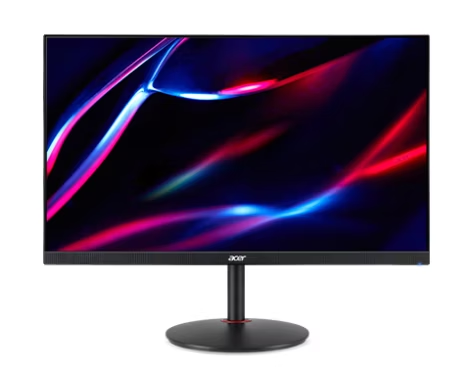
Acer Nitro XV272U W2bmiiprx Gaming Monitor
The W2 remains a conditional choice for a DisplayPort gaming desk: its documented 240Hz mode now has a reviewer-reported 3 ms input-lag result. That result does not describe lower refresh rates or every retail sample. Buyers balancing gaming and creative work should also distinguish the 99% sRGB specification from calibrated accuracy, and inspect their own unit for the sample-specific backlight leakage reported in testing.
Updated 2026-10-08

We may earn a commission from qualifying purchases.
Prices and sellers
No price information yet
Conditions and limitations
DisplayPort is required for the listed 240Hz mode
- Capability
- 2560 x 1440 at 240Hz is listed for DisplayPort.
- Limitations
- HDMI is listed at 2560 x 1440 at 144Hz.
- No tested source-device matrix is available.
- Requirements
- Use the documented DisplayPort input and a source that can supply the mode.
Compatibility
Input modes are specified, but the reviewed sources do not identify a complete tested source-device and OS matrix.
Where sources differ
HDMI label differs across sources
- Explanation
- The documented HDMI mode remains 2560 x 1440 at 144Hz; confirm implementation and required functions on the exact US unit.
- Status
- unresolved
Reported issues and fixes
Top-edge leakage on the reviewed sample
- Status
- reported
- Symptom
- The reviewer observed backlight leakage at the top edge, visible in dark scenes.
Care and support
Public product records and review were checked, but no exact-US-unit support end date, spares policy or repair commitment was established.
Ownership costs
Operating power is listed as 26 W by an exact-part retailer. Independent energy measurement, usage hours and monetary inputs are absent; no ownership-cost total is calculated.
Who it suits
DisplayPort gaming fit and sample inspection limits are explained. Lower-refresh behavior, sustained performance and exact-US-unit HDMI implementation remain unresolved.
Measured performance
Sdr brightness
391 nitReviewer-reported brightness measurement; instrument and test pattern not disclosed. · MonitorNerds W2 sample at 100% backlight. Hardware revision, firmware, country and duration not disclosed.
Source [2]Hdr brightness
421 nitReviewer-reported peak brightness; instrument, window size and duration not disclosed. · HDR mode active on the reviewed W2 sample; not a sustained-brightness guarantee.
Source [2]Contrast ratio
1149 ratioReviewer-reported contrast measurement; instrument and test pattern not disclosed. · At 30% brightness on the reviewed W2 sample; not the advertised dynamic contrast.
Source [2]Input lag
3 msReviewer-reported input-lag measurement; instrument and processing/scanout components not disclosed. · At 240Hz on the reviewed W2 sample. Not a measurement at 144Hz or 60Hz.
Source [2]Reviewer consensus
Consensus rows require at least two distinct sources for the topic.
| Topic | Positive | Negative | Mixed | Reading | Evidence |
|---|---|---|---|---|---|
| Ergonomics and mounting | 1 | 1 | 0 | Debated · 1 v 1 | [5], [2] |
| Hdr brightness and contrast | 1 | 0 | 1 | Mixed · 1/2 | [5], [2] |
| Panel type and uniformity | 1 | 1 | 0 | Debated · 1 v 1 | [2], [1] |
| Ports and bandwidth | 1 | 1 | 1 | Mixed · 1/3 | [6], [5], [2] |
| Resolution and pixel density | 2 | 0 | 0 | Agreed · 2/2 | [5], [1] |
Single-source notes
The review
Acer Nitro XV272U W2: connection choice and evidence limits
Panel and image specifications
The Acer Nitro XV272U W2 combines an IPS panel with a native resolution of 2560 x 1440. Those specifications identify the display being discussed, rather than proving how every panel will look on a desk. Acer's regional product sheet lists 99% sRGB coverage and native brightness of 400 nits. Treat those figures as manufacturer specifications. Gamut coverage describes a different requirement from calibrated accuracy, so the coverage claim alone is insufficient for a professional color workflow. The existing recommendation for occasional creative work should remain conditional on the buyer's actual accuracy needs. Similarly, a brightness specification does not establish screen uniformity or dark-scene performance. Buyers should avoid turning any one headline figure into a blanket assessment of picture quality: resolution, color coverage and light output each answer a narrower question. [5], [1]
Independent testing adds useful detail to those specifications. MonitorNerds reported 391 nits with the backlight at 100%, and a peak of 421 nits with HDR mode active. The same review reported contrast of 1149:1 at 30% brightness. These are three different conditions; combining them into one supposed operating point would misrepresent the test. The article does not disclose the measuring instrument, HDR test window or measurement duration. Its peak result therefore cannot establish sustained brightness over a long session. The reviewer also observed leakage along the top edge of its sample, especially apparent in dark scenes. That observation is a reason to inspect a purchased unit, not evidence that every W2 has the same defect. Keep the independent measurements separate from the manufacturer's 400-nit rating and from any promise about a different retail sample. [5], [2]
Interpret the measured gaming result carefully
The reported 3 ms input lag is a physical test result at the monitor's 240Hz setting, rather than a subjective review score. It is also not a gray-to-gray pixel response measurement. Keeping those categories separate prevents a common buying mistake: assuming a low input-lag number proves clean pixel transitions at every refresh rate. MonitorNerds does not disclose the lag instrument or how processing and scanout contributed to the result. The finding is therefore best used as bounded evidence for the tested high-refresh condition. It should not be copied into a claim about HDMI at 144Hz, a lower frame-rate game or an unspecified source device. For a buyer whose setup can use the documented DisplayPort mode, the result strengthens the gaming case. For other conditions, FreeSync branding and the maximum refresh specification leave further behavior to be checked. [5], [4], [2]
Choose the connection for the mode you need
Connection choice is central to this monitor's buying case. The regional datasheet assigns 2560 x 1440 at 240Hz to DisplayPort, while HDMI is listed at 2560 x 1440 at 144Hz. Its input layout includes two HDMI connections, one DisplayPort 1.4 connection and audio output. A buyer seeking the maximum documented refresh mode should plan around DisplayPort rather than assume every socket offers the same mode. FreeSync Premium is documented, but that name does not supply a tested operating range for every source device in this evidence set. Before buying, confirm that the intended computer can provide the selected mode through the connection actually being used. This is particularly relevant when the monitor will be shared between devices: the maximum mode belongs to a stated input condition, not simply to the product name. [5], [4]
The HDMI version label remains inconsistent across public records. The regional product sheet labels the inputs as HDMI 2.1, and Aztek's listing for US part UM.HX2AA.201 repeats that label. MonitorNerds instead describes the W2 inputs as enhanced HDMI 2.0 ports limited to 144Hz. These sources agree more clearly on the lower documented HDMI refresh mode than on the interface label. The exact US hardware implementation was not independently identified here, so the article should not silently resolve the conflict by choosing whichever label sounds better. Ask for confirmation of the functions and modes needed on the actual unit. A connection label is insufficient evidence of a particular console feature or a complete variable-refresh compatibility matrix. Retaining the disagreement helps a buyer ask a specific, useful question before committing. [5], [2], [6]
Everyday fit and what remains unknown
The documented stand offers height adjustment, which is useful to consider alongside the intended desk arrangement. That adjustment feature does not imply a laboratory assessment of comfort or mechanical rigidity. MonitorNerds noticed wobble when its sample was touched or nudged, so stability deserves attention during setup. The practical check is whether the purchased unit remains acceptably steady under the buyer's normal desk use. The reported top-edge leakage is another sample inspection point, particularly for people who spend time with dark backgrounds. Neither observation establishes a population-wide defect rate. Notebookcheck's existing recommendation for gaming with some creative work on the side remains an editorial judgment rather than a guarantee of calibrated output. Preserve that distinction when weighing the monitor as a mixed-use display instead of reading the recommendation as professional certification. [5], [3], [2]
The evidence now answers one previously unresolved gaming question: the independent W2 review reports input lag of 3 ms at 240Hz. It does not settle every other question about daily use. Sustained behavior over an extended session, lower-refresh response tuning and a dedicated text-clarity test remain outside the verified measurements in this update. The IPS panel and resolution establish the configuration, while the color-coverage specification establishes a stated gamut target. None of those facts can substitute for the missing tests. A buyer can still make a conditional decision around the documented configuration, provided the unresolved requirement is not the main reason for purchasing. If text rendering, sustained performance or verified professional accuracy is essential, seek evidence for that specific requirement before treating the W2 as a confirmed match. [5], [1], [2]
Power planning and the purchase decision
Simplified Computers lists operating power of 26 W for part UM.HX2AA.201. This is a retailer-provided specification, not an independently measured energy result under a disclosed brightness level. It can inform initial planning, but it does not establish energy use in every mode or an annual operating cost. No price observations or monetary cost estimate are included in this assessment. The buying decision should instead follow the documented strengths and the remaining limits: DisplayPort provides the listed 240Hz mode, HDMI has the lower listed mode, and the independent review supplies a high-refresh input-lag result. Against that, sample-specific leakage and stand wobble justify checking the actual unit. The W2 is a conditional fit when these documented capabilities match the intended setup and the unresolved requirements are acceptable, rather than a universal recommendation based on a headline refresh number. [5], [2], [4]
Buyer questions
Before you buy
Compatibility
Which connection should I use for the maximum refresh mode?
Use DisplayPort for the maximum mode listed in the datasheet. HDMI is assigned a lower refresh mode; confirm the exact US part's connection details before buying. [5]
Setup
Can I adjust the stand height?
Yes, the datasheet lists height adjustment. Check the physical fit of your desk and unit; the evidence does not include a measured ergonomic study. [5]
Product images
Facts and specifications
Manufacturer datasheet
| Specification | Value | Source |
|---|---|---|
| Brightness | 400 nit | [5] |
| Color Gamut | 99% sRGB | [5] |
| Ports | 2 HDMI inputs, 1 DisplayPort 1.4, speakers and audio out; HDMI version needs US-part confirmation | [5] |
| Refresh Rate | 240 Hz | [5] |
| Resolution Width | 2560 px | [5] |
| Stand Adjustment | Height adjustment 120mm | [5] |
Retailer listing
| Specification | Value | Source |
|---|---|---|
| Adaptive Sync | AMD FreeSync Premium | [4] |
| Interface | Aztek labels the UM.HX2AA.201 inputs as two HDMI 2.1 ports and DisplayPort 1.4. US | [6] |
| Panel Type | IPS | [1] |
| Power | 26 W US | [4] |
| Resolution Height | 1440 px | [1] |
Stated by reviewers
| Specification | Value | Source |
|---|---|---|
| Interface | MonitorNerds describes the W2 HDMI inputs as enhanced HDMI 2.0 ports limited to 144Hz. | [2] |
| Risk | MonitorNerds observed stand wobble when its sample was touched or nudged.; MonitorNerds observed top-edge backlight leakage on its sample and notes unit variation. | [2] |
Measured by a lab
Other facts
KnowSpec analysis
Who should consider the XV272U W2?
The W2 remains a conditional choice for a DisplayPort gaming desk: its documented 240Hz mode now has a reviewer-reported 3 ms input-lag result. That result does not describe lower refresh rates or every retail sample. Buyers balancing gaming and creative work should also distinguish the 99% sRGB specification from calibrated accuracy, and inspect their own unit for the sample-specific backlight leakage reported in testing.
Method: Condition-aware interpretation of reviewer-reported physical measurements.Judge brightness and black depth separately
The independent sample reached 391 nits at full SDR backlight and 421 nits in HDR mode, while contrast measured 1149:1 at a different, 30% brightness setting. These conditions must stay separate: the results support usable light output but do not establish sustained HDR brightness, uniform blacks or another unit's behavior. A buyer prioritizing dark-scene fidelity should inspect that requirement separately from the advertised brightness.
Method: Synthesis of manufacturer specifications, independent hands-on results and bounded sample observations.Visible information gaps
Missing information is shown rather than guessed.
- Topic:Efficiencynot found
- Topic:Text Clarity And Scalingnot found
- Interfaceconflicting
- Topic:Sustained Performancenot found
Sources and method
- Acer UM HX2AA 201 Manuals, Certifications & Specsdevice.report · retrieved 2026-10-02Other source
- Acer Nitro XV272U W2 ReviewMonitorNerds · retrieved 2026-10-08Lab review
- 27-inch Acer Nitro 1440p, 240Hz gaming monitor becomes budget starNotebookcheck · retrieved 2026-10-02Editorial review
- Acer Nitro XV272U W2 UM.HX2AA.201Simplified Computers · retrieved 2026-10-08Retailer listing
- Acer Nitro XV272UW2 Product SheetAcer · retrieved 2026-10-02DatasheetPDF
- Acer UM.HX2AA.201Aztek Computers · retrieved 2026-10-08Retailer listing