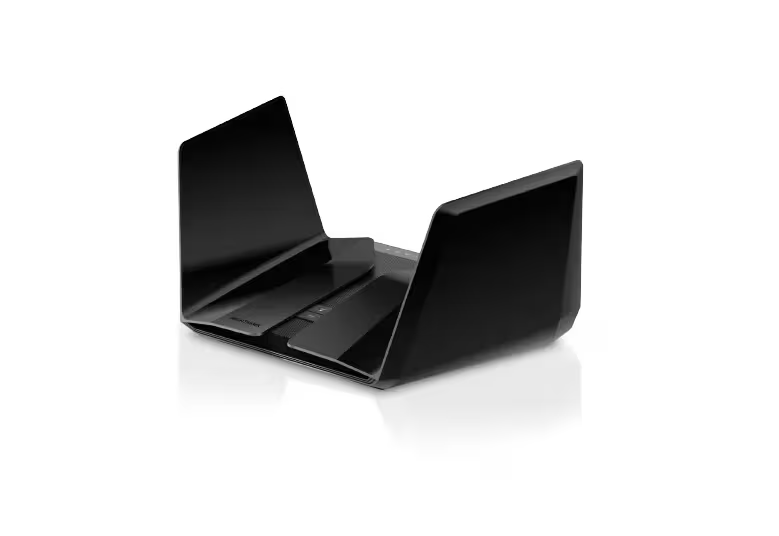
NETGEAR Nighthawk AX12 RAX120 AX6000 Dual-Band WiFi 6 Router
Do not buy an unidentified RAX120 for a new security-dependent Internet connection on the strength of its AX6000 label. This ASIN maps to RAX120-100NAS but does not establish v1 or v2. NETGEAR's 2026 advisories recommend retiring RAX120/v1 after security support ended. The separately listed v2 requires its own support check. Local USB sharing and multi-gig connectivity remain useful capabilities, but Time Machine and ReadyCLOUD requirements point elsewhere.
Updated 2026-10-04

We may earn a commission from qualifying purchases.
Prices and sellers
No price information yet
Conditions and limitations
Allocate the single multi-gig port deliberately
- Capability
- One multi-gig connection can serve the Internet uplink or a local NAS/switch.
- Limitations
- The same physical port cannot simultaneously provide separate multi-gig WAN and multi-gig LAN sockets.
- Requirements
- A compatible multi-gig peer and suitable cabling
- Configure WAN use through the router web interface when needed
Read throughput together with its test conditions
- Capability
- Historical testing demonstrates gigabit-class throughput in a 160 MHz setup, with substantially different client behavior in an 80 MHz attenuation test.
- Limitations
- The 4.804 Gbps nominal figure is for the 5 GHz radio; neither it nor AX6000 is a single-device file-transfer guarantee.
- No current-firmware cross-revision retest was found.
- Requirements
- Compatible client, channel width and sufficiently fast upstream/local link
- Treat dated firmware and differing test methods separately
Compatibility
Legacy Time Machine backup is removed
- Connection
- USB drive attached to the router
- Functions
- Legacy router-hosted Time Machine backup
- Notes
- The official release note removes the feature for both revisions; do not use a launch manual to promise it on updated firmware.
- Protocol
- Time Machine
- Result
- unsupported
- Source device
- Mac using Time Machine
- Target device
- RAX120 USB storage
Local USB access survives ReadyCLOUD retirement
- Connection
- Access an attached USB drive from the home network
- Functions
- Local file sharing
- Notes
- Local access remains available; ReadyCLOUD remote access has ended and legacy Time Machine was removed. Filesystem/client combinations were not exhaustively verified.
- Protocol
- Local network file access
- Result
- partial
- Source device
- Home-network client
- Target device
- RAX120 USB drive
Where sources differ
Reported issues and fixes
Officially documented random-reboot fix
- Fixed version
- 1.2.9.52
- Status
- fixed
- Symptom
- The router sometimes rebooted randomly, according to NETGEAR's fix description.
Care and support
RAX120/v1 security support has ended
- Details
- June and August 2026 advisories mark RAX120/v1 EoS and recommend retirement. RAX120v2 is listed separately without that marker. The ASIN's delivered revision remains unknown, and an exact support-end date or future v2 support horizon was not established.
ReadyCLOUD router service retired in 2023
- Announced support date
- 2023-04-04
- Details
- NETGEAR ended WiFi-router ReadyCLOUD service on April 4, 2023. Local USB access remains; firmware rollback cannot restore the closed service.
Who it suits
Choose a maintained router for a new Internet-facing deployment
- Check before buying
- Inspect the actual hardware revision.
- Check its current official support notice.
- Constraints
- This decision applies to verified RAX120/v1, not an assumed ASIN revision.
- Needs
- Ongoing security maintenance
- Reason
- NETGEAR marks v1 End-of-Support and recommends retiring EoS devices.
- Tradeoffs
- Hardware performance does not replace security support.
- Assessment
- unsuitable
Check whether your WAN and NAS both need multi-gig links
- Check before buying
- Map the modem/ONT, NAS and switch connections.
- Resolve revision and support status first.
- Constraints
- Only one multi-gig router socket
- Needs
- A faster local NAS or Internet link
- Reason
- The layout suits one selected multi-gig role; a dual-sided requirement calls for a different supported port layout.
- Tradeoffs
- Giving that socket to WAN removes it as a separate multi-gig LAN connection.
- Assessment
- conditional
Match the exact backup and remote-access functions
- Check before buying
- Separate local file sharing from backup automation and remote access.
- Constraints
- Feature removal and cloud-service retirement
- Needs
- Time Machine backup or legacy ReadyCLOUD access
- Reason
- Choose a currently supported storage solution that explicitly provides the backup or remote-access function you need.
- Tradeoffs
- Basic local USB sharing remains, but it does not supply the removed functions.
- Assessment
- unsuitable
Areas not yet researched (1)
No conclusion is available for these areas. This does not mean the Product has no limitations or reported issues.
- Ownership costs
Specifications
Historical 5ghz wireless throughput
1250000000 bit/sTweakTown 2020 indoor throughput test, 5 GHz with 160 MHz channel setting · The article lists a Ryzen 5 3600/Windows 10 system and indoor obstacles but does not fully identify the wireless adapter or router firmware. This is not a current-firmware or cross-revision retest.
Source [7]Reviewer consensus
Consensus rows require at least two distinct sources for the topic.
| Topic | Positive | Negative | Mixed | Reading | Evidence |
|---|---|---|---|---|---|
| Firmware security | 0 | 2 | 0 | Weak point · 2/2 | [1], [8] |
| Limitations | 0 | 2 | 0 | Weak point · 2/2 | [4], [7] |
Single-source notes
- App & parental controls: Agreed · 1/1 · [7]
- Buyer fit: Agreed · 1/1 · [6]
- Ethernet wan lan: Agreed · 1/1 · [5]
- Measured performance: Agreed · 1/1 · [7]
- Range and coverage: Mixed · 1/1 · [2]
- Real world throughput: Agreed · 1/1 · [7]
- Thermals and reliability: Agreed · 1/1 · [4]
- Vpn and advanced routing: Weak point · 1/1 · [6]
The review
NETGEAR RAX120: support status, port choices and the limits of old benchmarks
Support status changes the buying decision
ASIN B07P3FGKYD is associated with RAX120-100NAS, but neither that regional model suffix nor a RAX120 product photo settles which hardware revision is supplied. NETGEAR's June and August 2026 advisories mark RAX120/v1 End-of-Support and recommend retirement. For a new Internet-facing installation that depends on ongoing security maintenance, choose a supported alternative if the unit is confirmed as v1; verify the revision before treating an unidentified listing as v2. [3], [1], [8]
The advisories list v2 separately without the EoS marker, which is not a promise of indefinite support. Their fixed-firmware entries are also not proof of the latest available release. NETGEAR documents a random-reboot fix in version 1.2.9.52, but that fix should not be inflated into a guarantee about every unit. Conversely, old reboot complaints should not automatically be presented as unresolved on updated firmware. [1], [8], [4]
Useful ports, with a real allocation tradeoff
The rear panel combines four ordinary Gigabit LAN sockets, a Gigabit WAN socket and one multi-gig socket capable of 5 Gbps. NETGEAR allows the multi-gig socket to serve either WAN or a local device. This matters before setup: putting the faster socket on the Internet side removes it as a dedicated multi-gig connection for a NAS or switch. A plan requiring both links needs a different port layout or a carefully checked alternative network design. [7], [5]
AX6000 describes an aggregate radio class, not one device's download speed. The 5 GHz radio's nominal figure is 4.804 Gbps, while actual file-transfer performance depends on client capability, channel configuration and the rest of the network. TweakTown measured 1.25 Gbps in its 2020 wide-channel test. Its article does not fully identify the wireless adapter or router firmware, so that result should remain attached to the review's conditions rather than become a universal product rating. [7], [2]
SmallNetBuilder provides a useful counterpoint: its RAX120 test used firmware V1.0.1.90, an Intel AX200 Windows client and a controlled attenuation chamber. It excluded the wider channel mode used by TweakTown. The AX client could report a high link rate yet trail the AC client at strong signal levels, then hold up better as the signal weakened. Short, controlled throughput runs are not a room-by-room coverage guarantee, and the two laboratories' results should not be blended into one score. [7], [2]
Controls and physical limitations
The 2020 review showed separate network names for the two bands or Smart Connect, plus rule-based QoS. That is useful setup context, but does not establish today's advanced parental-control offering. The folding antenna hinges were judged sturdy yet the weakest physical point, so placement and handling deserve attention. Current-firmware long-term reliability, power consumption, multi-client performance and mesh behavior remain research gaps; none should be filled with launch-era promises. [4], [7]
Local storage survives, but legacy backup services do not
The two USB ports and TweakTown's sequential storage results show why the RAX120 attracted local file-sharing users. However, ReadyCLOUD remote access ended on April 4, 2023, and NETGEAR says the closed cloud service cannot be restored by installing old firmware. Local access to an attached USB drive from the home network remains a separate available function. Firmware 1.2.9.52 also removes legacy Time Machine backup, so a Mac-backup or remote-storage purchase needs a currently supported solution offering those specific functions. [4], [7], [6]
Buyer questions
Before you buy
Does this ASIN guarantee RAX120v2?
No revision was established from the ASIN mapping. Confirm the actual hardware label and its support status before buying. NETGEAR marks RAX120/v1 EoS in its 2026 advisories; v2 is a separate entry, so neither support status should be silently assigned to an unidentified unit. [3], [1]
Compatibility
Can I rely on old Time Machine or ReadyCLOUD instructions?
No. Version 1.2.9.52 removes legacy Time Machine backup, and ReadyCLOUD router service ended in 2023. Older firmware cannot revive the closed cloud service. Local USB file sharing remains available, but it does not replace either removed function. [4], [6]
Setup
Can both my Internet uplink and NAS use separate multi-gig ports?
The router has only one multi-gig socket. You can configure it for the Internet connection or use it for a local NAS/switch. Assigning it to WAN leaves the ordinary wired LAN sockets at Gigabit speed, so check the complete port plan before choosing this router. [5], [7]
Limitations
What does AX6000 tell me about real speed?
It is an aggregate radio class. The nominal 5 GHz capability and the client's reported link rate are different from application throughput. The reviewed 1.25 Gbps result belongs to TweakTown's particular historical setup; SmallNetBuilder's differently configured test shows why client and channel conditions matter. [7], [2]
Care and maintenance
Were random reboots fixed?
NETGEAR's 1.2.9.52 release note specifically lists a random-reboot fix. That documents an addressed firmware issue, not a current long-term reliability test or a guarantee for every hardware unit. Check the unit's revision and current official firmware guidance together. [4], [8]
Product images
Facts and specifications
Manufacturer manual
| Specification | Value | Source |
|---|---|---|
| Compatibility | ReadyCLOUD retirement does not remove local file access to a USB drive attached to the router from the home network. | [6] |
Stated by reviewers
| Specification | Value | Source |
|---|---|---|
| Wi-Fi Bands | 2 | [7] |
| Ethernet Ports | 6 | [7] |
| Ethernet Speed | 5 Gbps | [7] |
| Maximum Link Rate | 4804 Mbps | [7] |
| Ports | Two USB 3.0 ports for attached storage | [7] |
| Wi-Fi Standard | Wi-Fi 6 (802.11ax) | [7] |
Measured by a lab
| Specification | Value | Source |
|---|---|---|
| Data Rate | 1250 Mbps | [7] |
Other facts
| Specification | Value | Source |
|---|---|---|
| Buyer Fit | A buyer needing Time Machine backups or ReadyCLOUD remote access should choose a currently supported storage solution providing those functions. RAX120's local USB sharing and old storage benchmarks do not restore either removed service.; For a new Internet-facing installation that needs continuing security support, an identified RAX120/v1 is unsuitable under NETGEAR's retirement guidance. If the hardware revision is unverified, establish it before deciding; do not assume this ASIN guarantees a supported v2 unit. | [1], [8], [4], [6] |
| Limitation | Firmware 1.2.9.52 removes legacy Time Machine backup on both RAX120 and RAX120v2. Older manuals and launch reviews therefore do not establish current Time Machine support.; ReadyCLOUD service for WiFi routers ended on April 4, 2023. The server shutdown means installing older router firmware cannot restore that remote-access feature. | [4], [6] |
| Risk | The June 2026 advisory marks RAX120/v1 End-of-Support and recommends retiring EoS models because no further security updates are planned. RAX120v2 is separately listed without that marker; this is not an indefinite support promise for v2 or proof of this ASIN's revision. | [1] |
| Setup Requirement | The multi-gig Ethernet port can serve either the Internet connection or a local device; WAN use is configured in the web interface. NETGEAR explicitly lists RAX120 and RAX120v2 as applicable. | [5] |
KnowSpec analysis
Verify the revision before considering the hardware
Do not buy an unidentified RAX120 for a new security-dependent Internet connection on the strength of its AX6000 label. This ASIN maps to RAX120-100NAS but does not establish v1 or v2. NETGEAR's 2026 advisories recommend retiring RAX120/v1 after security support ended. The separately listed v2 requires its own support check. Local USB sharing and multi-gig connectivity remain useful capabilities, but Time Machine and ReadyCLOUD requirements point elsewhere.
Method: Compare documented test conditions without ranking incompatible methods or claiming a personal test.Plan which side gets the multi-gig socket
The single 5 Gbps-capable port can feed either the Internet connection or a local NAS/switch. Using it for WAN leaves ordinary Gigabit LAN sockets. If your plan needs separate multi-gig WAN and LAN links at the router, compare a currently supported design with the required port layout before committing.
Method: Topology inference from the observed rear ports and NETGEAR's WAN/LAN configuration instructions.The historic speed evidence is configuration-dependent
The 4.804 Gbps specification describes the 5 GHz radio's nominal capacity. TweakTown's 2020 result used 160 MHz, whereas SmallNetBuilder's older AX200 tests used 80 MHz on that band and found that a high link rate did not guarantee higher throughput. These tests establish useful context, not a current-firmware promise for every revision and client.
Method: Synthesis of the exact-ASIN mapping, dated official support advisories and feature-retirement notices.Visible information gaps
Missing information is shown rather than guessed.
- Generationnot found
- Processornot found
- Antenna Countrights restricted
- Topic:Thermals And Reliabilitynot found
- Security Protocolrights restricted
- Powerrights restricted
- Coverage Areanot found
- Topic:Multi Client Capacityrights restricted
- Mesh Supportrights restricted
Products in this content
-
GL.iNet GL-MT300N-V2 Mango N300 Mini Travel Router
The Mango GL-MT300N-V2 suits travelers who value a pocket-size router, flexible uplinks and router-level VPN configuration more than broadband speed. Its single-band Wi-Fi and Fast Ethernet make it a conditio
-
GL.iNet GL-AR300M16 (Shadow) N300 Mini Travel Router
The GL-AR300M16 is a conditional choice for travellers who value a tiny, configurable network more than throughput. Its internal antennas and Micro-USB power connection keep the kit compact, while the single-
-
NETGEAR Nighthawk R6900P AC1900 Dual-Band WiFi Router
The R6900P is difficult to recommend as a new primary Internet router. NETGEAR marks it end-of-support and recommends retirement. Its remaining wired, wireless and local-storage functions can
-
TP-Link Archer AX6000 AX6000 Dual-Band Wi-Fi 6 Router
Consider the Archer AX6000 if you want a Wi-Fi 6 router with many wired connections and configurable household controls, provided you can verify the supplied revision and its current support.
-
TP-Link Archer AX21 AX1800 Dual-Band Wi-Fi 6 Router
The Archer AX21 is worth considering when replacing an old router with Wi-Fi 6, provided you do not need advanced parental controls or guaranteed coverage at a distance. Check the unit’s hardware revision bef
-
TP-Link Archer AX73 AX5400 Dual-Band Gigabit Wi-Fi 6 Router
The Archer AX73 suits a home seeking capable Wi-Fi 6 and ordinary Gigabit wired connections, especially with compatible clients on its higher-frequency band. Its headline wireless class should
Sources and method
- June 2026 NETGEAR Security AdvisoryNETGEAR · retrieved 2026-10-04Manufacturer support
- Wi-Fi 6 Performance Roundup: Five Routers TestedSmallNetBuilder · retrieved 2026-10-04Lab review
- NETGEAR Nighthawk WiFi 6 Router RAX120: B07P3FGKYDDevice.report · retrieved 2026-10-04Other source
- RAX120 / RAX120v2 Firmware Version 1.2.9.52NETGEAR · retrieved 2026-10-04Manufacturer support
- Set up the 2.5G or 5G Multi-Gig Ethernet port for an Internet connectionNETGEAR · retrieved 2026-10-04Manufacturer support
- Support for ReadyCLOUD feature ends spring 2023NETGEAR · retrieved 2026-10-04Manufacturer support
- NETGEAR Nighthawk AX12 Wireless Router ReviewTweakTown · retrieved 2026-10-04Lab review
- NETGEAR Sicherheitshinweis August 2026NETGEAR · retrieved 2026-10-04Manufacturer support