TP-Link Archer AX73 AX5400 Dual-Band Gigabit Wi-Fi 6 Router
The Archer AX73 suits a home seeking capable Wi-Fi 6 and ordinary Gigabit wired connections, especially with compatible clients on its higher-frequency band. Its headline wireless class should not determine the purchase alone: heavy simultaneous downloads can disrupt streaming, USB results vary between tests, and hardware revision and current firmware features need checking. Buyers needing multi-Gigabit WAN should choose a different port configuration.
Updated 2026-10-05

We may earn a commission from qualifying purchases.
Prices and sellers
No price information yet
Conditions and limitations
The wireless rating requires compatible clients
- Capability
- V1 supports Wi-Fi 6 on two bands, with 160MHz capability on 5GHz.
- Limitations
- PHY maxima are not one-device internet throughput or guaranteed room coverage.
- Requirements
- Clients must support the desired Wi-Fi 6 features and channel width.
Gigabit wired connections limit expansion
- Capability
- One WAN and four LAN connections operate at Gigabit link rates.
- Limitations
- No multi-Gigabit port is documented; aggregate Wi-Fi branding does not increase WAN speed.
- Requirements
- Match the intended internet service and wired devices to the port speed.
Compatibility
A tested USB storage configuration
- Connection
- External SSD connected to the router for network file transfers.
- Functions
- Reading and writing an approximately 3.5GB multimedia folder
- Notes
- Successful in MBReviews' tested configuration; filesystem, host and current-firmware interoperability are not fully established.
- Protocol
- USB 3.0
- Result
- full
- Source device
- TP-Link Archer AX73
- Target device
- SanDisk Extreme 256GB external SSD
Where sources differ
Reported issues and fixes
Variable 2.4GHz internet-test results
- Status
- reported
- Symptom
- Highlab observed substantially varying 2.4GHz downloads while its 5GHz runs were steady.
Care and support
Official current support and community snapshots were robots-refused. No support-end date, warranty promise or update commitment is asserted.
Who it suits
Choose by connection and workload
- Check before buying
- Confirm the hardware revision and regional firmware.
- Check mesh partners and current HomeShield features.
- Consider whether bulk transfers compete with delay-sensitive traffic.
- Constraints
- No multi-Gigabit WAN requirement
- Needs
- Capable home Wi-Fi with conventional wired connections
- Reason
- The evidence supports this role when client compatibility, room coverage and workload fit the documented limits.
- Tradeoffs
- Busy concurrent traffic can expose latency even when transfer throughput looks useful.
- Assessment
- conditional
Areas not yet researched (1)
No conclusion is available for these areas. This does not mean the Product has no limitations or reported issues.
- Ownership costs
Specifications
Wifi download near
709360000 bit/siperf3 download · 802.11ax, 5GHz · PurePC 2024, one metre from router; original 88.67 MB/s. Accessible test page does not fully specify client and channel width.
Source [1]Wifi download far
286160000 bit/siperf3 download · 802.11ax, 5GHz · PurePC 2024, ten metres from router; original 35.77 MB/s. Results belong to that environment.
Source [1]Wan download
947040000 bit/siperf3 WAN download · PurePC 2024; original 118.38 MB/s. No universal sustained-load or VPN implication.
Source [4]Network activity power
7.9 WPower measurement during increased network activity · PurePC 2024; exact load not fully specified on the accessible page. Not an idle or annual-energy claim.
Source [4]Reviewer consensus
Consensus rows require at least two distinct sources for the topic.
| Topic | Positive | Negative | Mixed | Reading | Evidence |
|---|---|---|---|---|---|
| Limitations | 0 | 2 | 0 | Weak point · 2/2 | [6], [3] |
| Range and coverage | 1 | 1 | 0 | Debated · 1 v 1 | [1], [3] |
| Sustained performance | 1 | 0 | 1 | Mixed · 1/2 | [6], [3] |
Single-source notes
- App & parental controls: Weak point · 1/1 · [2]
- Buyer fit: Agreed · 1/1 · [2]
- Efficiency: Agreed · 1/1 · [4]
- Ethernet wan lan: Agreed · 1/1 · [5]
- Firmware security: Agreed · 1/1 · [5]
- Measured performance: Agreed · 1/1 · [6]
- Mesh and backhaul: Agreed · 1/1 · [5]
- Multi client capacity: Weak point · 1/1 · [6]
- Real world throughput: Agreed · 1/1 · [1]
- Thermals and reliability: Agreed · 1/1 · [2]
- Vpn and advanced routing: Agreed · 1/1 · [5]
- Wireless standards and bands: Agreed · 1/1 · [5]
The review
TP-Link Archer AX73: useful speed, with limits worth checking
Start with the ports and your clients
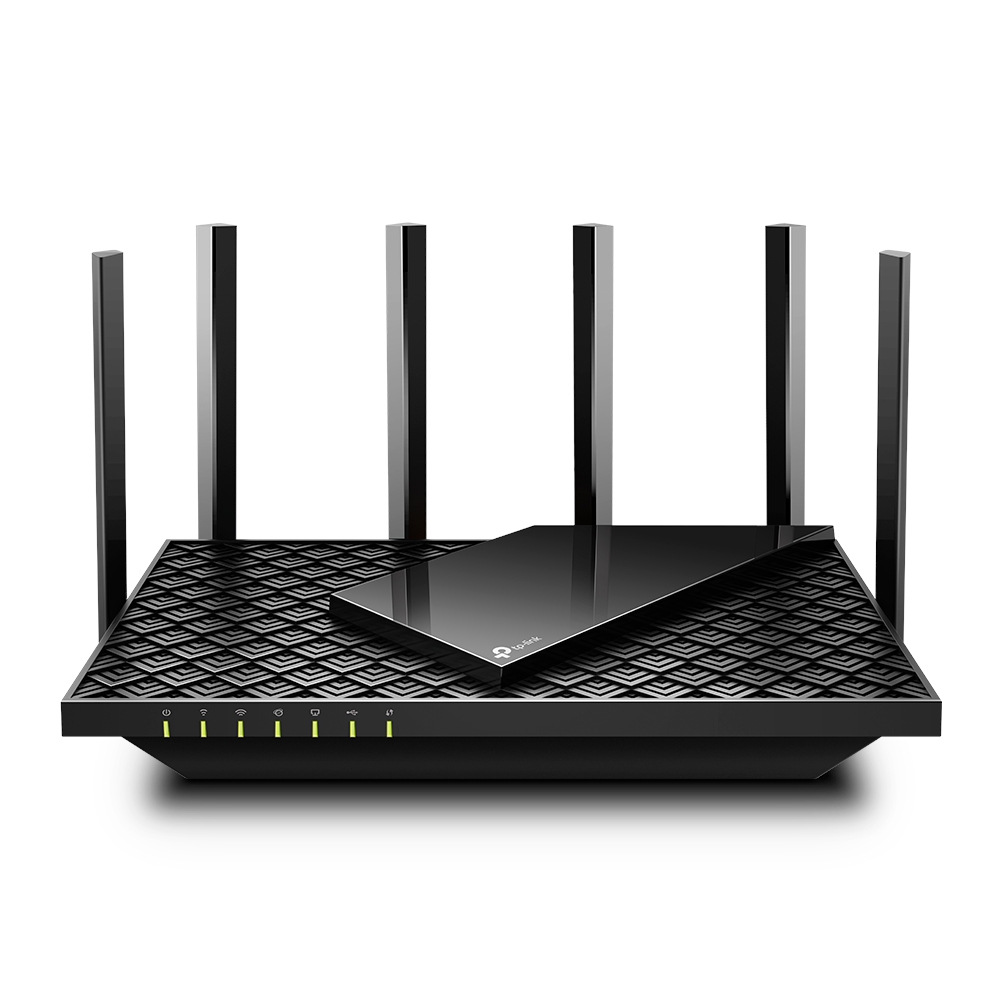
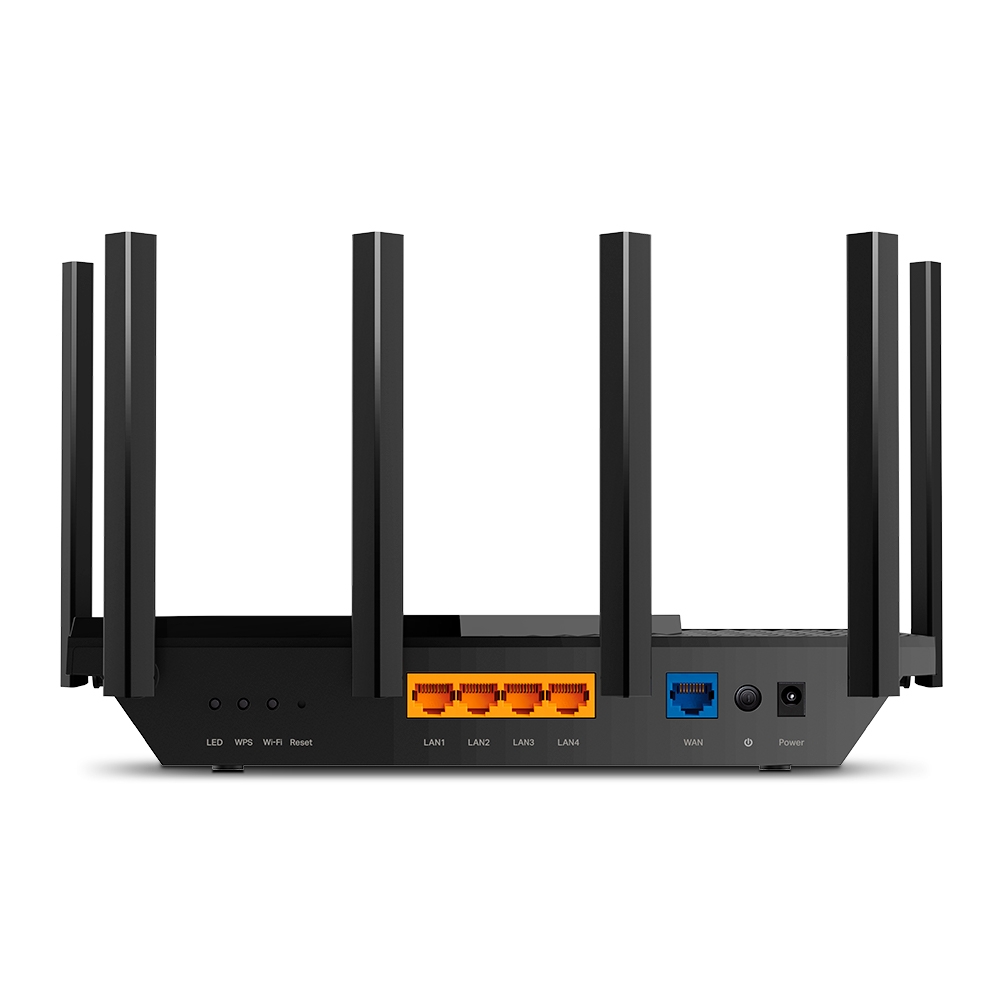
The V1 documentation describes a dual-band Wi-Fi 6 router with six antennas, one WAN port and four LAN ports. Each wired connection is Gigabit. The published radio maxima are 4804 Mbps and 574 Mbps, which are physical link rates rather than promised internet downloads. Compatible clients are required for features such as OFDMA and 160 MHz operation. This makes client capability and the wired bottleneck more useful buying checks than the AX5400 label alone. [5]
Speed falls with the test location
PurePC's 2024 iperf3 tests on the higher-frequency Wi-Fi 6 band recorded 709.36 Mbps download at its near test point and 286.16 Mbps farther away. Its WAN download test reached 947.04 Mbps. These results illustrate usable performance and the cost of distance, without predicting your floor plan. Highlab also measured signal through walls, but neither that observation nor a router's antenna count establishes a guaranteed coverage area. The retrieved PurePC test pages leave some client and environment details unresolved. [3], [4], [1]
USB sharing is useful, but results are setup-specific
The documented USB port supports external-storage sharing. MBReviews obtained 89.1 MB/s read and 55 MB/s write with a SanDisk Extreme SSD and a multimedia folder. PurePC's CIFS test returned 35.39 MB/s download and 21.18 MB/s upload. The accessible pages do not align the drive, files, host and firmware closely enough to explain the gap. Treat storage sharing as a feature to test with your own drive and workload rather than assuming either review is a universal speed promise. [5], [6], [4]
Check the actual revision before planning expansion
The retained V1 datasheet documents OneMesh, WPA3-capable security and OpenVPN/PPTP server functions. It does not establish the latest EasyMesh or wired-backhaul feature set for the unit a seller will ship. Blacktubi's historical software experience also separates basic HomeShield features from paid advanced protection and reporting. Before buying for a particular mesh or parental-control feature, verify the hardware label, regional firmware and current plan terms. Neither VPN throughput nor a future support period is established here. [5], [2]
A busy connection can still feel slow
MBReviews' mixed-client stress test kept the network running during simultaneous downloads, yet competing downloads and streaming produced disruptive delay in heavier combinations. Surviving a load is therefore different from delivering smooth playback. Highlab described steady higher-band measurements and trouble-free ordinary five-device use, while its lower-band internet tests varied substantially. These observations are compatible: normal household activity and deliberately intensive concurrent traffic are different demands. A household with frequent bulk transfers should weigh responsiveness, not just peak speed. [6], [3]
Power, cooling and the final trade-off
PurePC measured 7.9 W during its stated increased-network-activity test; this is a condition-specific reading rather than an annual energy estimate. Blacktubi described cool, stable operation during prolonged stress, without a temperature or duration measurement. Together these are encouraging observations, not a long-term reliability guarantee. The practical decision is whether the documented Gigabit ports, wireless client requirements and storage behavior fit your home. A multi-Gigabit internet upgrade or demanding concurrent-transfer workload deserves particular attention. [5], [6], [2], [4]
Buyer questions
Before you buy
Does AX5400 mean a device gets that internet speed?
No. The V1 radio ratings are PHY maxima shared across the router's capabilities. Actual transfers depend on clients and conditions, and the documented WAN link is 1 Gbit/s. The class name is not an internet-speed guarantee. [5]
Will it cover every room in my home?
The tests cannot establish that. PurePC saw a substantial drop between its near and farther locations, and Highlab's wall measurements belong to its own setup. Check the layout and intended router position rather than treating review results as an area guarantee. [1], [3]
Are all security and parental-control features included?
Do not assume so. Blacktubi's historical HomeShield review places advanced protection and detailed reporting in a paid tier. WPA3 support is documented separately and requires compatible clients. Check current regional plan features before relying on a particular control. [2], [5]
Compatibility
Can I assume current mesh features from an older review?
No. The retained official V1 documentation establishes OneMesh, while current EasyMesh and backhaul details remain unverified in the accepted snapshots. Confirm the exact regional hardware and firmware before choosing companion equipment. [5]
Everyday use
Can I use an external USB drive for shared files?
Yes, the V1 documentation supports storage sharing, and MBReviews successfully tested a SanDisk Extreme SSD. Transfer rates differ substantially from PurePC's CIFS results, so verify your own drive, filesystem and workload rather than assuming one benchmark applies to every setup. [5], [6], [4]
Limitations
Is it suitable for many simultaneous downloads and streams?
It is conditional. MBReviews kept the network operating under stress but observed disruptive streaming delay when demanding traffic competed. Ordinary home use was more positive in Highlab's review. Peak throughput alone does not resolve this workload question. [6], [3]
Product images
Facts and specifications
Manufacturer datasheet
| Specification | Value | Source |
|---|---|---|
| Antenna Count | 6 EU/US V1 | [5] |
| Wi-Fi Bands | 2 EU/US V1, 2.4 GHz and 5 GHz | [5] |
| Compatibility | OFDMA, HT160, 1024-QAM, Target Wake Time and WPA3 require client support; PHY rates and coverage are not guaranteed throughput EU/US V1 | [5] |
| Ethernet Ports | 5 EU/US V1, one WAN plus four LAN | [5] |
| Ethernet Speed | 1 Gbit/s EU/US V1, per LAN port | [5] |
| Frequency | 5 GHz EU/US V1, higher-frequency band | [5] |
| Maximum Link Rate | 4804 Mbps EU/US V1, 5 GHz PHY maximum; 574 Mbps EU/US V1, 2.4 GHz PHY maximum | [5] |
| Mesh Support | OneMesh in the 2020 V1 datasheet; current EasyMesh/backhaul support is not established by retained snapshots EU/US V1, historical documentation | [5] |
| Option | 160 MHz channel bandwidth on the 5 GHz radio (HT160), subject to compatible clients EU/US V1 | [5] |
| Ports | One USB 3.0 port for external-storage sharing; V1 EU/US V1 | [5] |
| Processor | 1.5 GHz triple-core CPU, documented for V1 only EU/US V1 | [5] |
| Security Protocol | WPA/WPA2-Personal, WPA2/WPA3-Personal, WPA/WPA2-Enterprise; WPA3 requires compatible clients EU/US V1 | [5] |
| Software | OpenVPN and PPTP VPN server in V1 documentation; no VPN throughput established EU/US V1, documented feature set | [5] |
| WAN Speed | 1 Gbit/s EU/US V1 | [5] |
| Wi-Fi Standard | Wi-Fi 6 (802.11ax), backward-compatible with 802.11a/b/g/n/ac; V1 EU/US V1 | [5] |
Measured by a lab
| Specification | Value | Source |
|---|---|---|
| Data Rate | 286160000 bit/s PurePC 2024, 5GHz 802.11ax iperf3 download at 10m, 35.77 MB/s; 709360000 bit/s PurePC 2024, 5GHz 802.11ax iperf3 download at 1m, 88.67 MB/s; 947040000 bit/s PurePC 2024 WAN iperf3 download, 118.38 MB/s | [4], [1] |
| Power | 7.9 W PurePC 2024 increased-network-activity test; exact load unspecified | [4] |
Other facts
| Specification | Value | Source |
|---|---|---|
| Buyer Fit | Blacktubi favors AX73 for strong 5GHz performance with compatible 160MHz clients; this does not establish whole-home results for every layout. Malaysia review, 2021 | [2] |
| Limitation | MBReviews flags the absence of a multi-Gigabit port; the documented WAN cannot directly exploit an internet service above 1 Gbit/s. Reviewed AX73 and V1 port specification; MBReviews found disruptive streaming latency when concurrent downloads, 4K streams and intensive browsing competed; high total throughput did not ensure smooth multi-client streaming. 2024 5GHz/80MHz mixed-client stress conditions | [6] |
KnowSpec analysis
A conditional choice for a Gigabit home network
The Archer AX73 suits a home seeking capable Wi-Fi 6 and ordinary Gigabit wired connections, especially with compatible clients on its higher-frequency band. Its headline wireless class should not determine the purchase alone: heavy simultaneous downloads can disrupt streaming, USB results vary between tests, and hardware revision and current firmware features need checking. Buyers needing multi-Gigabit WAN should choose a different port configuration.
Method: Compare what each experiment measures without averaging incompatible setups or extrapolating a device-count guarantee.Throughput and responsiveness answer different questions
The evidence supports useful single-client speed, but not unlimited busy-household capacity. PurePC measures transfer rates, while MBReviews stresses latency under competing traffic. Highlab's ordinary home use was smoother than its variable lower-band speed tests might suggest. Match the test to your workload and keep each review's conditions attached to its result.
Method: Synthesis of official V1 specifications and attributed independent tests; no prediction of performance in an unseen home.Visible information gaps
Missing information is shown rather than guessed.
- Softwarerights restricted
- Coverage Areanot found
- Generationnot found
Products in this content
-
GL.iNet GL-MT300N-V2 Mango N300 Mini Travel Router
The Mango GL-MT300N-V2 suits travelers who value a pocket-size router, flexible uplinks and router-level VPN configuration more than broadband speed. Its single-band Wi-Fi and Fast Ethernet make it a conditio
-
GL.iNet GL-AR300M16 (Shadow) N300 Mini Travel Router
The GL-AR300M16 is a conditional choice for travellers who value a tiny, configurable network more than throughput. Its internal antennas and Micro-USB power connection keep the kit compact, while the single-
-
NETGEAR Nighthawk R6900P AC1900 Dual-Band WiFi Router
The R6900P is difficult to recommend as a new primary Internet router. NETGEAR marks it end-of-support and recommends retirement. Its remaining wired, wireless and local-storage functions can
-
TP-Link Archer AX6000 AX6000 Dual-Band Wi-Fi 6 Router
Consider the Archer AX6000 if you want a Wi-Fi 6 router with many wired connections and configurable household controls, provided you can verify the supplied revision and its current support.
-
NETGEAR Nighthawk AX12 RAX120 AX6000 Dual-Band WiFi 6 Router
Do not buy an unidentified RAX120 for a new security-dependent Internet connection on the strength of its AX6000 label. This ASIN maps to RAX120-100NAS but does not establish v1 or v2. NETGEA
-
TP-Link Archer AX21 AX1800 Dual-Band Wi-Fi 6 Router
The Archer AX21 is worth considering when replacing an old router with Wi-Fi 6, provided you do not need advanced parental controls or guaranteed coverage at a distance. Check the unit’s hardware revision bef
Sources and method
- Test routera TP-Link Archer AX73 – Pomiary Wi-Fi 5 GHz 802.11axPurePC · retrieved 2026-10-04Lab review
- TP-Link Archer AX73 Review: Strong signal and solid performanceBlacktubi · retrieved 2026-10-04Lab review
- Recenzja TP-Link Archer AX73 (AX5400)Highlab · retrieved 2026-10-04Lab review
- Test routera TP-Link Archer AX73 – Pomiary USB / WAN / Pobór mocyPurePC · retrieved 2026-10-04Lab review
- Archer AX73 EU and US 1.0 DatasheetTP-Link · retrieved 2026-10-04DatasheetPDF
- TP-Link Archer AX73 AX5400 WiFi 6 Router Review – With multi-client stress testsMBReviews · retrieved 2026-10-04Lab review