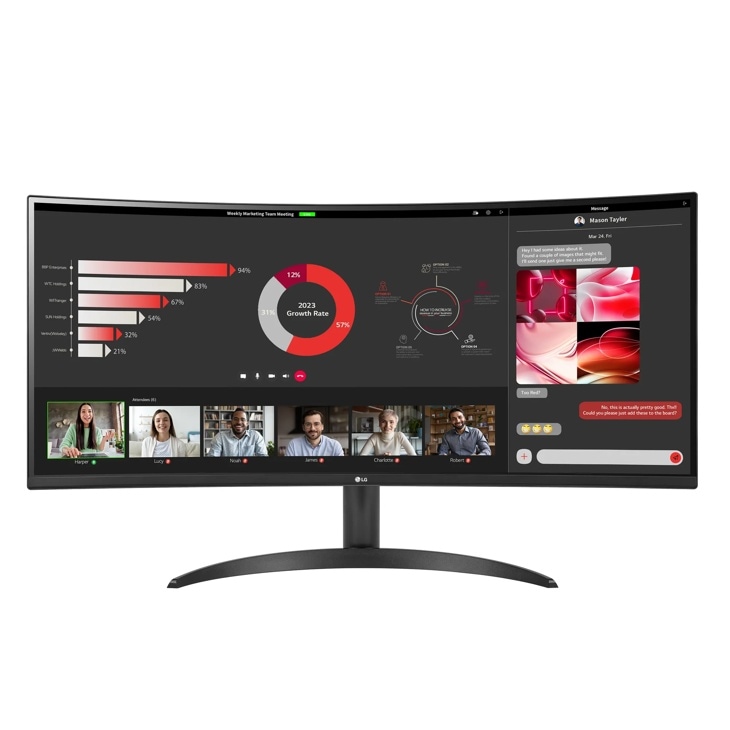
LG 34WR50QK-B Curved UltraWide WQHD Monitor
The documented VA panel, 3440 px horizontal resolution and 300 nit typical brightness describe a potential workspace, not a verified color or motion result. A regional maximum of 100 Hz adds a useful comparison point, but the 5 ms listing is still a specification. USB-C is absent according to the editorial sources, and the regional stand only tilts. BitByteIQ's reviewer needed an arm and noticed ghosting. Shortlist the model when video and charging can be arranged separately and screen position fits your desk; seek stronger exact-model testing if motion or calibrated color is decisive.
Updated 2026-10-08

We may earn a commission from qualifying purchases.
Prices and sellers
No price information yet
Conditions and limitations
Regional catalog documents resolution, maximum refresh and input inventory. Exact US full-resolution input timings and adaptive-sync operating range were not verified in a permitted manufacturer snapshot.
Compatibility
Connector specifications and buying guidance are available; no exact computer, cable, OS and revision combination is documented with a reproducible compatibility test.
Where sources differ
Regional adaptive-sync descriptions remain inconsistent. No accepted manufacturer snapshot establishes the exact US feature tier or usable VRR range, so the inherited conflict is retained as a gap.
Reported issues and fixes
Reviewer-reported fast-motion ghosting
- Status
- reported
- Symptom
- BitByteIQ's reviewer reports some ghosting during fast motion.
Care and support
US product and support pages were opened publicly but native snapshots were robots-denied. Regional pages exceeded snapshot limits. Warranty, repairability, spares availability and support end dates are therefore not newly claim-verified.
Ownership costs
Reviewer experience identifies a possible arm requirement and the regional catalog lacks height adjustment. Prices, energy-use measurements and a numerical ownership-cost calculation were not collected.
Who it suits
A workspace choice with connection and positioning checks
- Check before buying
- Confirm the regional suffix and US package.
- Verify the complete computer and cable path.
- Inspect familiar fast-motion scenes if sensitive to ghosting.
- Constraints
- No reliance on unverified USB-C docking.
- Check seated screen position before selecting the stand arrangement.
- Needs
- A wider documented desktop with a separately planned video connection.
- Reason
- Shortlist when the documented inputs and stand arrangement suit the desk; the reported ghosting warrants examination if motion is important.
- Tradeoffs
- Published display specifications do not settle measured motion or color quality.
- Assessment
- conditional
Testberichte.de · Megekko / Catalog Object Cloud · HowToTechInfo · BitByteIQ
Reviewer consensus
Single-source notes
The review
LG 34WR50QK-B: specifications and unresolved questions
What the display specifications establish
The LG 34WR50QK-B evidence includes a regional retailer catalog for the 34WR50QK-B.AEU variant. It identifies a VA panel, 3440 px horizontal resolution, 1440 px vertical resolution and 300 nit typical brightness. Those are published specifications rather than results from an independently measured sample. The complete resolution helps describe the desktop you are considering, but it does not answer how comfortably you will read your own applications at a chosen scaling setting. Before ordering, try the window arrangement you actually need and decide which text must remain readable without leaning toward the display. This is a useful purchasing exercise rather than a claim that the monitor has passed a readability test. Brightness and panel type also need careful interpretation. The catalog's typical brightness does not establish measured HDR highlights, backlight uniformity or calibrated color accuracy. Treat those questions as separate from the published VA specification. If your work depends on judging images consistently, seek exact-model calibration and uniformity evidence before treating this display as a verified creative-work choice. A specification can identify what is advertised while leaving the quality of its implementation unresolved. The regional catalog should also remain clearly identified as regional evidence; it does not independently confirm every accessory or detail of the US package. [5]
Response time is not input lag
The commercial summary lists a response time of 5 ms, while the regional catalog lists a maximum refresh rate of 100 Hz. Keep both in their proper category: they are stated specifications, not an independently verified input-lag or motion-clarity result. BitByteIQ's English review adds a different kind of evidence. In its exact-model section, the author reports noticing some ghosting during fast motion. The account does not supply overdrive settings, a transition-time table or a reproducible test method. It therefore supports a reported visual concern, without establishing how severe that concern will be on a particular revision or in another user's games. For a buyer, the useful next step is to match the remaining uncertainty to the activity that matters. Someone choosing mainly for documents can assess scrolling and window movement during a trial. Someone sensitive to motion artifacts should examine familiar fast scenes and request stronger test evidence if the decision depends on response behavior. Do not convert the 5 ms listing into an input-lag figure, and do not convert a reviewer's observation into a universal defect. Neither supported specification removes the need to check the intended computer connection and display mode. Sustained performance and measured input lag remain open questions in this research. [4], [5], [1]
Connections and adjustment
The editorial evidence identifies no USB-C. A separate English editorial source corroborates that limitation, while the European catalog lists two HDMI inputs and one DisplayPort 1.4 input. This gives a buyer a starting point for a video-connection plan, without proving every resolution and refresh combination through every adapter. Check the laptop or desktop's actual video output, the chosen cable and any intermediate device together. If a single cable for video, charging and peripherals is essential to your routine, request explicit support for that complete requirement before choosing this model. Do not assume a connector inventory supplies docking functions that the evidence has not established. Positioning deserves the same advance planning. The regional catalog describes tilt adjustment without height adjustment. BitByteIQ's reviewer found the default stand too low and bought a VESA arm, while the earlier editorial assessment also flags limited ergonomic adjustment. That personal experience is a reason to check your seated viewing position, not proof that every buyer must replace the stand. Measure the arrangement that works for you and confirm the exact package's mounting requirements before selecting accessories. The practical tradeoff is between a setup that already fits and one that needs additional planning; this research does not calculate accessory costs or endorse an unverified mount. [2], [5], [3], [1]
Two computers require a control plan
Best Desk Setup's documentation-based guide distinguishes displaying two sources from controlling two computers. That distinction matters when planning a desk shared by a work machine and a personal machine. Decide how the keyboard and mouse will move between them, and confirm the required switching arrangement rather than inferring it from a display feature. The regional input inventory can inform the video side of that plan, but this research does not certify a particular two-computer configuration. Consider whether you need both machines visible at once or mostly alternate between them. Keeping those tasks separate makes the remaining compatibility questions easier to ask and prevents a feature name from becoming an unsupported promise about the whole workstation. [5], [6]
What remains unknown
The wider source set improves the discussion but does not turn it into a laboratory review. Best Desk Setup explicitly states that it has not tested the monitor; its documentation-based guidance serves a different purpose from BitByteIQ's first-person use observations. Neither provides the quantitative evidence needed to close the gaps in input lag, calibrated color accuracy or sustained performance. The VA catalog entry alone cannot settle these questions. It is reasonable to use specifications for an initial shortlist and use firsthand experience to identify what to examine, while keeping the strength of each conclusion aligned with its source. Manufacturer collection also remains limited. The US product and support pages were opened publicly, but native snapshots were refused under their robots policy. Other regional product pages exceeded the snapshot size limit. Consequently, the research preserves the gap in directly verified US package details rather than applying the European suffix indiscriminately. Adaptive-sync descriptions remain unresolved, and the accepted evidence does not establish the exact US feature tier or usable range. These are specific reasons to confirm the intended package and mode before purchase. A long source list should not be mistaken for a complete record of every regional difference. [5], [1], [6]
Who should keep it on the shortlist?
Keep the LG 34WR50QK-B on the shortlist when its documented resolution suits the workspace you need and you can arrange video, charging and screen position deliberately. Compare other options if USB-C docking or adjustable screen height is central to your day. If fast-motion quality determines the purchase, the reported ghosting and absence of quantitative testing justify a closer trial rather than an automatic recommendation. The existing 5 ms response-time specification remains useful context, but it is not a measured gaming verdict. Confirm the exact model, regional suffix, package and connection path before relying on the regional catalog. This is a conditional buying conclusion built from specifications and attributed observations, with the remaining performance and US-market gaps kept visible. [2], [4], [5], [3], [1]
Buyer questions
Before you buy
Is the response-time figure a verified gaming result?
No. The listed 5 ms response time is a stated specification. It is not a verified input-lag, motion-clarity or sustained-performance result. [4]
Compatibility
Can I assume USB-C connectivity?
No. The editorial source identifies no USB-C; verify the connection required by your computer before buying. [2]
Does displaying two sources settle keyboard and mouse switching?
No. Best Desk Setup's documentation-based guide treats displaying two sources and controlling two computers as separate tasks. Verify the required control arrangement for your actual computers. [6]
Setup
What should I check about positioning?
The editorial assessment flags limited ergonomic adjustment. Confirm the actual stand and mounting requirements of the US package before choosing a desk setup. [2]
Limitations
Does the brightness specification prove HDR quality?
No. The catalog's 300 nit typical brightness is not an independently measured HDR result or a calibrated color-accuracy test. [5]
Does the review prove a measured ghosting problem?
No. BitByteIQ's reviewer reports seeing some ghosting in fast motion, but provides no quantitative transition measurements or overdrive settings. Treat it as an attributed observation to examine during a trial. [1]
Product images
Facts and specifications
Retailer listing
| Specification | Value | Source |
|---|---|---|
| Brightness | 300 nit | [5] |
| Panel Type | VA | [5] |
| Ports | Two HDMI inputs and one DisplayPort 1.4 input in the 34WR50QK-B.AEU catalog. Europe; 34WR50QK-B.AEU catalog | [5] |
| Refresh Rate | 100 Hz Europe; 34WR50QK-B.AEU catalog | [5] |
| Resolution Height | 1440 px Europe; 34WR50QK-B.AEU catalog | [5] |
| Resolution Width | 3440 px | [5] |
| Response Time | 5 ms | [4] |
| Stand Adjustment | Tilt adjustment without height adjustment in the 34WR50QK-B.AEU catalog. Europe; 34WR50QK-B.AEU catalog | [5] |
Stated by reviewers
Other facts
| Specification | Value | Source |
|---|---|---|
| Limitation | The editorial assessment identifies few ergonomic adjustment options; this is not a measured usability study. | [2] |
KnowSpec analysis
Choose the workspace only after checking position and connections
The documented VA panel, 3440 px horizontal resolution and 300 nit typical brightness describe a potential workspace, not a verified color or motion result. A regional maximum of 100 Hz adds a useful comparison point, but the 5 ms listing is still a specification. USB-C is absent according to the editorial sources, and the regional stand only tilts. BitByteIQ's reviewer needed an arm and noticed ghosting. Shortlist the model when video and charging can be arranged separately and screen position fits your desk; seek stronger exact-model testing if motion or calibrated color is decisive.
Method: Source methodology comparisonA hands-on report is useful without being a lab result
BitByteIQ supplies first-person observations about ghosting and stand position, so these concerns deserve a personal trial. They do not quantify transition times or guarantee another buyer's experience. Best Desk Setup explicitly did not test the monitor. Use that guide to plan connections and controls, and retain uncertainty about measured performance rather than turning source variety into a reliability verdict.
Method: editorial_synthesisVisible information gaps
Missing information is shown rather than guessed.
- Source.Manufacturernot public
- Topic:Efficiencynot found
- Topic:Buyer Fitnot found
- Topic:Text Clarity And Scalingnot found
- Adaptive Syncconflicting
- Topic:Measured Performancenot found
- Topic:Sustained Performancenot found
- Topic:Color Gamut And Accuracynot found
- Topic:Limitationsnot found
- Input Lagnot found
Products in this content
-
ASUS VP229Q 21.5 Inch Monitor 1080P Full HD IPS Eye Care Monitor
The IPS panel and Full HD resolution identify a compact desktop format, while HDMI, DisplayPort and VGA provide documented connection choices. Buyers needing adjustable screen height should plan a separate VESA mount because the supplied st
-
ASUS ProArt PA279CV 27 Inch 4K UHD USB-C Professional Monitor
A conditional fit for sRGB-oriented photography and creative desktop work, with useful stand adjustment and USB-C connectivity. Inspect panel uniformity and check the laptop charging requirement and USB mode before purchase.
-
Dell SE2722H 27 Inch Full HD Monitor
The Dell SE2722H is a straightforward everyday monitor for buyers who want a matte Full HD screen, a VA panel, AMD FreeSync, and a modest 75 Hz refresh rate. Its one HDMI input and legacy D-sub input suit basic desktop setups, while the sta
-
Acer Nitro KG241Y Sbiip 23.8 Inch Full HD Gaming Monitor
The documented Sbiip model combines a 23.8-inch VA screen, 165 Hz refresh, a tilt-only stand, and a 100 x 100 mm mounting pattern. DisplayNinja reports approximate input lag and visible dark-scene trailing, but its model page omits the late
-
Acer Nitro XV272U W2bmiiprx Gaming Monitor
The W2 remains a conditional choice for a DisplayPort gaming desk: its documented 240Hz mode now has a reviewer-reported 3 ms input-lag result. That result does not describe lower refresh rates or every retail sample. Buyers
-
MSI PRO MP275Q 27 Inch WQHD Office Monitor
The evidence favors office and web-oriented work, with a tilt-only stand and declared 100 Hz operation. Independent brightness and contrast results are now available, with incomplete methodology and unknown sample count. The 300 nit rating
Sources and method
- Top 10 Monitors for Home Office 2025 | Tested & ReviewedBitByteIQ · retrieved 2026-10-08Editorial review
- LG UltraWide 34WR50QK-BTestberichte.de · retrieved 2026-10-02Editorial review
- LG 34WR50QK-B Monitor Review: Curved Ultrawide Worth It?HowToTechInfo · retrieved 2026-10-08Editorial review
- LG Monitor UltraWide 34WR50QK-BEnlaza Connect · retrieved 2026-10-02Other source
- LG 34WR50QK-B.AEU specificationsMegekko / Catalog Object Cloud · retrieved 2026-10-02Retailer listingPDF
- LG 34WR50QK buying guide: a simpler ultrawide for office workBest Desk Setup · retrieved 2026-10-08Editorial review