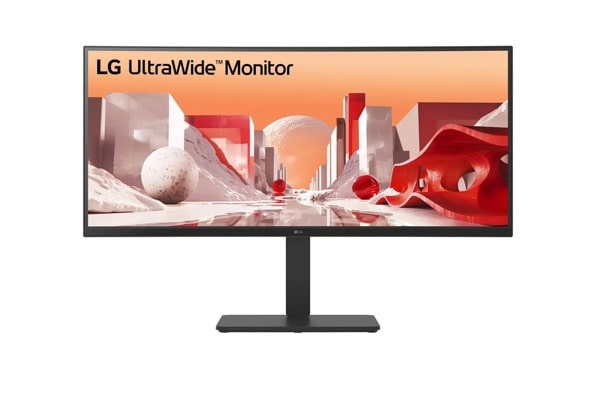
LG 34BA85QE-B 34" UltraWide QHD Curved IPS Monitor with Built-in FHD Webcam and USB Type-C
The LG 34BA85QE-B suits an office desk combining notebook connectivity and video calls. Its IPS panel, ultrawide resolution, adjustable stand and built-in webcam support that role. The trade-off is a 60 Hz ceiling and an editorial assessment of rudimentary HDR. Choose it for workspace integration, while treating gaming latency, panel uniformity and long-term reliability as unresolved questions.
Updated 2026-10-03

We may earn a commission from qualifying purchases.
Reviewer consensus
Consensus rows require at least two distinct sources for the topic.
| Topic | Positive | Negative | Mixed | Reading | Evidence |
|---|---|---|---|---|---|
| Hdr brightness and contrast | 1 | 1 | 0 | Debated · 1 v 1 | [4], [2] |
| Refresh rate and response time | 0 | 2 | 0 | Weak point · 2/2 | [3], [2] |
| Resolution and pixel density | 2 | 0 | 0 | Agreed · 2/2 | [1], [2] |
Single-source notes
- Buyer fit: Agreed · 1/1 · [4]
- Color gamut and accuracy: Agreed · 1/1 · [2]
- Efficiency: Agreed · 1/1 · [1]
- Ergonomics and mounting: Agreed · 1/1 · [2]
- Limitations: Weak point · 1/1 · [3]
- Measured performance: Agreed · 1/1 · [3]
- Panel type and uniformity: Agreed · 1/1 · [2]
- Ports and bandwidth: Agreed · 1/1 · [2]
The review
LG 34BA85QE-B: workspace integration before gaming promises
What the evidence supports
The IPS display combines 3440 x 1440 resolution with a built-in webcam highlighted for video conferencing. LG specifies sRGB 99% typical coverage. Together these features support a document and meeting workstation, but coverage alone does not establish accuracy or panel uniformity. [2], [4], [1]
Brightness, motion and HDR
LG specifies 300 nits typical brightness; connect reports an SDR average of 308 nits. The display is limited to 60 Hz, and the review table lists a 13 ms response time without a detailed measurement protocol. Testberichte.de describes HDR support as rudimentary. These findings favor measured expectations over a gaming or HDR promise. [2], [3], [4]
Desk setup and unresolved questions
The USB Type-C interface supports notebook charging, and the stand adjusts in height, tilt and swivel. Check the exact regional configuration because the evidence contains conflicting port documentation. The European datasheet's 0.5 W standby rating is not a daily energy estimate. The reviewer flags the lack of a mains switch; sustained performance, input lag, VRR and text-scaling tests remain evidence gaps. [2], [3], [1]
Buyer questions
Before you buy
Who is this monitor for?
It is a plausible fit for a notebook desk used for documents and video calls. The evidence supports an IPS display, integrated webcam, USB Type-C interface and adjustable stand. The conclusion is conditional on the buyer's computer compatibility and supplied configuration. [2], [4]
Setup
What should be checked before setting up a notebook?
Confirm the supplied regional configuration and the notebook's display, data and charging requirements before relying on the USB Type-C connection. The stand provides height, tilt and swivel adjustment. Conflicting port documentation in the evidence means a seller's exact configuration should be confirmed rather than guessed. [2]
Everyday use
How should the brightness figures be read?
The 300 nits value is LG's typical specification. The 308 nits value is connect's reported SDR average. They describe different evidence contexts and do not guarantee a purchased unit's brightness. Neither figure proves HDR performance or uniformity. [2], [3]
Limitations
Does it establish a gaming or HDR advantage?
No such advantage is established. LG specifies 60 Hz, the review table lists 13 ms response time, and the editorial assessment calls HDR support rudimentary. Response time is not input lag; the evidence does not resolve input latency or VRR behavior. [3], [4]
Product images
Facts and specifications
Manufacturer datasheet
| Specification | Value | Source |
|---|---|---|
| Brightness | 300 nit US | [2] |
| Color Gamut | sRGB 99% (CIE1931), typical US | [2] |
| Interface | USB Type-C with Power Delivery up to 90W US | [2] |
| Panel Type | IPS US | [2] |
| Power | 0.5 W EU | [1] |
| Refresh Rate | 60 Hz US | [2] |
| Resolution Height | 1440 px EU | [1] |
| Resolution Width | 3440 px US | [2] |
| Stand Adjustment | Tilt -5° to 21°, height 150mm, swivel +/- 45° US | [2] |
Stated by reviewers
| Specification | Value | Source |
|---|---|---|
| Response Time | 13 ms DE | [3] |
Measured by a lab
| Specification | Value | Source |
|---|---|---|
| Brightness | 308 nit DE | [3] |
Other facts
KnowSpec analysis
An office hub with motion and HDR limits
The LG 34BA85QE-B suits an office desk combining notebook connectivity and video calls. Its IPS panel, ultrawide resolution, adjustable stand and built-in webcam support that role. The trade-off is a 60 Hz ceiling and an editorial assessment of rudimentary HDR. Choose it for workspace integration, while treating gaming latency, panel uniformity and long-term reliability as unresolved questions.
Method: inferredBrightness evidence does not settle HDR quality
LG lists typical brightness of 300 nits, while connect reports an SDR average of 308 nits. These are a specification and a review result, not interchangeable promises for every unit. The stated sRGB coverage helps explain the office and content-work positioning, but it does not establish calibration accuracy or uniformity for a purchased sample.
Method: inferredCheck the supplied regional configuration
USB Type-C charging and stand adjustment are reasons to consider this monitor for a notebook workstation. Check the supplied regional configuration because the evidence records conflicting port documentation. The standby rating describes one operating state and does not predict daily electricity consumption. A reviewer also flags the missing mains switch.
Method: inferredVisible information gaps
Missing information is shown rather than guessed.
- Topic:Text Clarity And Scalingnot found
- Input Lagnot found
- Topic:Sustained Performancenot found
- Topic:Ports And Bandwidthconflicting
- Adaptive Syncnot found
Products in this content
-
ASUS VP229Q 21.5 Inch Monitor 1080P Full HD IPS Eye Care Monitor
The IPS panel and Full HD resolution identify a compact desktop format, while HDMI, DisplayPort and VGA provide documented connection choices. Buyers needing adjustable screen height should plan a separate VESA mount because the supplied st
-
ASUS ProArt PA279CV 27 Inch 4K UHD USB-C Professional Monitor
A conditional fit for sRGB-oriented photography and creative desktop work, with useful stand adjustment and USB-C connectivity. Inspect panel uniformity and check the laptop charging requirement and USB mode before purchase.
-
Dell SE2722H 27 Inch Full HD Monitor
The Dell SE2722H is a straightforward everyday monitor for buyers who want a matte Full HD screen, a VA panel, AMD FreeSync, and a modest 75 Hz refresh rate. Its one HDMI input and legacy D-sub input suit basic desktop setups, while the sta
-
Acer Nitro KG241Y Sbiip 23.8 Inch Full HD Gaming Monitor
The documented Sbiip model combines a 23.8-inch VA screen, 165 Hz refresh, a tilt-only stand, and a 100 x 100 mm mounting pattern. DisplayNinja reports approximate input lag and visible dark-scene trailing, but its model page omits the late
-
Acer Nitro XV272U W2bmiiprx Gaming Monitor
The W2 remains a conditional choice for a DisplayPort gaming desk: its documented 240Hz mode now has a reviewer-reported 3 ms input-lag result. That result does not describe lower refresh rates or every retail sample. Buyers
-
MSI PRO MP275Q 27 Inch WQHD Office Monitor
The evidence favors office and web-oriented work, with a tilt-only stand and declared 100 Hz operation. Independent brightness and contrast results are now available, with incomplete methodology and unknown sample count. The 300 nit rating
Sources and method
- LG Business-Monitor 34BA85QE-B.AEULG Electronics Deutschland · retrieved 2026-10-03DatasheetPDF
- 34BA85QE-B UltraWide Curved MonitorLG Electronics USA · retrieved 2026-10-03DatasheetPDF
- LG 34BA85QE-B im Test: Startklar für jede Videokonferenzconnect · retrieved 2026-10-03Lab review
- LG UltraWide 34BA85QE-B TestTestberichte.de · retrieved 2026-10-03Editorial review