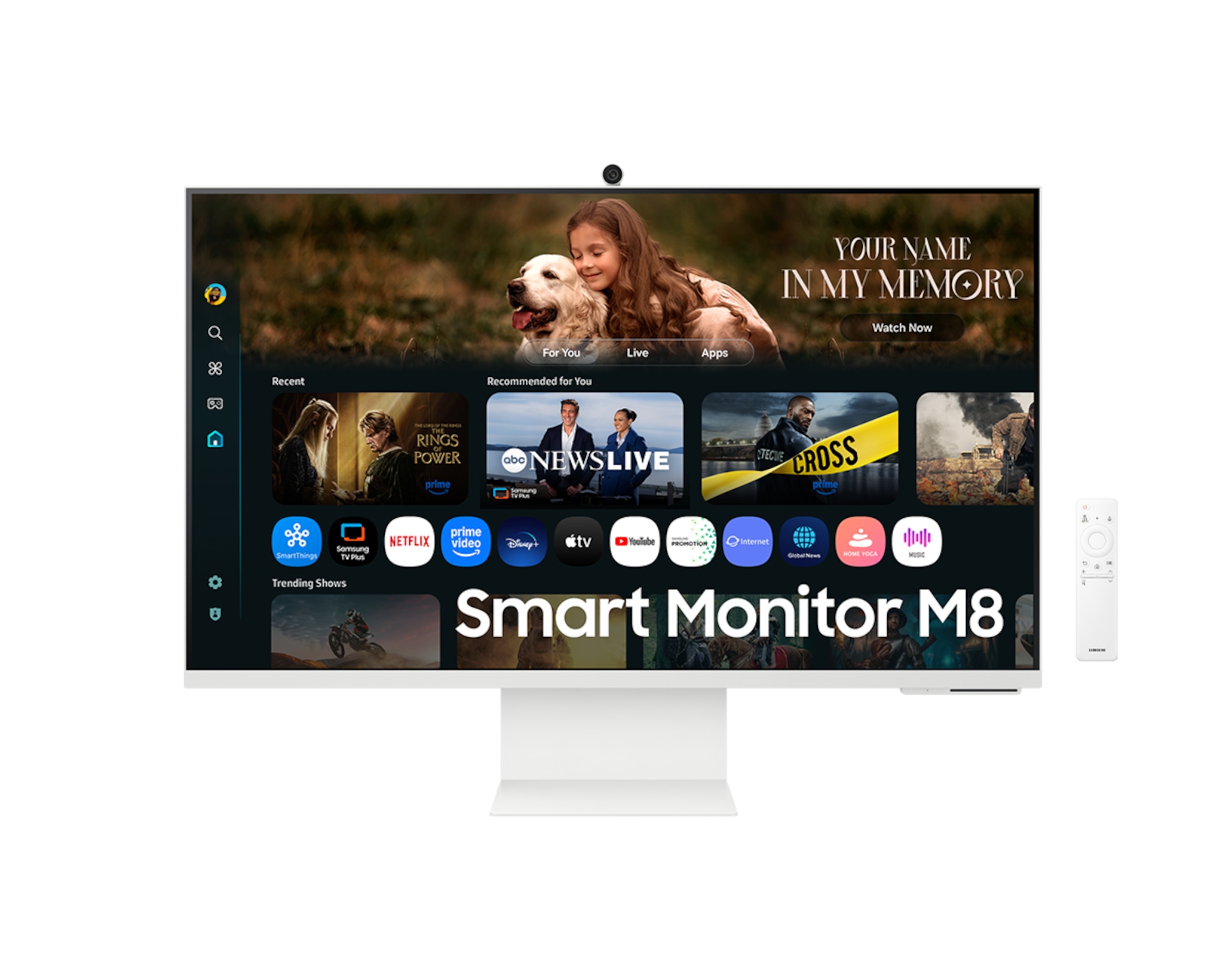
Samsung Smart Monitor M80F 32-Inch 4K UHD Smart TV & Computer Monitor
The M80F suits a desk shared between documents, streaming and calls: manufacturer documents establish the port selection and smart apps, while one owner describes clear text. Choose it for that combination only if the 60 Hz ceiling fits your work. A positive owner impression does not certify colour accuracy, input lag or compatibility with every laptop; buyers who depend on those results should seek exact-unit tests before committing.
Updated 2026-10-08

We may earn a commission from qualifying purchases.
Prices and sellers
No price information yet
Conditions and limitations
Documented refresh ceiling
- Capability
- The published refresh ceiling is 60 Hz.
- Limitations
- A refresh specification does not establish measured input lag or pixel-transition behaviour.
- Requirements
- Confirm that the selected input and source device expose the intended refresh mode.
Compatibility
Physical ports are documented, but the available evidence does not establish reproducible compatibility cases for named host devices and software versions.
Where sources differ
The public Abt document identifies LS32FM803UNXZA on page 1 but LS32FM902SNXZA in page 2's model header. Only model-matched page 1 is used; page 2 specifications are not promoted to exact US facts.
Reported issues and fixes
An owner describes occasional washed-out imagery, but no reproducible fault, affected firmware range or confirmed repair is established.
Care and support
US lifecycle announcements timed out and public product pages refused snapshots. A US warranty term, repairability commitment and exact support end date remain unverified.
Ownership costs
German class F is explicitly region-scoped. No prices are collected, and a US usage profile or independently measured power draw is unavailable, so monetary ownership cost remains unknown.
Who it suits
The buyer guide explains ports, stand adjustment, smart apps and the refresh ceiling; exact-unit laboratory comparisons and lifecycle guarantees remain missing.
Reviewer consensus
Consensus rows require at least two distinct sources for the topic.
| Topic | Positive | Negative | Mixed | Reading | Evidence |
|---|---|---|---|---|---|
| Buyer fit | 2 | 0 | 1 | Leans positive · 2/3 | [2], [5], [4] |
| Ergonomics and mounting | 1 | 0 | 1 | Mixed · 1/2 | [5], [1] |
Single-source notes
Alternatives
| Alternative | Where this Product wins | Where it loses | Pick it if |
|---|---|---|---|
| MSI PRO MP275Q 27 Inch WQHD Office Monitor | The M80F has greater documented horizontal resolution than the MSI. [3] The M80F stand supports height adjustment, while the MSI stand is documented as tilt-only. [1] | The M80F has a lower documented refresh ceiling than the MSI. [3] | Pick the M80F for greater documented pixel width and stand height adjustment; pick the MSI for higher documented refresh. |
The review
Samsung Smart Monitor M80F buyer guide
A versatile smart desk display
The Samsung Smart Monitor M80F combines a desk display with smart entertainment functions. The existing evidence places it in work, entertainment and video calls, while the model-matched US document identifies Smart TV Apps and Samsung's US announcement names the NQM AI Processor. That combination matters most when the same screen serves several routines: documents during work, a call between tasks, and streaming afterwards. The published horizontal resolution is 3840 pixels. These are documented features and intended uses, rather than proof that every activity performs equally well. Treat the processor name as an identification of the product's processing hardware, not as a measured speed improvement. The useful buying question is whether you will use the smart functions alongside your computer connection. If your priorities instead depend on independently measured motion, colour accuracy or long-term reliability, the available accepted evidence leaves those questions open. [3], [2], [5], [4]
Ports and desk setup
The documented connection set includes HDMI, two USB ports and USB-C with power delivery. This offers different ways to plan a desk connection, but the presence of a connector is only the beginning of a compatibility decision. Before purchasing for a particular laptop, check what that laptop can send through its selected port and what functions you need at the monitor. The accepted claim does not certify every laptop, cable or application combination. For physical positioning, the owner describes tilt and height adjustment without swivel, and the model-matched US document also specifies pivot. These adjustments answer different needs: changing viewing height, tilting the panel, and rotating its orientation should not be confused with turning the screen horizontally towards another person. A desk used mostly by one seated viewer can therefore be assessed differently from a shared table. If horizontal swivel is essential, verify the actual mounting arrangement rather than assuming pivot supplies it. [3], [1], [5]
Position the display for the person using it
Plan the viewing position before deciding that an adjustable stand solves your whole setup. Height adjustment and tilt can change where the panel sits relative to a seated viewer, and documented pivot offers a separate orientation change. The owner's report of no swivel is therefore still relevant when the screen must face somebody beside the main user. Ask whether you regularly show documents to another person, or whether the display stays aimed at one chair throughout the day. Also separate positioning from image quality: the positive text report and occasional washed-out impression describe experience, not a controlled comparison of every viewing angle. A sensible pre-purchase demonstration uses your ordinary document, your expected seat and the adjustment you actually need. That check is especially useful if the same desk alternates between work and calls. The evidence supports the named adjustments, while the comfort and readability of your individual arrangement remain practical checks rather than guarantees. [1], [5]
Text clarity and everyday documents
For document work, the evidence combines a published horizontal resolution of 3840 pixels with one owner's positive report about text clarity across the resolutions they tried. That makes desk work a supported use case, but the two pieces of information answer different questions. The resolution is a specification; the clarity report describes a person's experience. Neither establishes the exact scaling settings, viewing distance or software configuration another buyer will use. If your daily work depends on small type, consider checking the text at your normal sitting position with your own applications. Do not interpret the owner's report as a guarantee that every selectable resolution will look identical. The VA panel identification is also a documented technology description, rather than a complete judgement of readable text or uniformity. It helps identify the display you are considering while leaving the practical fit of your own workflow to be confirmed. [3], [1]
What the smart features add
Smart TV Apps distinguish this buying proposition from simply attaching a display to a computer. Samsung's US documentation describes direct access to content, and its M80F announcement identifies the NQM AI Processor. The practical attraction is the combination of entertainment functions and an ordinary desk role in one display. That is most relevant if switching between those uses is part of your actual routine. The accepted claims do not supply a complete app catalogue for every country, confirm every service subscription, or measure the processor's effect on a particular programme. Before choosing around one essential service, check its current availability for the region and account you will use. Before choosing around AI image processing, seek evidence for the particular viewing mode that matters to you. A manufacturer feature description establishes what is offered; it should not be promoted into a promise of consistently better pictures in every situation. [2], [5], [4]
Limits to consider
The published refresh ceiling is 60 Hz. Buyers who explicitly need a higher refresh mode should treat that specification as a clear selection limit, even when the smart features otherwise match their routine. It does not tell us the monitor's measured input lag, nor does it establish how quickly individual pixel transitions occur. The owner also reports that the picture sometimes looked washed out. That is a useful warning about a viewing impression, but it is not a measured contrast ratio and does not prove every unit or setting behaves the same way. Energy information needs similar care. The German LS32FM801UUXEN datasheet lists efficiency class F; this regional label must not become a measured electricity-use claim for the US unit. Without an appropriate US measurement and a stated usage pattern, this guide cannot turn that label into annual consumption or a monetary ownership estimate. [3], [1]
Compared with an office-focused rival
The inherited comparison with the MSI PRO MP275Q remains a comparison of documented specifications. The M80F has the greater published horizontal pixel count and includes stand height adjustment, while the MSI entry records a higher refresh rate. That contrast can help organise a shortlist: a buyer choosing around documented screen detail and seated viewing height has a different priority from a buyer choosing around refresh. It should not be read as an independent side-by-side test of image quality, responsiveness or reliability. More pixels alone do not establish better colour accuracy, and stand adjustment alone does not certify a more comfortable result for every desk. Likewise, a higher published refresh figure is only one part of motion performance. Keep the comparison at the level the underlying evidence supports, then ask which specification directly addresses the problem you are trying to solve. The rival's inherited evidence has not been newly researched in this refresh. [3], [1]
A conditional everyday recommendation
The most defensible recommendation is conditional: shortlist the M80F when one desk needs documented computer connections, adjustable viewing height and smart entertainment, and when a 60 Hz ceiling is acceptable. Keep the owner's positive everyday impressions alongside the occasional washed-out picture report rather than presenting either as universal. For a purchase driven primarily by competitive gaming, exact colour reproduction or a guaranteed support period, the accepted evidence is not yet sufficient to settle the decision. Independent reviews were located, but their publishers did not permit the required native snapshots, so their numerical tests are not stored here as verified measurements. The next useful check is therefore specific to your priority: verify the exact input mode, inspect your normal text layout, confirm the essential service, or obtain an attributable test for the performance requirement. This preserves the monitor's supported everyday role while showing where a buyer still needs stronger evidence. [3], [2], [1], [5]
Buyer questions
Before you buy
What kind of buyer is the M80F for?
It is supported as a versatile choice for work, entertainment and video calls. [2]
Compatibility
What connections are documented?
The documented connection set includes HDMI, two USB ports and USB-C with power delivery. [3]
Setup
How can the stand be adjusted?
The stand supports tilt and height adjustment, but it does not swivel. [1]
Everyday use
Is text clear for desk work?
One owner reported that text stayed sharp and clear across the resolutions they tested. [1]
Product images
Facts and specifications
Manufacturer datasheet
| Specification | Value | Source |
|---|---|---|
| Panel Type | VA US | [3] |
| Ports | HDMI, two USB ports and USB-C with power delivery US | [3] |
| Processor | NQM AI Processor US | [4] |
| Refresh Rate | 60 Hz US | [3] |
| Resolution Width | 3840 px US | [3] |
| Smart TV Platform | Smart TV Apps US | [5] |
| Stand Adjustment | Height adjustment, tilt, and pivot US | [5] |
Stated by reviewers
| Specification | Value | Source |
|---|---|---|
| Stand Adjustment | Tilt and height adjustment without swivel US | [1] |
Other facts
KnowSpec analysis
Who the Samsung Smart Monitor M80F suits
The M80F suits a desk shared between documents, streaming and calls: manufacturer documents establish the port selection and smart apps, while one owner describes clear text. Choose it for that combination only if the 60 Hz ceiling fits your work. A positive owner impression does not certify colour accuracy, input lag or compatibility with every laptop; buyers who depend on those results should seek exact-unit tests before committing.
Method: evidence_synthesisMain trade-offs
The strongest documented compromises are a 60 Hz refresh ceiling and the owner's occasional washed-out picture impression. Height and tilt adjustment help a fixed desk position, and the US document adds pivot, but pivot does not promise horizontal swivel. German class F belongs to LS32FM801UUXEN documentation and cannot be used as measured US power consumption. Motion-critical and colour-critical buyers still lack accepted independent test evidence for this exact US unit.
Method: evidence_synthesisVisible information gaps
Missing information is shown rather than guessed.
- Topic:Sustained Performancenot found
- Topic:Color Gamut And Accuracynot found
- Topic:Input Lagnot found
- Topic:Adaptive Sync And Vrrnot found
- Warrantynot found
- Topic:Measured Performancenot found
- Topic:Measured Performancerights restricted
- Topic:Hdr Brightness And Contrastnot found
Products in this content
-
ASUS VP229Q 21.5 Inch Monitor 1080P Full HD IPS Eye Care Monitor
The IPS panel and Full HD resolution identify a compact desktop format, while HDMI, DisplayPort and VGA provide documented connection choices. Buyers needing adjustable screen height should plan a separate VESA mount because the supplied st
-
ASUS ProArt PA279CV 27 Inch 4K UHD USB-C Professional Monitor
A conditional fit for sRGB-oriented photography and creative desktop work, with useful stand adjustment and USB-C connectivity. Inspect panel uniformity and check the laptop charging requirement and USB mode before purchase.
-
Dell SE2722H 27 Inch Full HD Monitor
The Dell SE2722H is a straightforward everyday monitor for buyers who want a matte Full HD screen, a VA panel, AMD FreeSync, and a modest 75 Hz refresh rate. Its one HDMI input and legacy D-sub input suit basic desktop setups, while the sta
-
Acer Nitro KG241Y Sbiip 23.8 Inch Full HD Gaming Monitor
The documented Sbiip model combines a 23.8-inch VA screen, 165 Hz refresh, a tilt-only stand, and a 100 x 100 mm mounting pattern. DisplayNinja reports approximate input lag and visible dark-scene trailing, but its model page omits the late
-
Acer Nitro XV272U W2bmiiprx Gaming Monitor
The W2 remains a conditional choice for a DisplayPort gaming desk: its documented 240Hz mode now has a reviewer-reported 3 ms input-lag result. That result does not describe lower refresh rates or every retail sample. Buyers
-
MSI PRO MP275Q 27 Inch WQHD Office Monitor
The evidence favors office and web-oriented work, with a tilt-only stand and declared 100 Hz operation. Independent brightness and contrast results are now available, with incomplete methodology and unknown sample count. The 300 nit rating
Sources and method
- Very well designed monitorThe Insiders · retrieved 2026-09-28Owner community
- Samsung Smart Monitor M8 M80FTestberichte.de · retrieved 2026-09-28Editorial review
- SMART AI Monitor M80F Technical DataSamsung Electronics GmbH · retrieved 2026-09-28DatasheetPDF
- Pre-Order Now: Experience AI-Powered Intelligence with Samsung’s 2025 Smart Monitor LineupSamsung Electronics America · retrieved 2026-10-08Manufacturer
- LS32FM803UNXZA M80F specification sheetSamsung Electronics America via Abt · retrieved 2026-10-08DatasheetPDF