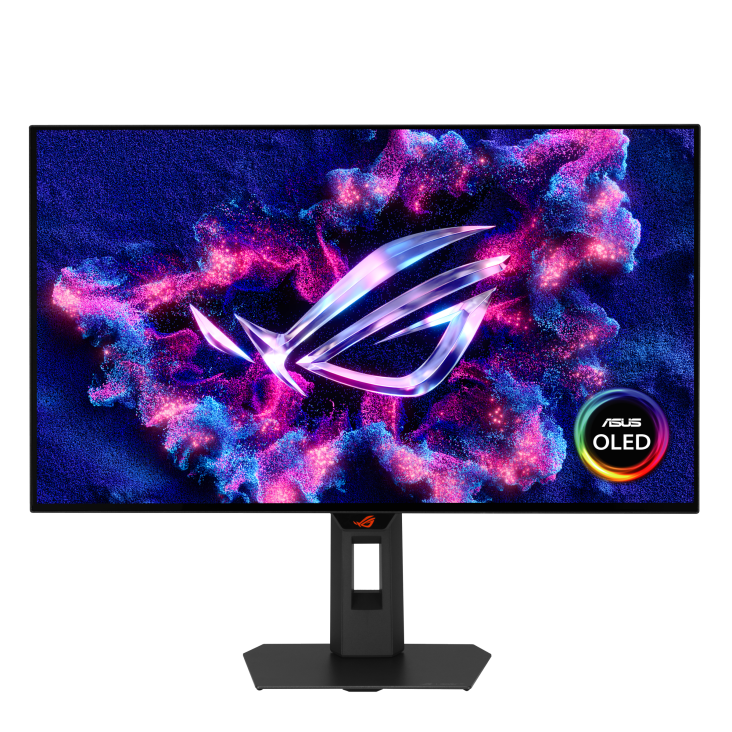
ASUS ROG Strix OLED XG27AQDMG Gen2 (XG27AQDMGR)
The ASUS XG27AQDMGR suits gaming and movies: its WOLED panel combines a 240 Hz refresh rate, adaptive-sync and very low measured display lag. Review evidence also supports HDR brightness and flexible stand adjustment. Office use needs caution because text can show fringing and the monitor lacks USB-C and a KVM switch. Measured brightness depends on mode; power efficiency remains unverified.
Updated 2026-10-08

We may earn a commission from qualifying purchases.
Prices and sellers
No price information yet
Conditions and limitations
ELMB requirements and proximity behavior documented; not all firmware-specific modes tested.
Compatibility
Gen2 Xbox Series X test confirms 4K 120 Hz with HDR10, VRR and ALLM; other devices remain unverified.
Where sources differ
1300-nit manual peak and 1155-nit test result differ in conditions; identical-condition discrepancy not established.
Reported issues and fixes
Text fringing and reflections documented; firmware-specific defects, incidence and fixes unverified.
Care and support
Accessible mirrored manual covers mounting; exact US warranty, spare parts and support end date remain unverified.
Ownership costs
Separate mount purchase documented; monetary totals and independently measured power efficiency remain unknown.
Who it suits
Gaming, console, office and lighting tradeoffs explained; no current-price or rival-revision comparison performed.
Measured performance
Sdr max luminance
262 nitTFTCentral luminance measurement · XG27AQDMGR / XG27AQDMG Gen 2 review sample; SDR with Uniform Brightness enabled, OLED care features disabled and Performance power mode. Not a Gen1 measurement.
Source [2]Hdr peak white luminance
1155 nitTFTCentral peak white luminance testing · XG27AQDMGR / XG27AQDMG Gen 2 sample; Gaming/Cinema/Console HDR modes, brightness 100, low-APL scenes. Text does not state an exact window percentage for this maximum; not sustained full-screen brightness.
Source [2]Total display lag
0.167 msTFTCentral total display lag testing · XG27AQDMGR / XG27AQDMG Gen 2 sample at native 240 Hz. ELMB adds latency and is a different mode; result excludes whole-system input-to-action latency.
Source [2]Dci p3 average color error
0.9 dETFTCentral dE 2000 colour accuracy measurement · XG27AQDMGR / XG27AQDMG Gen 2 sample in default Racing/native wide-gamut mode, evaluated against DCI-P3. This is color error, not percent gamut coverage.
Source [2]Reviewer consensus
Single-source notes
The review
ASUS XG27AQDMGR: gaming strengths and office tradeoffs
Panel, brightness and colour
The ASUS XG27AQDMGR, also called XG27AQDMG Gen 2, is the refreshed model considered here. Its WOLED panel combines a horizontal resolution of 2560 pixels with a 240 Hz refresh rate, and the independent reviews support a gaming and movie focus. Model naming matters: a review of the original XG27AQDMG is not automatically a test of this version. The TFTCentral measurements used in this article come from its explicitly titled Gen 2 review. They describe that review sample and its settings, rather than guaranteeing identical results for every monitor sold under the assigned model name. [2], [1], [3]
Colour accuracy and colour gamut answer different questions. TFTCentral measured DCI-P3 colour error at dE 0.9 in the default native wide-gamut mode. That result describes how closely the tested colours matched the reference; it is not a percentage of the colour space that the panel covers. The corrected evidence therefore treats it as an accuracy observation rather than a gamut specification. PC Monitors also describes strong sustained HDR brightness in its written summary, but that summary supplies no numerical result. Its observation adds useful qualitative context without creating another physical brightness measurement or establishing a measured duration for sustained output. [4], [2]
Brightness needs a mode attached to the number. TFTCentral measured a maximum 262 nits in SDR with Uniform Brightness enabled, whereas its higher-brightness HDR modes reached up to 1155 nits. The ASUS manual lists a 1300-nit HDR peak specification. These figures have different origins and conditions: one is a manufacturer specification, one describes uniform SDR operation, and one is an observed HDR peak. A buyer should not read the largest number as a promise of equally bright full-screen desktop content. The measured peak is useful for comparing highlight capability, while the uniform SDR result is more relevant to predictable desktop brightness. [2], [5]
Gaming performance and adjustment
The normal gaming proposition is a 240 Hz refresh rate with adaptive-sync and very low measured display lag. TFTCentral recorded 0.167 ms total display lag at the native refresh rate on its Gen 2 sample. That is a display measurement, not the time from pressing a mouse button to seeing an action after the computer and game have processed it. The practical implication is that the reviewed monitor contributed little display delay in that mode. Buyers still need to evaluate their intended computer and game settings separately, rather than assuming that a low monitor result guarantees the same complete-system latency. [2]
The included stand supports tilt, height, swivel and rotation, giving users several ways to position the screen for their seating arrangement. This flexibility is useful when the monitor must serve both gaming and another desk task, because positioning can be adjusted without treating a fixed stand angle as an unavoidable constraint. For a separate arm or wall mount, the manual specifies a 100 x 100 mm VESA pattern and says the wall-mount kit is purchased separately. That is a mounting specification, not evidence that any particular third-party arm has been tested. Check the intended mount against the manual before installation. [2], [5]
ELMB changes the operating tradeoff instead of simply adding another benefit to normal 240 Hz gaming. TFTCentral found that it requires the monitor to be set to 120 Hz, with adaptive-sync, Uniform Brightness and low-blue-light modes disabled, and that it operates in SDR rather than HDR. Someone choosing the monitor for adaptive-sync HDR gaming should therefore evaluate normal operation first. A user who specifically wants ELMB needs to accept the different refresh-rate and feature combination. The presence of both features in a specification list does not mean that every attractive gaming setting can be enabled together. [2], [2]
Connections, console signals and OLED care
The mirrored ASUS manual specifies two HDMI 2.1 inputs and one DisplayPort 1.4 input. TFTCentral separately confirmed an Xbox Series X sending 4K at 120 Hz with HDR10, VRR and ALLM to the Gen 2 monitor. Accepting that signal does not turn the native panel into a 4K display: the reviewer identifies the panel as 2560 x 1440. This distinction matters for console buyers comparing input compatibility with native detail. It also avoids transferring the older model's HDMI limitations to this refresh. Computer users who require USB-C docking still need to account for the reported absence of that connection. [2], [1], [5], [2]
The Neo Proximity Sensor adds an operational care feature: the reviewed monitor switches to a black image when the user moves beyond its configured range and restores content when the user returns. The detection distance is adjustable, so setup should reflect where the user actually sits. This behavior is a useful reason to check the care settings rather than assuming they match every desk automatically. It is not a measured lifespan extension, and the evidence here does not quantify how many hours of protection it provides. Treat the sensor as a configurable behavior, with long-term durability remaining a separate question. [2]
Office limitations and evidence gaps
Office suitability is conditional. Can Buy or Not recommends the monitor mainly for games and movies, while noting that text can show character fringing and that there is no USB-C port or KVM switch. For a buyer spending most of the day reading documents, those limitations deserve attention even if the gaming image is appealing. USB-C docking and switching a shared keyboard and mouse between computers are different requirements from displaying a game. A buyer should list those requirements before purchase, because the reported omissions cannot be resolved merely by selecting a different picture preset. [1]
Some ownership questions remain unresolved in this evidence set. Several manufacturer and retailer URLs refused native snapshots under their robots policies, so the research uses an accessible mirrored ASUS manual alongside independent sources. No new independent power-efficiency experiment or long-duration burn-in result is established here. Exact US warranty entitlement, spare-part availability and the installed firmware revision also remain unverified. These are limits of the available research, not findings that support is absent or that the product fails. Buyers with unusually heavy static workloads should seek the applicable written warranty terms rather than turning a general reviewer statement into a guaranteed service commitment.
Room layout is another part of the buying decision. Monitor Garage reports noticeable reflections from the glossy surface and recommends controlling room lighting, especially when a window faces the screen. A clean-looking image in one review setup is not a guarantee that the same coating will be comfortable at a desk facing a bright window. Consider where light sources sit relative to your own viewing position before deciding that the glossy finish is an advantage. The reflection issue and the text-fringing issue are separate limitations: improving the lighting arrangement does not establish that small text will look different. [1], [7]
Buyer questions
Before you buy
Who does this monitor suit?
Gaming and movie use are the supported fit. Office users should weigh text fringing and the absence of USB-C and a KVM switch. [1]
Compatibility
Does it provide USB-C docking or a KVM switch?
No USB-C or KVM switch is reported. Check your intended computer connection before choosing it for office use. [1]
Does a 4K input make this a native 4K monitor?
No. TFTCentral confirmed Xbox Series X input at 4K 120 Hz with HDR10, VRR and ALLM, but the native panel remains 2560 x 1440. [2]
Setup
Can the stand position be adjusted?
Yes. The reported adjustments are tilt, height, swivel and rotation. [2]
Everyday use
How should the brightness measurements be interpreted?
TFTCentral measured 262 nits in SDR with Uniform Brightness and up to 1155 nits in tested higher-brightness HDR modes. The values describe different modes and conditions. [2]
Product images
Facts and specifications
Manufacturer manual
| Specification | Value | Source |
|---|---|---|
| Brightness | 1300 nits | [5] |
| Ports | Two HDMI 2.1 inputs and one DisplayPort 1.4 input | [5] |
| VESA Mount | 100 x 100 mm; wall mount purchased separately | [5] |
Stated by reviewers
| Specification | Value | Source |
|---|---|---|
| Adaptive Sync | adaptive-sync | [2] |
| Compatibility | TFTCentral confirmed Xbox Series X input at 4K 120 Hz with HDR10, VRR and ALLM; the panel remains native 2560 x 1440. | [2] |
| Model | XG27AQDMGR / XG27AQDMG Gen 2 US | [3] |
| Panel Type | WOLED | [2] |
| Ports | No USB-C or KVM switch | [1] |
| Refresh Rate | 240 Hz | [2] |
| Resolution Width | 2560 px | [2] |
| Stand Adjustment | Tilt, height, swivel, rotate | [2] |
Measured by a lab
Other facts
| Specification | Value | Source |
|---|---|---|
| Buyer Fit | The reviewer recommends the monitor mainly for video games and movies. | [1] |
| Limitation | Monitor Garage reports noticeable reflections and recommends controlling room lighting, especially a window facing the screen.; No KVM switch or USB-C port reduces its usefulness as an office monitor.; Text can show character fringing; text clarity is less suited to office work than newer RGB-stripe panels.; TFTCentral found ELMB requires 120 Hz, SDR, adaptive-sync off, Uniform Brightness off and low-blue-light modes off; it is unavailable in HDR. | [1], [7], [2] |
| Setup Requirement | The Neo Proximity Sensor blacks the image when the user leaves its configured range and restores content on return; detection distance is adjustable. | [2] |
| Use Case | PC Monitors reports strong sustained HDR brightness relative to QD-OLED offerings, without publishing numerical measurements in this written summary. | [4] |
KnowSpec analysis
Gaming first, office use with reservations
The ASUS XG27AQDMGR suits gaming and movies: its WOLED panel combines a 240 Hz refresh rate, adaptive-sync and very low measured display lag. Review evidence also supports HDR brightness and flexible stand adjustment. Office use needs caution because text can show fringing and the monitor lacks USB-C and a KVM switch. Measured brightness depends on mode; power efficiency remains unverified.
Method: Exact Gen2 review synthesisChoose the operating mode for your games
ELMB requires 120 Hz SDR with adaptive-sync disabled, so it does not provide the same combination as normal 240 Hz adaptive-sync HDR gaming. Decide which combination matters for your games before treating the presence of ELMB as an automatic improvement.
Method: Independent exact-model observationsConsole input and native detail are different
The confirmed Xbox Series X 4K 120 Hz input with HDR10, VRR and ALLM provides a useful console connection path. The native panel remains 2560 x 1440, so buyers should separate acceptance of a 4K signal from the detail of a native 4K panel.
Method: inferredMatch the monitor to the desk
Text fringing, glossy reflections, and the absence of USB-C and a KVM switch affect different parts of office use. Controlling lighting can address reflected windows, but it does not add docking or prove improved character clarity; assess each requirement separately.
Method: Exact Gen2 review synthesisVisible information gaps
Missing information is shown rather than guessed.
- Efficiencynot found
- Topic:Efficiencynot found
- Warrantynot found
- Source.Manufacturernot public
Products in this content
-
ASUS VP229Q 21.5 Inch Monitor 1080P Full HD IPS Eye Care Monitor
The IPS panel and Full HD resolution identify a compact desktop format, while HDMI, DisplayPort and VGA provide documented connection choices. Buyers needing adjustable screen height should plan a separate VESA mount because the supplied st
-
ASUS ProArt PA279CV 27 Inch 4K UHD USB-C Professional Monitor
A conditional fit for sRGB-oriented photography and creative desktop work, with useful stand adjustment and USB-C connectivity. Inspect panel uniformity and check the laptop charging requirement and USB mode before purchase.
-
Dell SE2722H 27 Inch Full HD Monitor
The Dell SE2722H is a straightforward everyday monitor for buyers who want a matte Full HD screen, a VA panel, AMD FreeSync, and a modest 75 Hz refresh rate. Its one HDMI input and legacy D-sub input suit basic desktop setups, while the sta
-
Acer Nitro KG241Y Sbiip 23.8 Inch Full HD Gaming Monitor
The documented Sbiip model combines a 23.8-inch VA screen, 165 Hz refresh, a tilt-only stand, and a 100 x 100 mm mounting pattern. DisplayNinja reports approximate input lag and visible dark-scene trailing, but its model page omits the late
-
Acer Nitro XV272U W2bmiiprx Gaming Monitor
The W2 remains a conditional choice for a DisplayPort gaming desk: its documented 240Hz mode now has a reviewer-reported 3 ms input-lag result. That result does not describe lower refresh rates or every retail sample. Buyers
-
MSI PRO MP275Q 27 Inch WQHD Office Monitor
The evidence favors office and web-oriented work, with a tilt-only stand and declared 100 Hz operation. Independent brightness and contrast results are now available, with incomplete methodology and unknown sample count. The 300 nit rating
Sources and method
- Asus ROG Strix OLED XG27AQDMGR review: Great visualsCan Buy or Not · retrieved 2026-10-03Editorial review
- Asus ROG Strix XG27AQDMG Gen 2 (aka XG27AQDMGR)TFTCentral · retrieved 2026-10-03Lab review
- Asus ROG Strix OLED XG27AQDMG Gen 2 arrivesNotebookcheck · retrieved 2026-10-08Other source
- ASUS ROG Strix OLED XG27AQDMGR (XG27AQDMG Gen2) ReviewPC Monitors · retrieved 2026-10-03Other source
- ROG STRIX OLED XG27AQDMGR User ManualASUS via ManualsLib · retrieved 2026-10-08Manual
- Asus ROG Strix XG27AQDMG Gen 2 (aka XG27AQDMGR)TFTCentral · retrieved 2026-10-08Lab review
- ASUS ROG XG27AQDMGR / XG27AQDMG Gen 2Monitor Garage · retrieved 2026-10-08Editorial review