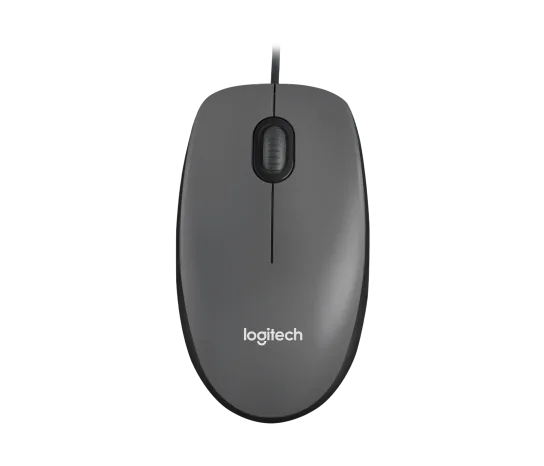
Logitech M100 Wired USB Mouse, Black/Grey (910-001601)
Choose the M100 if your priority is basic USB pointing and scrolling without a battery, pairing routine or configuration download. Its ambidextrous body accommodates either hand, but the three-button layout offers no dedicated side shortcuts. Judge it as a simple input tool; verified latency and long-term durability measurements are missing.
Updated 2026-10-04

We may earn a commission from qualifying purchases.
Prices and sellers
No price information yet
Conditions and limitations
Basic USB operation without a configuration download
- Capability
- Basic pointing, left/right clicking, wheel scrolling and middle-click through the cable.
- Limitations
- This does not verify a current customization application or onboard profiles.
- The three-button layout provides no dedicated side-button shortcuts.
- Requirements
- A compatible computer with an available USB connection.
Compatibility
Manufacturer-listed desktop operating systems
- Connection
- Connect the mouse cable to an available compatible USB port.
- Functions
- Basic mouse input
- Notes
- Manufacturer compatibility declaration, not an independently tested matrix of every OS release or hub. USB-C-only hosts and third-party adapters were not validated.
- Protocol
- USB
- Result
- full
- Source device
- Logitech M100
- Target device
- Computer running a manufacturer-listed desktop OS
Where sources differ
Uniform color naming remains a gap. Contradictory supplier laser/scroll cells and corrupt official durability/temperature cells were excluded instead of repaired by guesswork.
Reported issues and fixes
No exact-variant failure-rate study was retained. Owner or review anecdotes are not a confirmed defect affecting every unit.
Care and support
No spare parts listed on the current support page
- Details
- The current support page offers no spare parts. Repairability, authorized repair availability and switch lifetime are not established by that notice.
Ownership costs
No monetary observations were requested or collected. Regional warranty and service costs remain unresolved; no total-cost calculation is made.
Who it suits
Prioritize straightforward basic input
- Check before buying
- Match the exact part number and verify your computer connection.
- Check the cable route and personal grip fit.
- Constraints
- A compatible USB connection and an acceptable cable route.
- Needs
- Basic pointing and scrolling without an installation workflow.
- Reason
- The documented setup and controls match this narrow use case.
- Tradeoffs
- Wired power avoids battery upkeep, but the cable remains on the desk.
- A limited control set avoids extra controls while offering no dedicated thumb shortcuts.
- Assessment
- suitable
Require testing for precision-sensitive use
- Check before buying
- Look for a test identifying the actual hardware revision and measurement method.
- Constraints
- Nominal resolution and a historical owner anecdote do not establish those requirements.
- Needs
- Measured latency and predictable sensor behavior.
- Reason
- The evidence records an unresolved measured-performance gap.
- Tradeoffs
- Basic operation is documented; instrumented performance remains unverified.
- Assessment
- unknown
The review
Logitech M100 910-001601: basic wired input, with clear limits
Start with the exact part and the intended job
This assessment covers Logitech M100 part 910-001601, associated with ASIN B00CHRVCBA in the independent identity record. That record labels the variant Black. The part number matters when comparing offers: similar-looking names are not evidence that another model or a historical hardware revision has the same internals. [1]
The documented controls are left-click, right-click and a wheel that also performs middle-click. That is enough for ordinary pointing and scrolling, but it leaves no separate thumb shortcuts. The practical choice is whether this modest control set matches your work; the retained sources do not establish modern customization-app support or onboard profiles. [3], [4]
Published size helps; it does not predict comfort
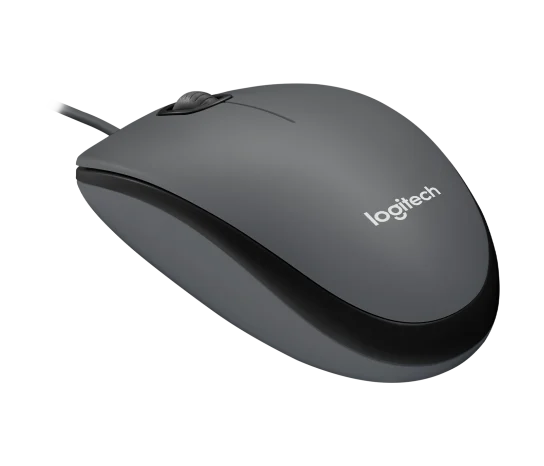
Published body dimensions are 113 × 62 × 38 mm, and the datasheet lists 90 g for the mouse, separately from packaging. Treat these as specification values rather than our measurements. Compare the outline with a mouse you already like, and check palm support and finger reach; the word ambidextrous describes handedness, not a guarantee of comfort for every grip. [3], [2]
In a 2011 Team Liquid discussion, one owner preferred the M100's shape to the Logitech Mini Optical and liked using it for StarCraft II. That personal comparison is useful as an example of fit preference, but it does not define a hand-size range. No retained glide measurement or controlled comfort study supports a universal recommendation. [5]
Check the computer connection and cable route
Basic setup is to connect the cable to a compatible computer USB port; the exact-part retailer description requires no software download. Logitech lists Windows, macOS, ChromeOS and Linux support. This is a manufacturer compatibility declaration, not a test of every operating-system update, dock or adapter. A USB-C-only setup needs its connection path checked before purchase. [3], [4]
The exact-part sheet specifies a 1.8 m cable. Measure the route around the desk and leave slack for movement instead of assuming that nominal length guarantees reach. USB supplies power, so there is no battery to charge or radio to pair. The tradeoff is a persistent cable and the need to reconnect it when changing hosts. [3], [2]
Know what the specifications do not settle
The manufacturer specifies a red-light optical sensor and nominal 1000 DPI resolution. Resolution alone does not establish sensor accuracy, click delay or high-speed tracking. The USB interface description is also not a measured polling rate. Instrumented reviews were sought, but no usable verified test record was retained, so those performance questions remain open rather than receiving estimated numbers. [3]
The current support page lists no available spare parts, which warrants checking service options if repairability matters to you. It does not prove that repair is impossible or predict when switches will fail. A uniform regional warranty and production-specific durability data remain unverified. The resulting recommendation is limited to basic wired use, with purchase terms and personal fit checked separately. [3], [4]
Buyer questions
Before you buy
Will the cable reach a desktop tower?
The specified cable is 1.8 m. Check the actual route around furniture and allow slack for the mouse movement; that length alone cannot guarantee reach in your arrangement. [2]
Setup
Does it need batteries or Bluetooth pairing?
No. This M100 is a corded USB mouse powered through its cable. You connect it to the computer rather than pairing it as a wireless device. [3]
Do I have to install an app?
The exact-part setup description says no software installation is needed for basic operation. That does not establish programmable buttons, onboard profiles or compatibility with a current Logitech configuration app. [4]
Limitations
Does 1000 DPI make it a proven gaming mouse?
No. That figure is a nominal sensor specification, not a latency or tracking-accuracy result. An old owner discussion describes enjoyable gaming use, but the retained evidence does not establish competitive performance for this exact production version. [3], [5]
Product images
Facts and specifications
Manufacturer datasheet
| Specification | Value | Source |
|---|---|---|
| Button Count | 3 | [3] |
| Cable Length | 180 cm | [2] |
| Depth | 38 mm | [3] |
| Height | 113 mm | [3] |
| Width | 62 mm | [3] |
| Interface | Wired USB; low-speed USB under USB2.0 specification | [3] |
| Materials | ABS body and rubber scroll wheel | [3] |
| Operating System | Current support table: Windows10/11 or later, macOS10.5 or later, ChromeOS and Linux kernel2.6 or later; USB port required | [3] |
| Power Source | Corded USB power; no battery charging or wireless pairing workflow | [3] |
| Sensing Technology | Optical with visible red illumination | [3] |
| Sensor DPI | 1000 dpi | [3] |
| Shape | Full-size ambidextrous shape | [3] |
| Voltage | 5 V | [3] |
| Weight | 90 g | [2] |
Retailer listing
| Specification | Value | Source |
|---|---|---|
| Control Type | Scroll wheel with middle-click; no separate side buttons in the manufacturer three-button layout | [4], [3] |
| Model | M100 / 910-001601 | [1] |
| Option | Black in the ASIN-linked supplier record US | [1] |
Other facts
| Specification | Value | Source |
|---|---|---|
| Buyer Fit | In a2011 Team Liquid post, frozenclaw preferred the M100's more neutral shape to the Logitech Mini Optical for StarCraftII. This is one historical user's preference, not a hand-size study or a claim about all production revisions. | [5] |
| Setup Requirement | Connect the cable to a computer USB port for basic operation; the exact-SKU retailer description says no software installation is needed. | [4] |
| Use Case | The same2011 owner discussion recommends the M100 as a personal StarCraftII replacement; no measured latency, tracking-speed or current competitive-gaming suitability is established. | [5] |
KnowSpec analysis
A straightforward mouse for a fixed computer
Choose the M100 if your priority is basic USB pointing and scrolling without a battery, pairing routine or configuration download. Its ambidextrous body accommodates either hand, but the three-button layout offers no dedicated side shortcuts. Judge it as a simple input tool; verified latency and long-term durability measurements are missing.
Method: Separates the original owner's anecdote from the explicit instrumented-testing gaps.Cable reach versus an uncluttered desk
The published 1.8 m cable gives a concrete routing constraint: check the route to the computer rather than the straight-line distance. Wired power removes a battery task, while the cable still needs space to move. The 90 g figure is a specification, not a measurement of the force felt while dragging the mouse.
Method: Practical inference from the documented cable and nominal mouse weight, without claiming a measured cable stiffness or glide result.Do not turn historical enthusiasm into a benchmark
A historical owner favored the M100 for StarCraft II and preferred its shape to an older mouse. That establishes a personal use case, not present-day competitive suitability. The retained evidence does not quantify click latency, maximum tracking speed, polling rate or failure frequency; a buyer who needs those assurances should require a measured evaluation of the exact version.
Method: Editorial synthesis of manufacturer specifications, the exact-part datasheet and the retailer's setup description; performance gaps remain unresolved.Visible information gaps
Missing information is shown rather than guessed.
- Max Tracking Speednot found
- Sensor Modelnot found
- Input Lagnot public
- Polling Ratenot found
- Warrantyconflicting
- Optionconflicting
- Topic:Measured Performancenot public
- Topic:Sustained Performancenot found
- Topic:Efficiencynot found
- Paired Devicesnot found
- Topic:Limitationsnot public
- Topic:Value For Moneynot found
- Switch Typenot found
- Battery Lifenot found
Products in this content
-
Logitech M325 Wireless Mouse (910-002974), Black
The original black M325 is a sensible fit for a portable computer when you prefer a small, symmetrical mouse, replaceable power and a receiver that stores inside it. Reviewers liked ordinary pointing and handling, but large
-
Logitech G305 LIGHTSPEED Wireless Gaming Mouse, Black (910-005280)
Choose the black G305 if you want receiver-based gaming with replaceable AA power and programmable controls. Its right-handed button arrangement and battery-powered design are
-
Logitech MX Vertical Graphite Ergonomic Mouse (910-005447)
The MX Vertical is a conditional choice for right-handed office users who prefer a tall handshake-style grip and want wireless connections plus a real wired fallback. Medium-to-large hands are
-
Logitech Signature M650 L LEFT Wireless Mouse, Graphite (910-006239)
Choose the graphite M650 L LEFT when you want a conventional large mouse with right-side thumb buttons for everyday work. Its replaceable battery and customizable controls are
-
Logitech G203 LIGHTSYNC Wired Gaming Mouse, Black (910-005790)
The G203 LIGHTSYNC suits a desk setup where a fixed USB cable and programmable controls are welcome. The strongest reason to choose it is the combination of configurable buttons, RGB and famil
-
Logitech G303 Shroud Edition Wireless Gaming Mouse, Black (910-006103)
The G303 Shroud Edition is a conditional choice for claw-grip players who want its angular support and LIGHTSPEED wireless connection. Try the shape before committing: Mouse P
Sources and method
- Logitech910-001601 M100 Black USB MouseDevice.report · retrieved 2026-10-04Other source
- M100 Mouse Spanish specification sheet, part910-001601Logitech; PDF hosted by Cyberpuerta · retrieved 2026-10-04DatasheetPDF
- M100 Technical SpecificationsLogitech · retrieved 2026-10-04Manufacturer support
- Logitech M100 USB Optical Wired MouseHelp Tech Co. Ltd · retrieved 2026-10-04Retailer listing
- Logitech M100Team Liquid community · retrieved 2026-10-04Owner community