Razer DeathAdder V3 Wired Gaming Mouse, Black, RZ01-04640100-R3U1
The black wired DeathAdder V3 suits a right-handed gamer who prioritizes low weight and responsive controls and is comfortable keeping a cable on the desk. Its strongest evidence is an original lab review with clearly defined tests, supported by a separate hands-on review. Check hand fit first, then choose a polling setting your games and computer handle reliably. Current configuration-software support and long-term durability remain important unanswered ownership questions.
Updated 2026-10-05

We may earn a commission from qualifying purchases.
Prices and sellers
No price information yet
Conditions and limitations
High-polling motion reporting depends on the host and movement
- Capability
- The wired V3 supports up to 8000 Hz reporting, and TechPowerUp observed the corresponding polling interval under its test conditions.
- Limitations
- The reviewer recommends at least 1600 CPI and a strong CPU; this is advice, not its actual benchmark host specification.
- Benefits were difficult for that reviewer to perceive on a 165 Hz monitor at typically 200 FPS or more.
- A 0.125 ms polling interval is not an end-to-end latency guarantee.
- Requirements
- Enough movement and sensor counts to saturate the selected motion-reporting rate.
- Host CPU, USB configuration and game behavior that tolerate the extra polling load.
Stored settings can travel, but exact macros need checking
- Capability
- Historical testing found onboard persistence for changed settings, with five profiles reported separately.
- Limitations
- The retained software test is from May 2023 and does not establish current Synapse support.
- Persistence of every macro type, profile auto-switching and all host combinations was not independently established.
- Requirements
- Configure the desired settings in supported software before relying on the stored profile.
Measured click latency has a narrow definition
- Capability
- TechPowerUp reports 0.1 ms mean click latency and 0.01 ms standard deviation with NVIDIA LDAT.
- Limitations
- It excludes physical finger/button travel, application processing, rendering and display response.
- The result is reported independent of the selected polling rate; it must not be substituted for the motion reporting interval.
- Exact host and firmware details needed for replication are missing from the retained page.
- Requirements
- Interpret the measurement as electrical main-button activation to receipt of an OS button-down message.
Compatibility
High polling worked in the reviewer's listed games
- Connection
- Wired connection during the May 2023 review
- Functions
- High-polling input in Call of Duty: Black Ops II, Diabotical, KovaaK's, Quake Champions and Quake Live
- Notes
- The author lists these games up to 8000 Hz on the tested system and explicitly warns against treating that as a universal compatibility guarantee.
- Protocol
- USB
- Result
- partial
- Source device
- Razer DeathAdder V3 wired
- Target device
- TechPowerUp review PC; exact host configuration unspecified
Current operating-system configuration support remains unverified
- Connection
- Basic mouse operation and supported configuration software are separate questions.
- Functions
- Current configuration application and supported OS versions
- Notes
- The retained test used Synapse 3 in 2023. Current official Synapse 4 and Mac device-list pages returned a pre-page check; no current OS list is asserted and no V3 Pro Mac support is transferred.
- Protocol
- USB
- Result
- unknown
- Source device
- Razer DeathAdder V3 wired
- Target device
- Current Windows or Mac configuration environment
Where sources differ
Polling intervals and electrical-to-OS click latency use different definitions. No competing verified measurement of the same quantity was available, so they are not presented as a numerical contradiction.
Reported issues and fixes
Visible jitter at very high sensitivity in a lab test
- Status
- reported
- Symptom
- TechPowerUp observed significant paint-test jitter at 15000 CPI and more at 30000 CPI, while 1600 CPI showed none.
- Workaround
- A lower practical sensitivity may avoid the very-high-CPI behavior seen in that test; no firmware fix or universal threshold is established.
Care and support
A switch lifecycle rating is available, but no longitudinal cable/coating/scroll reliability, current warranty terms, service parts or support-end commitment was verified.
Who it suits
Is low-weight wired control your main priority?
- Check before buying
- Try the shell and reach to the controls if possible.
- Confirm the listing is the exact black wired V3.
- Decide whether the available controls cover your bindings.
- Constraints
- The shell must fit your hand and grip.
- A wired connection must work with your desk layout.
- Needs
- A light right-handed mouse for repeated gaming movements.
- Responsive primary-button input.
- Reason
- The documented weight, control design and lab result support this use, while small-hand fit and cable tolerance are personal constraints.
- Tradeoffs
- The restrained control set and lack of RGB favor a focused setup.
- A low lab click result does not guarantee an equally low complete-system response.
- Assessment
- conditional
Razer · TechPowerUp · TechPowerUp · TechPowerUp · Can Buy or Not
Should the highest polling setting determine your purchase?
- Check before buying
- Check whether your games behave consistently under high polling.
- Consider the computer and display alongside the mouse.
- Be willing to use a lower setting if it behaves better on your setup.
- Constraints
- CPU headroom and game input handling vary.
- Motion counts and movement affect the achieved report rate.
- Needs
- Consistent input in the games you actually play.
- Reason
- High polling is a supported option, but the evidence favors evaluating the whole system rather than making the maximum setting a universal requirement.
- Tradeoffs
- More frequent reports can improve granularity but add processing load.
- The reviewed users did not consistently perceive a latency improvement.
- Assessment
- conditional
Can you depend on stored bindings away from your main PC?
- Check before buying
- Verify current official support for the exact wired model and your OS.
- Test the intended mappings after moving the mouse to the destination machine.
- Constraints
- Current supported software and OS versions remain unverified.
- Every macro type has not been tested for onboard persistence.
- Needs
- Use your chosen settings without leaving configuration software running on every computer.
- Reason
- The evidence supports a practical test of stored settings before relying on a software-free destination computer.
- Tradeoffs
- Historical onboard persistence is promising for portable settings.
- A reported profile count does not guarantee that every planned binding will work on another host.
- Assessment
- conditional
Areas not yet researched (1)
No conclusion is available for these areas. This does not mean the Product has no limitations or reported issues.
- Ownership costs
Measured performance
Electrical to os click latency
0.1 msNVIDIA LDAT, electrical activation of the left main button to receipt of the OS button-down message · TechPowerUp's May 2023 review reports standard deviation 0.01 ms and says the result applies regardless of selected polling rate. Physical finger travel, game processing and display response are excluded. CPU model, OS build, firmware and repetition count are not specified in the retained text.
Source [6]Mean motion reporting interval
0.125 msTechPowerUp polling-interval test with the mouse set to 8000 Hz · Reported observed mean reporting interval, not click-to-screen latency. The exact CPI, host CPU, OS build and firmware are not stated in the retained text; no setup is inferred from image filenames.
Source [3]Reviewer consensus
Consensus rows require at least two distinct sources for the topic.
| Topic | Positive | Negative | Mixed | Reading | Evidence |
|---|---|---|---|---|---|
| Efficiency | 1 | 1 | 0 | Debated · 1 v 1 | [3], [2] |
| Measured performance | 1 | 0 | 1 | Mixed · 1/2 | [3], [2] |
| Wireless reliability and battery practice | 0 | 2 | 0 | Weak point · 2/2 | [4], [3] |
Single-source notes
- Build and double click durability: Agreed · 1/1 · [5]
- Buyer fit: Weak point · 1/1 · [2]
- Click latency: Agreed · 1/1 · [6]
- Companion software and onboard memory: Agreed · 1/1 · [1]
- Limitations: Weak point · 1/1 · [6]
- Scroll wheel and side buttons: Agreed · 1/1 · [5]
- Sensor tracking accuracy: Agreed · 1/1 · [6]
- Shape and grip fit by hand size: Agreed · 1/1 · [2]
- Value for money: Agreed · 1/1 · [2]
- Weight and feet glide: Agreed · 1/1 · [5]
Alternatives
| Alternative | Where this Product wins | Where it loses | Pick it if |
|---|---|---|---|
| Razer DeathAdder V3 Pro | The wired V3 avoids a wireless pairing and charging routine when you are willing to use its cable. That is a connection-type advantage for that preference, not a measured speed or price win. [4], [3], [2] | The V3 Pro offers wireless operation; this exact wired V3 cannot provide cable-free movement. Check the Pro's current exact variant and included accessories separately. [4], [3], [2] | Choose the wired V3 when a cable is acceptable and avoiding a wireless charging routine matters. Investigate the V3 Pro when cable-free movement is a requirement; no current polling ceiling or price comparison is established here. |
The review
Razer DeathAdder V3 wired: fit, polling and practical tradeoffs
Separate the lab result from the headline specification
TechPowerUp measured 0.1 ms click latency with NVIDIA LDAT, from electrical activation of the main button to the operating system receiving the button-down message. The review reports the result independently of the selected polling rate. It excludes finger travel, game processing and display response, so it must not be read as total click-to-screen latency. The retained test page does not identify the CPU model, OS build, firmware or repetition count needed for full replication. [6]
The Focus Pro 30K sensor has a stated maximum sensitivity of 30000 DPI. TechPowerUp found no reported deviation at its tested common sensitivity steps, while warning that another sample can differ. Its paint test showed no visible jitter at 1600 CPI, significant jitter at 15000 CPI and more at 30000 CPI; that is a test-specific sensitivity tradeoff, not a universal defect. The reviewer reached 5.5 m/s without a tracking malfunction, but this did not validate the stated 19.05 m/s ceiling. Use a sensitivity you can control rather than assume the highest setting is the most accurate choice. [5], [6]
Start with the shape, weight and cable
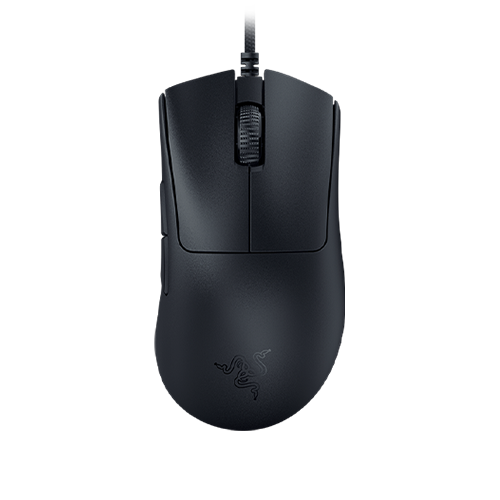
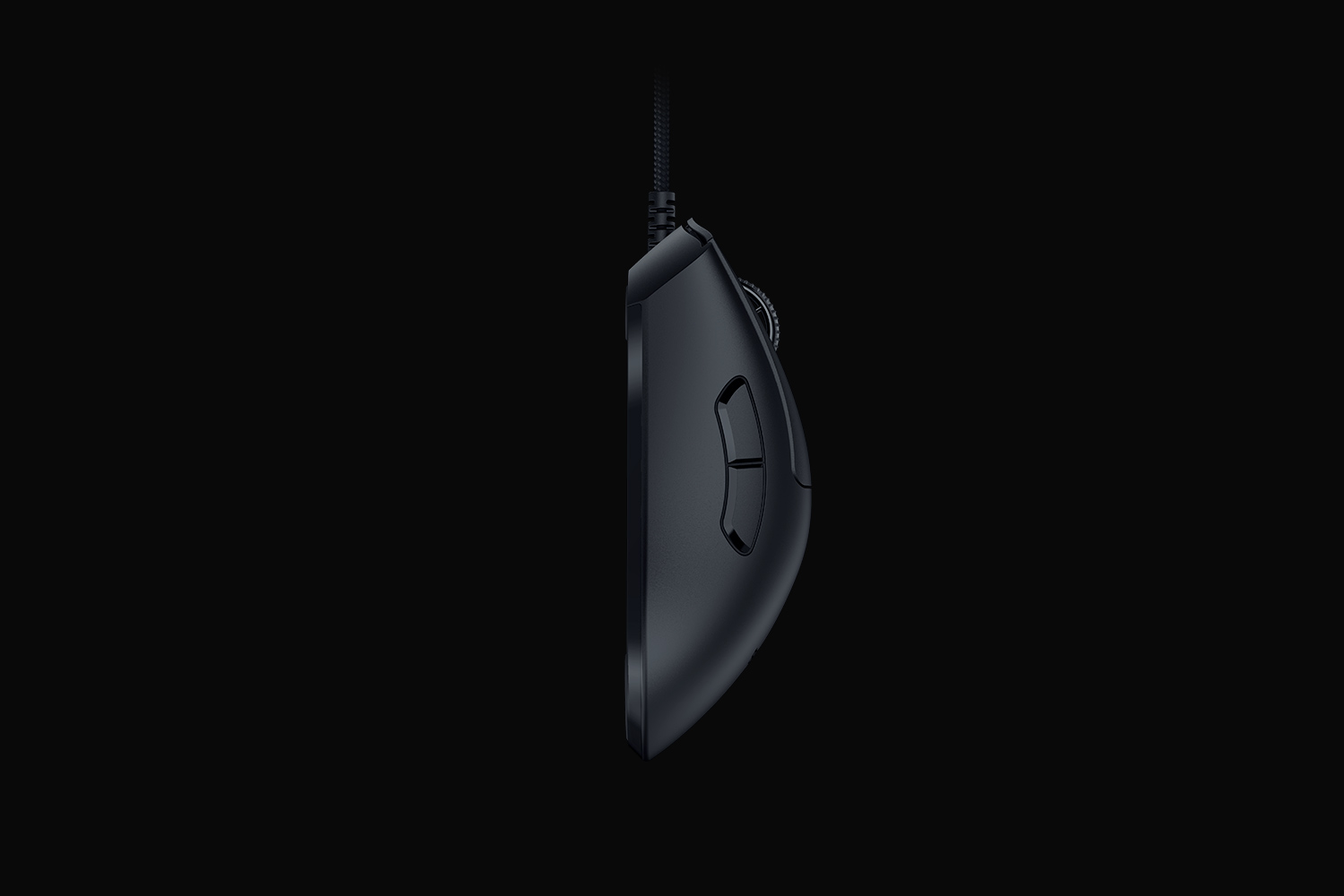
This is the black wired DeathAdder V3. Razer specifies 59 g excluding the cable and a body measuring 128 mm long, 68 mm wide and 44 mm high. It is a right-handed design with PTFE feet and a smooth-touch finish. Can Buy or Not's reviewer was comfortable with claw and fingertip grips but warned that smaller hands may find the mouse harder to grip. Those impressions are a reason to try the shape, not a promise based on grip style alone. [5], [4], [3], [2]
The control set is deliberately restrained: six buttons are specified, RGB lighting is absent, and the DPI-switching control sits underneath. The hands-on reviewer remapped side buttons for easier sensitivity changes during play. If you need many dedicated shortcuts or a particular scroll-wheel feel, check those requirements directly; detailed wheel testing could not be retained in this evidence set. [5], [4], [2]
Choose polling for the whole system
The wired V3 supports up to 8000 Hz, and TechPowerUp observed a mean 0.125 ms reporting interval at that setting. This is the interval between reports, a different quantity from the click-latency test. Sustaining the selected motion-reporting rate needs enough movement and sensor counts, and the extra CPU work can reduce responsiveness on a weaker system. [5], [3]
TechPowerUp's subjective evaluation used a 165 Hz monitor at typically 200 FPS or more and still found the latency difference difficult to perceive. Can Buy or Not reported no noticeable performance impact on an Intel 13th-generation system and likewise struggled to perceive the polling-rate difference. These are separate historical experiences, not matched-system benchmarks. Test the setting in your own games and keep the one that remains consistent; a successful result in the reviewer's game list is not a guarantee for every PC. [3], [2]
Check profile portability and support before committing
TechPowerUp's May 2023 Synapse 3 test found changed settings saved to onboard memory. Can Buy or Not separately reports five profiles, a capacity not independently confirmed here. The historical software offered remapping, HyperShift, sensitivity stages, polling selection and lift-off adjustment. Test the exact bindings you plan to use after moving to another computer; the evidence does not establish every macro's persistence or current configuration-software support. Basic USB operation and supported customization are separate questions. [1], [2]
Razer's optical-switch rating of up to 90 million clicks is a component rating, not an observed service life for the complete mouse. Long-term coating, cable and scroll reliability, service-parts availability and current warranty terms remain unverified. Can Buy or Not's historical buying recommendation favored light, smooth FPS handling, but it does not establish today's relative value. This is a focused choice for buyers who accept the wired connection and fit tradeoffs, rather than a durability or value guarantee. [4], [3], [5], [2]
Buyer questions
Before you buy
Is this the wireless DeathAdder V3?
No. This record covers the black wired DeathAdder V3, which connects through its Speedflex USB cable. Confirm that the product name says the wired V3 before buying, since similar names refer to different products. [4]
Will it suit a small hand or a claw grip?
The right-handed shell needs a personal fit check. Can Buy or Not's reviewer used claw and fingertip grips comfortably, but also warned that smaller hands may struggle to grip it comfortably. Low weight alone is not evidence that the size or shape will suit you. [2]
Compatibility
Is current Windows or Mac customization support confirmed?
Current configuration-software and OS support were not verified for this exact wired model. The retained software review used Synapse 3 in 2023; that history does not establish current support. Check the exact wired DeathAdder V3 in the current official device list, and distinguish basic USB mouse operation from supported customization. [1]
Setup
Can settings work without Synapse always running?
TechPowerUp's 2023 test found changed settings saved onboard and usable without the software remaining active. That supports profile portability in the tested setup, but does not confirm every macro or today's software behavior. The separate five-profile claim is reviewer-reported. Test your actual mappings on the destination computer. [1], [2]
Everyday use
Does the maximum polling rate mean the whole game responds instantly?
No. The 8000 Hz specification describes reporting cadence. TechPowerUp's separate 0.1 ms click result measures electrical switch activation to an OS message and excludes the game and display. Higher polling can also increase CPU load, so test stability in your actual games instead of assuming the maximum setting is always preferable. [6], [3]
Care and maintenance
Does the click rating prove long-term reliability?
No. Razer rates the optical switches for up to 90 million clicks, but that does not measure the service life of the cable, coating, wheel or complete mouse. Longitudinal reliability and current warranty terms were not established, so verify the applicable support terms rather than treating the switch rating as a whole-product guarantee. [5]
Product images
Facts and specifications
Manufacturer datasheet
| Specification | Value | Source |
|---|---|---|
| Brand | Razer | [5] |
| Button Count | 6 | [5] |
| Dimensions.Depth | 128 mm | [5] |
| Dimensions.Height | 44 mm | [5] |
| Dimensions.Width | 68 mm | [5] |
| Model | DeathAdder V3, wired | [5] |
| Polling Rate | 8000 Hz | [5] |
| Release Date | 2023-02-21 US | [5] |
| Sensor Model | Razer Focus Pro 30K optical sensor | [5] |
| Switch Type | Razer Optical Mouse Switches Gen-3; manufacturer rating up to 90 million clicks | [5] |
| Weight | 59 g | [5] |
Stated by reviewers
| Specification | Value | Source |
|---|---|---|
| Backlight | No RGB lighting | [4] |
| Cable Length | 1.8 m | [4] |
| Interface | Wired USB via Razer Speedflex cable | [4], [3] |
| Materials | PTFE mouse feet and smooth-touch shell finish | [4], [5] |
| Maximum Tracking Speed | 19.05 m/s | [6] |
| Option | Black wired model | [4] |
| Sensor DPI | 30000 dpi | [6] |
| Shape | Asymmetric right-handed ergonomic shape | [2] |
| Software | Razer Synapse 3 used in TechPowerUp's May 2023 test; current software support not established here | [1] |
Measured by a lab
| Specification | Value | Source |
|---|---|---|
| Input Lag | 0.1 ms | [6] |
Other facts
KnowSpec analysis
A focused wired choice when the shape fits
The black wired DeathAdder V3 suits a right-handed gamer who prioritizes low weight and responsive controls and is comfortable keeping a cable on the desk. Its strongest evidence is an original lab review with clearly defined tests, supported by a separate hands-on review. Check hand fit first, then choose a polling setting your games and computer handle reliably. Current configuration-software support and long-term durability remain important unanswered ownership questions.
Method: Use the dated software test and separate profile report; preserve the current-support and macro-persistence gaps.A high ceiling does not make the maximum setting compulsory
The lab's polling measurements support the hardware capability, but perceptible benefit is conditional. TechPowerUp struggled to perceive a latency difference in its stated display and frame-rate conditions; Can Buy or Not also reported little perceptible difference on its own system. These are individual experiences, while the extra CPU workload is a practical reason to test settings in the games you actually play. Neither review establishes a universal performance gain or a long-duration stability guarantee.
Method: Compare measured reporting cadence with the two reviewers' separately described subjective experiences, without treating their systems as equivalent.Stored settings are useful, but software history matters
Historical testing found changed settings usable from onboard memory without keeping Synapse active. That can help when moving the mouse between computers, but the evidence does not establish every macro or every current host configuration. Treat the reported profile capacity as a reviewer statement and verify your actual bindings on the destination computer before depending on them.
Method: Synthesis of manufacturer specifications, verified original-review anchors, narrowly defined lab results and explicit evidence gaps.Visible information gaps
Missing information is shown rather than guessed.
- Topic:Multi Device Pairingnot found
- Topic:Sustained Performancenot found
- Input Lagrights restricted
- Topic:Scroll Wheel And Side Buttonsrights restricted
- Operating Systemnot public
- Topic:Buyer Fitrights restricted
- Warrantynot found
- Topic:Build And Double Click Durabilitynot found
Products in this content
-
Logitech M325 Wireless Mouse (910-002974), Black
The original black M325 is a sensible fit for a portable computer when you prefer a small, symmetrical mouse, replaceable power and a receiver that stores inside it. Reviewers liked ordinary pointing and handling, but large
-
Logitech M100 Wired USB Mouse, Black/Grey (910-001601)
Choose the M100 if your priority is basic USB pointing and scrolling without a battery, pairing routine or configuration download. Its ambidextrous body accommodates either hand, but the three-button layout o
-
Logitech G305 LIGHTSPEED Wireless Gaming Mouse, Black (910-005280)
Choose the black G305 if you want receiver-based gaming with replaceable AA power and programmable controls. Its right-handed button arrangement and battery-powered design are
-
Logitech MX Vertical Graphite Ergonomic Mouse (910-005447)
The MX Vertical is a conditional choice for right-handed office users who prefer a tall handshake-style grip and want wireless connections plus a real wired fallback. Medium-to-large hands are
-
Logitech Signature M650 L LEFT Wireless Mouse, Graphite (910-006239)
Choose the graphite M650 L LEFT when you want a conventional large mouse with right-side thumb buttons for everyday work. Its replaceable battery and customizable controls are
-
Logitech G203 LIGHTSYNC Wired Gaming Mouse, Black (910-005790)
The G203 LIGHTSYNC suits a desk setup where a fixed USB cable and programmable controls are welcome. The strongest reason to choose it is the combination of configurable buttons, RGB and famil

Sources and method
- Razer DeathAdder V3 Review: SoftwareTechPowerUp · retrieved 2026-10-05Lab review
- Razer DeathAdder V3 review: FPS delightCan Buy or Not · retrieved 2026-10-05Editorial review
- Razer DeathAdder V3 Review: Testing 8000 HzTechPowerUp · retrieved 2026-10-05Lab review
- Razer DeathAdder V3 Review: public introduction and specifications excerptTechPowerUp · retrieved 2026-10-05Lab review
- Razer welcomes the DeathAdder V3 Pro Faker Edition and DeathAdder V3 to the cult-favorite mouse lineRazer · retrieved 2026-10-05Manufacturer
- Razer DeathAdder V3 Review: Sensor and PerformanceTechPowerUp · retrieved 2026-10-05Lab review